
Finding it hard to track what happens once your proposal leaves your inbox?
For most sales teams, the disconnect between systems creates extra work and gaps in what you can see.
Connecting your proposal workflow to Salesforce fixes that. Data flows in from the opportunity record to build the proposal, and activity flows back when the buyer engages or accepts. That second direction is the one worth checking before you commit to a tool, because it is what keeps the record accurate. Here is how to set it up.
How do you integrate proposal workflows with Salesforce?
To integrate proposal workflows with Salesforce, connect a proposal software that supports a native two-way sync with your CRM. It should pull the opportunity, account, contact or lead record into the proposal, and write activity back when the proposal is sent, viewed, or accepted.
Qwilr's Salesforce integration works both ways to give you better visibility on how your deal is moving. Proposals are generated from the opportunity, contact, account, or lead record, with fields populating without having to manually input information twice. Once the proposal is live, views and acceptance activity are recorded.
Step-by-step guide to building a Salesforce proposal workflow
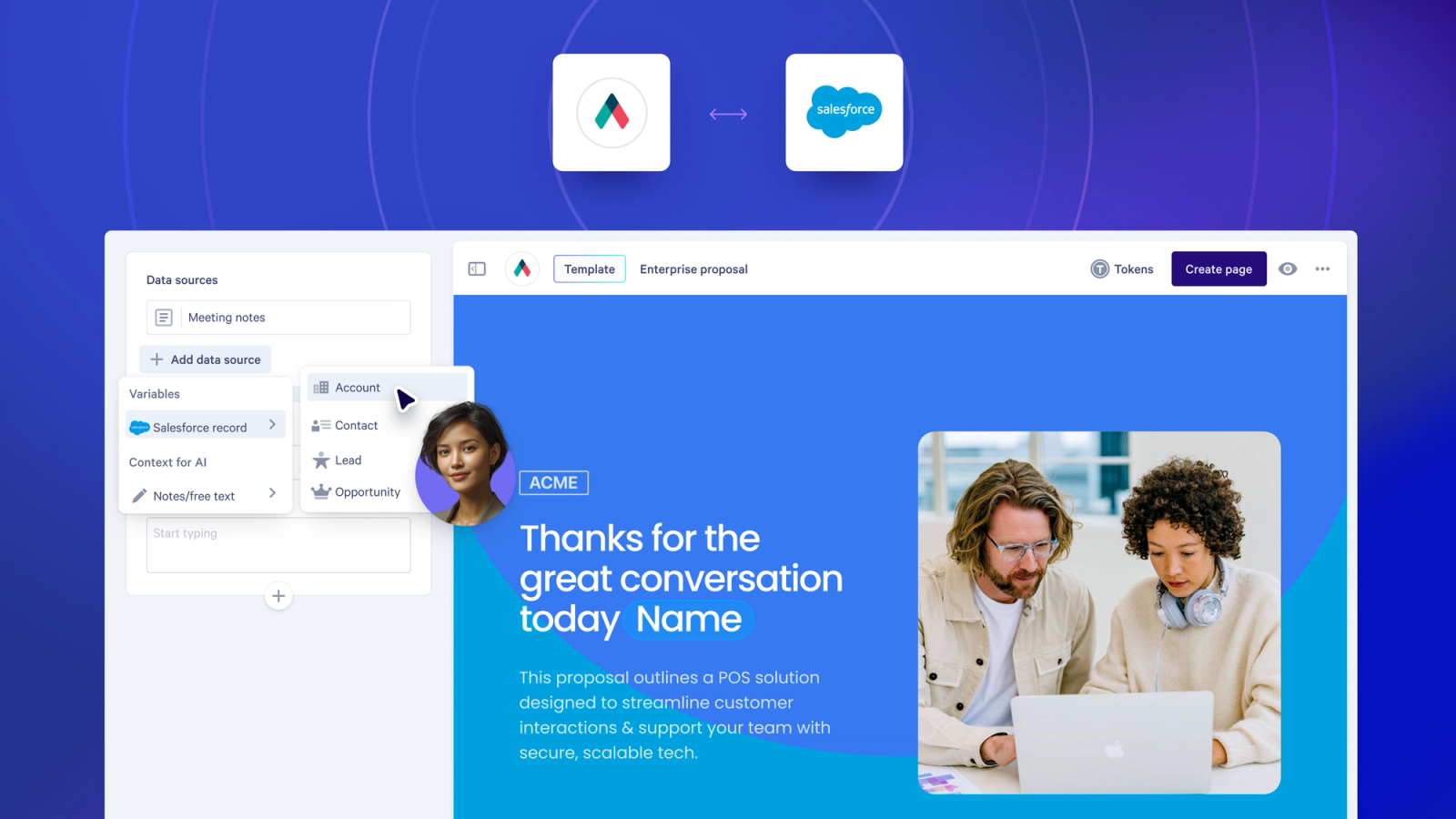
Here's what a connected proposal workflow looks like in Salesforce with Qwilr.
1. Connect your proposal software to Salesforce
Start by linking Qwilr to your Salesforce organization. The setup pulls in your opportunity, account, contact and lead objects. The fields available as variables in your proposal templates are configured with Qwilr support, so your team works with the fields that are relevant to your organization.
New to the integration? Setup is done once by a Qwilr account admin, and it needs Salesforce Super Admin access because the Qwilr Proposals package is installed into Salesforce first. The same email address has to be used for both logins, and one connection covers one environment, production or sandbox.
Follow the setup guide to get started.
2. Auto-populate the proposal with your data
Once connected, create a proposal template with variable fields mapped to Salesforce data. When a team member builds a proposal from a record, things like contact names, company details, product line items, and pricing are pulled in. The Smart Proposal Engine goes further again, drafting the page itself from the opportunity.
A template is linked to one record type and works only with that type. An Opportunity template can also reach fields on the related Account and on the opportunity's Primary Contact, which is whichever contact is marked primary in Contact Roles. A Contact template can reach its Account.
Two things to know about products: each one needs a quantity, and the price book item has to sit on the opportunity. Recurring pricing is not pulled across, so subscription terms belong in the product description or the quote itself. See Qwilr's quotes product for how pricing and product selection works inside a proposal.
3. Generate and send an interactive proposal from the Salesforce record
Teams can kick off a Qwilr web-based proposal straight from Salesforce, either through the Qwilr Proposals component on the record or by pasting the record URL into a Salesforce-connected template in Qwilr. The proposal is built as a live web page, not a PDF, so the buyer simply opens a link in their browser, rather than downloading an attachment.
Depending on your document creation credits, Qwilr's Smart Proposal Engine can use the Salesforce data to pre-build the proposal for you, drawing on call transcripts and meeting notes alongside the record.
Learn more about interactive proposals and how they work.
4. Sync acceptance and e-signature back to the opportunity
When the buyer accepts, Qwilr writes the outcome back to Salesforce in real time. The signed audit-trail PDF can be saved to the linked record, depending on your Salesforce setup. This way the agreement sits with the deal rather than in someone's inbox. Deal stage updates and accepted amounts can sync through Qwilr's Automations, which are set up separately from the integration.
Note that syncing the accepted amount back requires that the opportunity does not have products attached, as Salesforce calculates the Amount field from line items in those cases. Percentage discounts on line items sync where fixed-amount and quote-level discounts do not, and Automations run in production only.
5. Track buyer engagement inside the CRM
Once the proposal is sent, Salesforce stays current without manual input. First views and acceptances appear in the Activity tab on the record, allowing reps to see when a proposal was opened and act based on buyer engagement rather than sending a generic follow-up two days later.
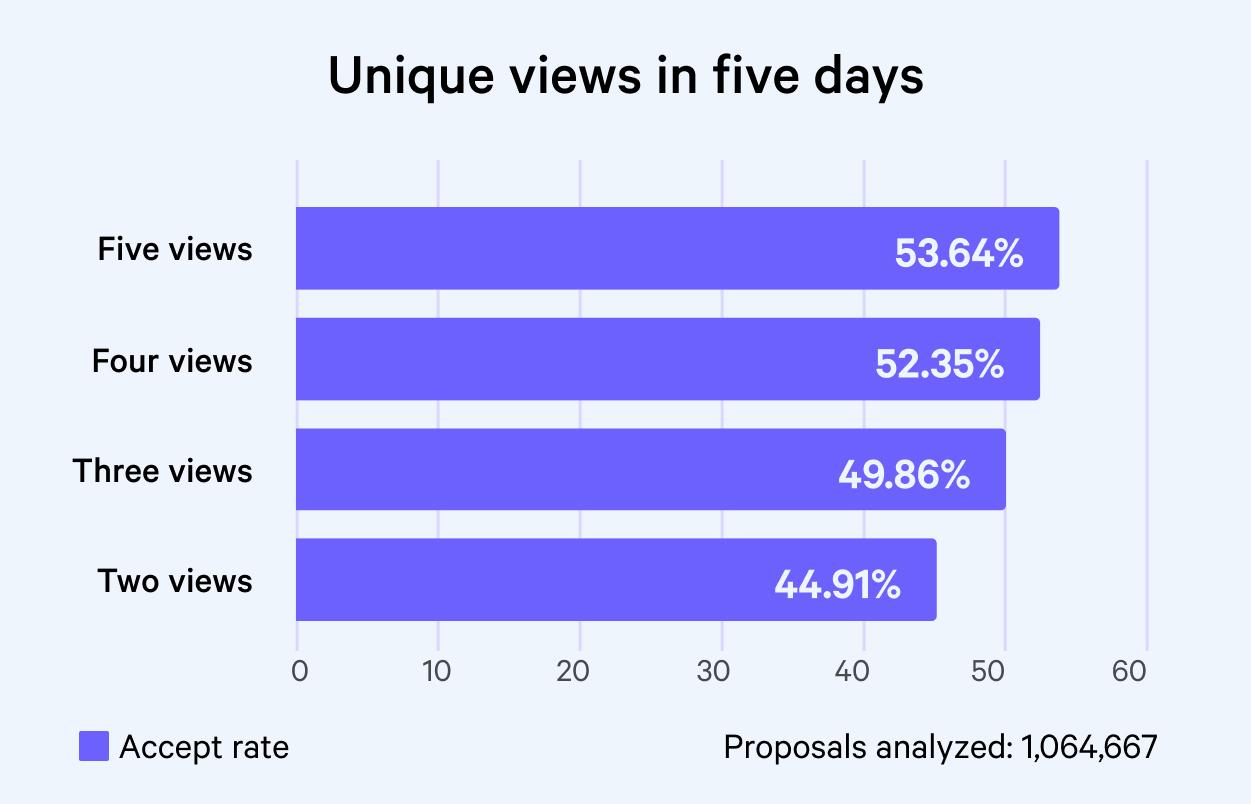
Our analysis of 1,064,667 proposals found that acceptance rates nearly double when at least two more people open a proposal in its first five days, so a second and third viewer on the record is the signal worth acting on. Explore Qwilr's proposal analytics and tracking.
What proposal tools integrate with Salesforce?
Several proposal tools integrate with Salesforce. The main difference is how deep the connection goes, and what you want Salesforce to handle for you.
With Qwilr, the integration is designed to keep your deal data and proposal activity in sync. It can pull details from opportunities, contacts, accounts, and leads, then write key activity back to Salesforce so the record stays up to date. Instead of sending a PDF, buyers receive a live web page they can open and share via a link.
Here is what each vendor's documentation confirms, as of September 2026.
| Capability | Qwilr | PandaDoc | Proposify |
|---|---|---|---|
Start a proposal from inside a Salesforce record | Yes, from Opportunity, Account, Contact or Lead | Yes, from Salesforce Lightning | Not yet in the current platform, listed as coming soon |
Salesforce products or line items into the proposal's pricing | Yes | Yes | Not yet, listed as coming soon |
Document activity written back to the record | Yes | Yes | Yes |
One thing worth knowing: if you need CRM data refreshed into a proposal after it has been created, PandaDoc does that on the document and Qwilr does not, so you regenerate from the record or edit the quote in place. For a fuller comparison, see Qwilr vs PandaDoc and Qwilr vs Proposify.
When evaluating, check whether the integration supports write-back to the CRM, not just pulling fields in on the way out. The most useful integrations keep the opportunity record accurate without your team having to update it manually. The same workflow across HubSpot, Pipedrive and Zoho is covered in our guide to CRM proposal software.
Connect Qwilr to Salesforce
If your proposals live outside Salesforce and your opportunity records never quite reflect where a deal stands, it is worth seeing how a connected workflow changes that. Explore Qwilr's Salesforce integration or book a demo to see the proposal workflow in action.
About the author

Isabella Cerini-Palozzo|Copywriter & Content Specialist
Bella is a SEO copywriter and content specialist with a background in law, before transitioning into marketing and content. She helps brands grow visibility and drive action through clear messaging and search-led content (blogs, website copy, and social), with a focus on GEO/SEO, strategy, and conversion. A lifelong storyteller with an early passion for screenwriting, she brings narrative craft to everything she creates - and when she’s not writing, you’ll find her teaching yoga or enjoy a dip in the ocean.
Frequently asked questions
Yes. When a buyer accepts a proposal, the event is recorded against the linked record and the signed audit-trail PDF can be saved to it, depending on how your Salesforce org stores attachments. Moving the opportunity forward, including the stage and the amount, runs through Qwilr's Automations rather than the integration itself.
Not usually. The Qwilr Salesforce integration is set up through a guided process, without the need for developer involvement. It does need a Qwilr account admin and Salesforce Super Admin access, because the Qwilr Proposals package is installed into Salesforce first, and the same email address has to be used for both logins. One connection covers one environment, production or sandbox, not both at once.
No. Data is pulled at the moment the proposal is created, so a later change to the opportunity does not flow through to a page that already exists. You regenerate the proposal from the record, or edit the quote in the page. Worth designing around if your pricing moves late in a deal.
Those on the record type the template is linked to, and a template only works with that type. An Opportunity template also reaches the related Account and the opportunity's Primary Contact, set through Contact Roles. The fields available as variables are configured with Qwilr support. One formatting quirk: dates come through as YYYY-MM-DD whatever the format in Salesforce.