
Qwilr vs PandaDoc: which proposal software is right for you?
PandaDoc centres on documents, CPQ and contract automation.
Qwilr takes a different approach, built for interactive, web-based proposals with live pricing and analytics that suit teams who want their proposals to feel like a premium, on-brand experience, whether that's a growing sales team, an agency, or a larger, process-driven organisation.
More than a million proposals sent with Qwilr


















In a nutshell
Choose Qwilr if
- Proposals need to look and feel like a premium brand experience
- Buyer engagement matters, and you want to know when, where and how long prospects read
- You want live, interactive pricing that buyers can explore themselves
- You want e-signatures and payment collected on the same page the buyer accepts
- You are a growing sales team looking for a fast, straightforward implementation
Choose PandaDoc if
- Your priority is contract and document automation at scale
- You need advanced CPQ with product catalogues and complex pricing rules
- You run high volumes of approval routing, audit trails and legal workflows
- You want a free e-signature tier to start
We get weighed up against PandaDoc, a lot
Qwilr and PandaDoc are proposal software built for different jobs. PandaDoc treats a proposal as a document, built around templates, dynamic fields, CPQ and contract automation.
Qwilr treats a proposal as an experience: an interactive, web-based page with live pricing, embedded video and section-by-section analytics on how buyers engage.
Both platforms offer e-signatures. Qwilr integrates natively with five CRMs: HubSpot, Pipedrive, Zoho, Salesforce and Microsoft Dynamics 365. The tables below break the rest down, so you can see which fits how your team sells.
Elevate your buyer experience beyond static PDFs
Leave behind PandaDoc's word-processed documents and enable your buyers with interactive proposals.
A solution that goes beyond e-sign & document workflows
Qwilr customers create documents for the entire buyer journey – from marketing material, the initial proposal, contracts and customer onboarding.
Get notified when buyers engage
Unlike PandaDoc, Qwilr's unique engagement algorithm tracks when buyers become engaged and disengaged. Get notified so you get in touch with a buyer when it's most relevant.
What does a Qwilr page give a buyer that a PandaDoc document doesn't?
Every row below can be checked against either vendor's own documentation.
What do Qwilr and PandaDoc each tell you after you send?
Both tools report on what a buyer did. They differ in how finely, and in whether anyone has to interpret it.
How do Qwilr and PandaDoc fit your CRM and security stack?
Pricing is not compared here, because both vendors change it. Check Qwilr's pricing and PandaDoc's directly before you decide.
Here's what really sets Qwilr apart from PandaDoc
Qwilr treats a proposal as an experience. PandaDoc treats it as a document. When you build in Qwilr, your proposal opens as an interactive, mobile-responsive web page, and every interaction is tracked, so you know which sections held attention and when a decision-maker returned for a second look.
Neither approach is wrong, the right choice depends on whether your deals are won on buyer experience and engagement, or on document throughput and contract complexity. For most growing sales teams, the proposal is the moment the deal is won or lost, which is where Qwilr's approach to proposal management does its best work.
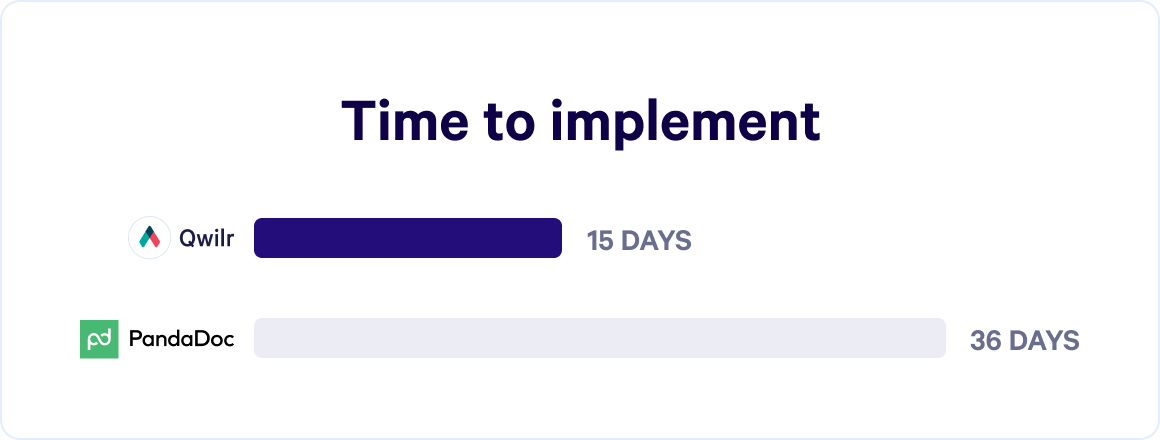
Fastest proposal solution to implement
According to G2's data, Qwilr is faster to implement and delivers return on investment 2+ months quicker, making it the tool of choice for growing sales teams.
Create client-ready proposals, quotes and contracts in minutes
Qwilr's editor is pre-loaded with 150+ templates, so reps can build a polished, on-brand proposal without waiting on design or wrestling with formatting. Saved blocks, smart templates and a shared content library keep messaging consistent across the team. Because each proposal lives on the web rather than in a PDF, it can carry embedded video, interactive pricing and calculators that a static document can't. PandaDoc's editor is built for structured documents, dynamic fields and CRM data, which suits teams sending contracts and standardised agreements at volume.
Explore templatesShare proposals as interactive web-pages
A Qwilr proposal opens as a living web page rather than a PDF, sometimes called a digital sales room. Buyers can open it on any device, explore optional line items, adjust quantities in interactive pricing, watch a short video from their rep, and accept on the spot, with no download or pinch-to-zoom PDF involved. A branded, interactive experience like this tends to keep buyers engaged for longer and makes pricing easier to understand, which usually means fewer follow-up emails and a faster path to a signed deal. PandaDoc's web viewer is stronger than a static file, but the experience still stays anchored to a document model.
Try our AI proposal generatorUnderstand your buyers better with analytics and notifications
Qwilr's proposal analytics turn a silent waiting game into a data-backed follow-up. You know when a buyer views, signs, pays, becomes engaged or loses interest, and which sections and interactive elements held their attention. If a buyer forwards your proposal and three new people open the pricing section, that's a signal a decision is close. PandaDoc shows when a document opens and how long recipients spend on each page, useful for compliance but lighter on buyer-behaviour insight. When a proposal goes cold, you know that too, before it costs you the quarter. This buyer engagement data helps reps prioritise the right deals and gives RevOps a clearer read on pipeline health.
Learn moreMake decision-making a breeze for your buyers
With Qwilr, your buyers can choose, sign and pay in one flow, without switching tools or tabs. It's a simpler way to move from acceptance to a signed, paid deal.
Integrations that cut manual CRM work
Qwilr connects natively to HubSpot, Pipedrive and Zoho CRM on every plan, with Salesforce added on the Scale plan, so reps can build proposals from CRM data and, where supported, trigger CRM updates from proposal events. It also connects to Stripe for payments, Slack for notifications, Quickbooks for invoicing, and Zapier for the rest of your stack. PandaDoc's CRM integrations, including Salesforce, start from its Business plan, plus a strong API for custom RevOps builds. Either way, check which tier actually includes the connection you need before assuming it's bundled in. Explore integrations
Hear from customers who chose us



Qwilr is such an effective way to deliver proposal documents compared to traditional tools like PandaDoc/Docusign, etc.



“I love the live link. It’s been really helpful to be able to make changes on the fly and not have to resend a bunch of documents. It’s a much better customer experience than someone needing to look through multiple versions to find the most current one.”



“Sometimes, we’re not even able to get in the room. Our proposal has to be the representation of the salesperson and have all the information a customer needs because our product is complex.”



“On a functional level, we really appreciate how Qwilr allows us to password protect and digitally sign our proposals to improve privacy and security with clients. Also, the ability to track page views on live proposals has helped us better focus our time and efforts on pursuing quality leads.”



“We’re seeing deals close a lot faster while also adding a level of professionalism and enjoying powerful insights. None of these things we were getting through the use of PDFs and e-signature software alone.”
What changed for four Qwilr customers
Full stories: LaunchNotes, Clum Creative, Destined and ParkCo.
500+ 5-star G2 reviews
Close rate
LaunchNotes, after moving off static documents.
Sales cycle
Clum Creative, who also grew revenue fourfold.
Time saved
Document production at Destined.
Proposal creation at ParkCo.
What people are saying on G2
Verified reviews from Qwilr customers on G2.
Completely transformed my sales and proposal process!
“I love how easy it is to create an interactive, immersive, and fast-loading proposal page that is geared and aimed at maximising conversions.”

Favorite Sales Tool!
“There is so much that I can do with Qwilr. We've been able to build several sales templates and then depending on the needs of our clients, choose the right template which means that we can speed up our sales process.”

Qwilr has changed the way we sell.
“Qwilr pages are beautiful & simple, and they set us apart from the competition. They are much easier to edit than other proposal services out there — meaning we can send more quotes in a shorter period of time.”

Proposal generation that's easy and beautiful
“Consistent appearance of the documents we create with Qwilr means that our proposals always look good and feel like us. The extensive library functions make it possible to reuse content easily and save time.”

Transformed our quotations!
“I love how visually appealing Qwilr is in regards to the proposals we send our clients. We've had really positive feedback, even from people very high up at Apple.”

Game Changer for Our Business
“We're solving the problem of dead quotes that lose momentum with Qwilr. We leverage the ability to see times quotes have been viewed quite a bit.”

Qwilr vs PandaDoc: frequently asked questions
Qwilr is the preferred choice for interactive proposals, buyer engagement and a modern sales experience. PandaDoc leans more towards CPQ and enterprise contract workflows.
The underlying difference is philosophy: Qwilr treats a proposal as an interactive web page, PandaDoc treats it as a document. Growing sales teams and agencies that win on buyer experience tend to prefer Qwilr. Operations-heavy teams sending high volumes of contracts often prefer PandaDoc.
Qwilr generally offers deeper buyer analytics. It tracks section-by-section engagement, return visits and which stakeholders viewed each part of the proposal.
PandaDoc provides viewer tracking, activity reporting and audit trails, which are strong for compliance but lighter on buyer-behaviour insight.
Yes, with both, but differently. Qwilr includes built-in e-signatures and QwilrPay, so buyers can sign and pay on the same page they accept.
PandaDoc includes e-signatures and connects to payment gateways.
Not fully. Qwilr's interactive pricing covers most straightforward, quote-to-close scenarios, but PandaDoc's CPQ is built for complex, multi-tier pricing and large product catalogues.
Teams with simple pricing tend to find Qwilr's built-in quoting enough. Teams with complex configuration rules usually still want a dedicated CPQ tool.
Both meet the bar most security reviews set. PandaDoc holds SOC 2 Type II, GDPR and HIPAA, with granular permissions, audit trails and full signing records. Qwilr holds SOC 2 Type 2, GDPR and PCI-DSS, with custom permissions, a certified audit trail on every acceptance and identity verification on higher tiers.
Certifications change, so confirm the current list with each vendor during your evaluation.
Most teams send their first Qwilr proposal within days. Content gets rebuilt into templates rather than migrated file by file, and there is no automatic PandaDoc import, so plan a short rebuild of your best few templates.
Help documentation, live chat and onboarding guidance cover setup, and higher plans add a customer success manager who builds the first templates with you. PandaDoc's implementation support is built for wider rollouts across departments, where configuring CPQ and approval workflows takes longer.