
Every trade account quoted at the agreed rate
New accounts get your pricing, terms and account details in one link they sign. Every rep quotes from the same locked price list, and quotes expire before supplier costs move.
4.6 out of 5 from 936 G2 reviews

Easy for admins to control and quick for reps to adopt




Opening accounts and keeping margin

Open the account in the same step
Acceptance form fields collect billing contacts, accounts payable email, tax details and delivery addresses, so there's no separate form to chase.

One price list for every rep
Lock the price list and discount bands so only an account admin can change them. With a dozen people quoting, that is where margin can slip.

Quotes that expire before costs move
Set quotes to expire after a fixed number of days. When a supplier raises prices, old quotes stop working instead of being accepted at last month's rate.
From first quote to open account
Build from the approved price list
Your line card, product detail, freight policy, returns and warranty save as blocks, with the price schedule locked.
A rep in their first week sends the same terms as your best seller.
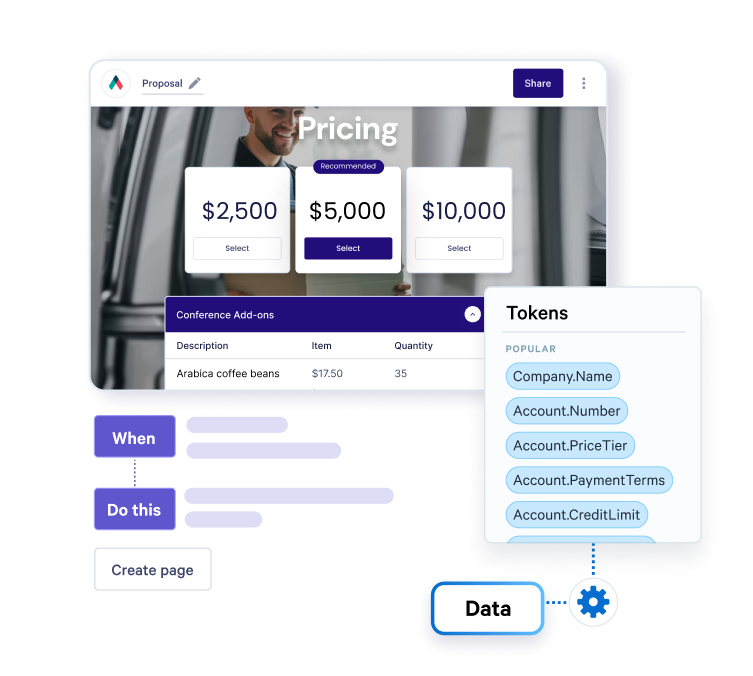
Show the volume breaks
Give lines a quantity range so the buyer picks the order size and sees the price at that volume. Add-ons like delivery or merchandising can sit alongside as optional items.

See which part they read
Qwilr emails you on the first open and shows time spent on each section.
If they keep going back to the payment terms, your next call is probably about credit terms.

Signed, with the account details captured
One signature covers the pricing and the trading terms, and custom fields collect what you need to set up the account. The answers come through in the acceptance email.
If the account starts prepaid until credit is approved, you can take the first payment on acceptance, while credit decisions stay with your finance team.

What customers say on G2
What people are saying about Qwilr on G2:
Powerful visual impact, user-friendly
It's honestly hard to complain about Qwilr. Using a web-based proposals instead of PowerPoint proposals or PDF proposals, allows the ability to embed personalized introduction videos, video testimonials/reviews, and/or product/service videos.
The best option on the market
Built-in templating, tokens, the pricing suite with tiered plans is excellent, overall look and feel adds an element of professionalism, integrations with many of the tools I use is a huge win.
Over the last two years, Qwilr has made huge and regular improvements to the editor, analytics, added agreements and several other things. I remain a big fan.
A flexible and dependable tool that makes your communication stand out
Qwilr can enhance the way your communication is seen and experienced by the client, especially when it is more nuanced or subtle questions and comments that follow the main presentation. This is the kind of edge a good team needs.
Works alongside your ERP
Your ERP keeps the catalogue, stock, orders and invoicing, and any pricing tool keeps setting the numbers. Qwilr is the proposal and trading terms the customer signs, and orders go through your usual system.
Quotes can start from the deal in HubSpot, Salesforce, Pipedrive, Zoho CRM or Microsoft Dynamics 365, and acceptance writes back.

Start from a quote template
Free, and built to be adapted to your own range and terms.
Browse all templates



Questions wholesalers ask
It's software that wholesale distributors and trade suppliers, such as building materials, electrical and industrial distributors, use to send pricing and terms to new and existing accounts as a web page. With Qwilr the price list stays locked, the buyer can see the volume breaks, and they can sign and give their account details in one step.
It doesn't replace your ERP, which keeps stock, orders and invoicing. See how quotes and pricing work.
Yes. Add fields to the acceptance form for billing contacts, accounts payable email, tax details and delivery addresses, and the buyer fills them in as they sign on the page. The answers come through in the acceptance email and the audit trail.
Lock the price list and discount bands in your templates so only an admin can change them. Reps change products and quantities while the rates stay fixed.
Admins also decide per template who can use it and who can also edit it, so each branch sends from an approved version. When rates change, update the saved pricing block and every new quote picks it up. Quotes already sent keep the price they went out at, which is what the customer was offered.
As long as your supplier costs hold. State the validity on the quote and set the link to expire after that many days, so old prices drop off. More in how to send a quote to a client.
Lines tied to commodity prices, such as copper cable or steel, usually need a shorter window than the rest of the range. Say which lines are subject to change in your terms, so the buyer knows before they sign.
Yes. Show the breaks in the price list and give lines a quantity range, so the buyer sees the price at the volume they choose. Our guide to tiered pricing covers how to lay them out.
Send every account the same page with the new prices, the date they apply and the reason. Reps can add a personal note, but the message and the numbers stay the same. Our guide to pricing structures covers how to frame the change.