
Sales reps only spend 30% of their time selling during an average week and 70% on non-selling work. One of the biggest time sinks sits inside the deal cycle itself: reps spend 10% of their week generating quotes/proposals and gaining approvals.
Improving sales productivity requires automating these repetitive tasks. Proposal automation software reduces that drag with reusable templates, CRM-populated fields, approval workflows, engagement tracking, and e-signature—turning what used to take hours into a process that takes minutes.
Whether you're a freelancer managing a handful of proposals monthly, a mid-market sales team coordinating across departments, or an enterprise handling hundreds of deals simultaneously, the right automation tool directly impacts how much time your team spends with prospects instead of formatting documents.
In this article, we compare the best proposal automation software for different business types.
| Proposal Automation Tool | Best For | Starting Pricing | G2 Rating |
|---|---|---|---|
Qwilr | Mid-market and enterprise sales teams (10-50 reps) needing CRM automation and analytics | $35/user/month (annual) | 4.6/5 |
PandaDoc | Small to mid-size teams (2-20 people) creating 50-200 standardized documents monthly | $19/user/month (annual) | 4.7/5 |
Proposify | Mid-size teams (5-20 reps) needing brand consistency across 50-200 monthly proposals | $41/user/month (annual) | 4.6/5 |
Nusii | Freelancers and small agencies (1-5 people) sending 10-30 proposals monthly | $29/month | 4.5/5 |
Jotform | Businesses already using Jotform for other forms wanting unified system | $34/month | 4.7/5 |
Bonsai | Freelancers and agencies (1-5 people) managing full client lifecycle | $9/user/month (annual) | 4.3/5 |
QuoteWerks | VARs, MSPs, and technical product resellers needing real-time distributor pricing | $45.83/user/month (annual) | 4.3/5 |
Better Proposal | Freelancers and small agencies (1-10 people) prioritizing design quality and speed | $19/month (1 user) | 4.3/5 |
Pricing as of January 2025*
1. Qwilr: Best proposal automation for mid-market and enterprise sales teams
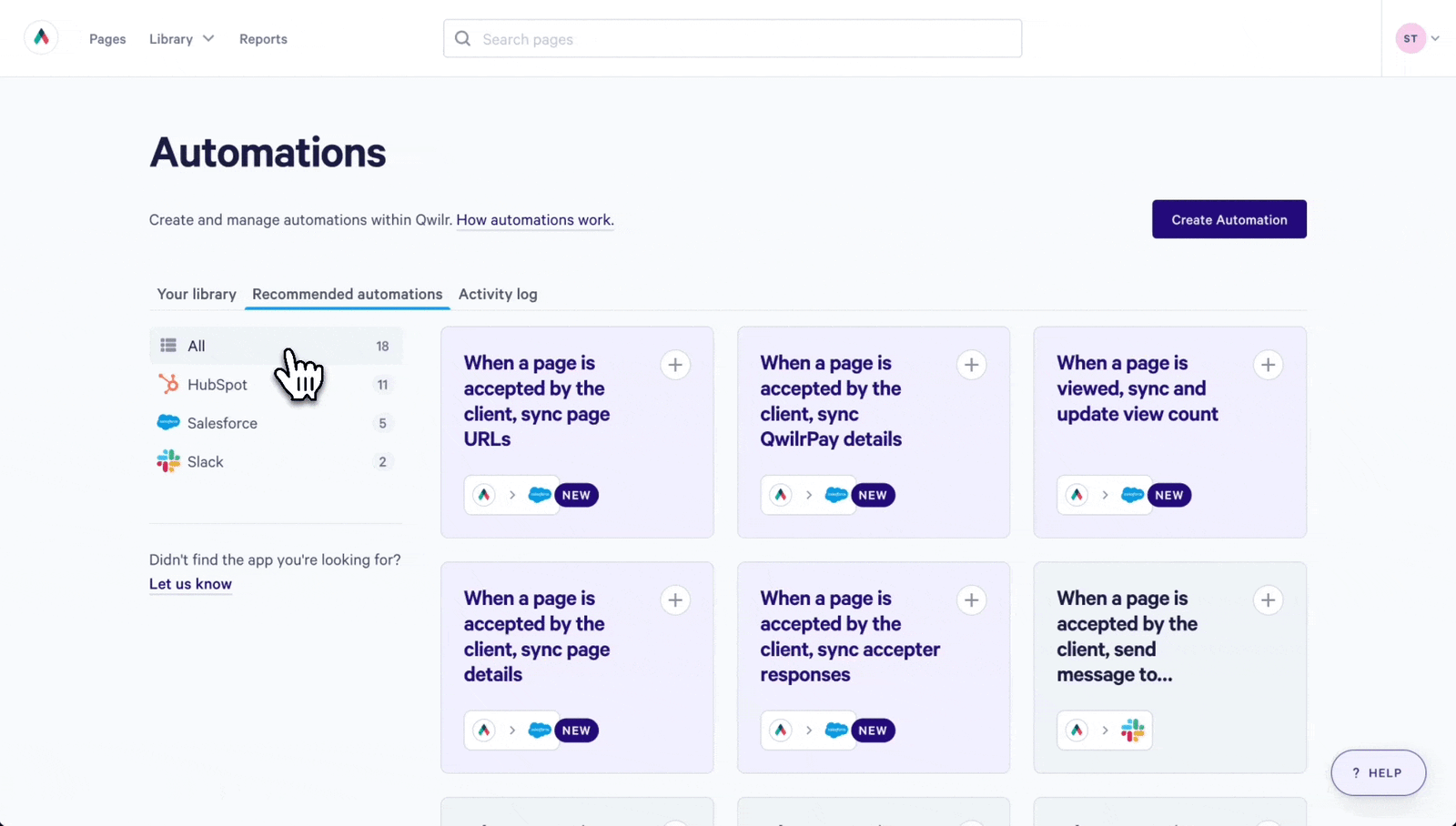
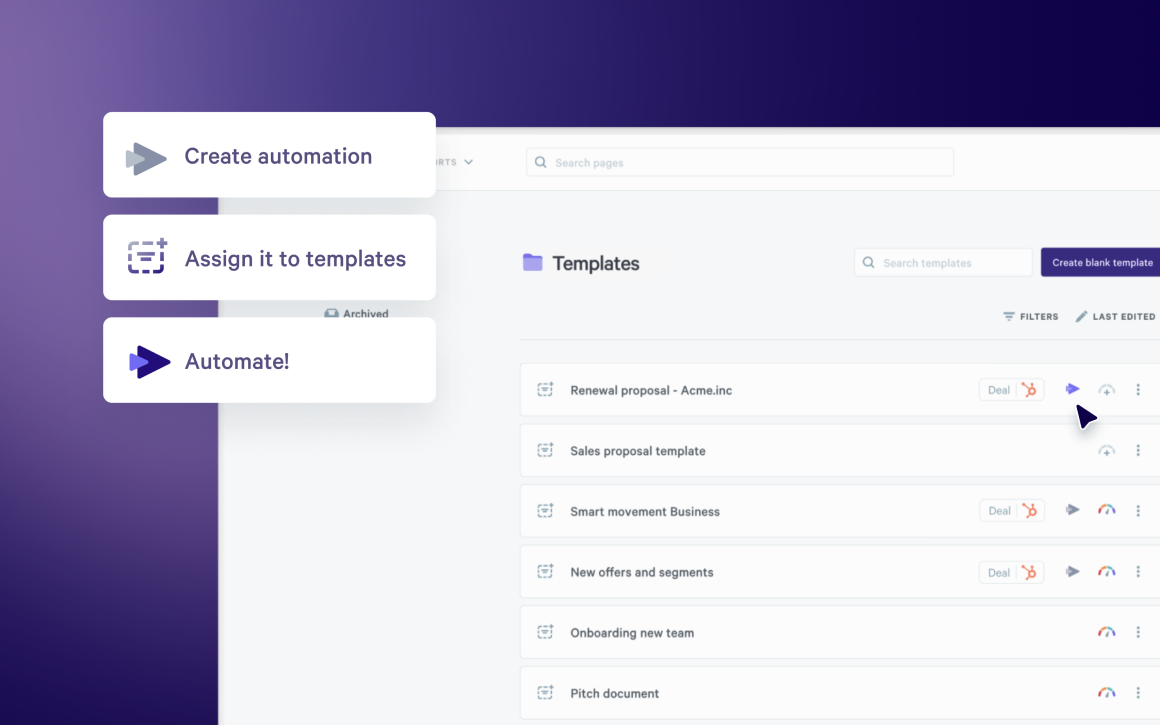
Qwilr is a proposal management platform that automates document creation, tracks prospect engagement, and integrates the entire proposal workflow into CRMs like Salesforce, HubSpot, Zoho CRM, or Pipedrive.
The platform solves three critical bottlenecks in proposal workflows: creating proposals from scratch takes 30 to 60 minutes per document, prospects can't interact with static PDFs to adjust quantities or select options, and sales teams have no visibility into which stakeholders are reviewing proposals or where deals stall.
Qwilr addresses these by generating CRM-populated proposals in minutes, delivering proposals as interactive web pages where prospects adjust pricing in real-time, and providing section-level analytics showing exactly how buying committees engage with content.
Teams using Qwilr cut proposal creation time while gaining visibility into buyer behavior that didn't exist with PDF-based workflows. The platform works best when multiple people need to review proposals before they go out, when pricing has several options or tiers, and when prospects need to share proposals with colleagues before making decisions.
Standout features
- CRM-automated proposal generation: Connect to CRMs to auto-populate customer names, deal values, product configurations, and pricing directly from CRM records using dynamic tokens.
- Content library with reusable blocks: Build a centralized repository of pre-approved content blocks (case studies, product descriptions, legal terms, pricing tables) that reps drag into proposals.
- Real-time collaboration tools: Multiple team members edit proposals simultaneously with live "Active Viewers" indicators showing who's currently working on the document. Leave inline comments on specific sections, assign tasks to colleagues, and route proposals through approval workflows before sending to prospects.
- Proposal analytics: Track when prospects open proposals, time spent on each section, which pricing options they examine, and when they share proposals internally with buying committee members and get Slack and email notifications.
- CRM and workflow automation: Trigger complex CRM workflows based on proposal activity. When prospects accept proposals, CRMs automatically update opportunity stages, create tasks for account executives, send welcome emails, or initiate onboarding sequences without manual updates.
- Version control and editing: Edit any live proposal and changes appear instantly for prospects viewing the web page and track full revision history showing who changed what and when.
- AI Proposal Creator: Generate complete proposal templates in minutes by inputting the website URL and industry. The AI builds professionally formatted proposals with company-specific information, which reps then customize using Qwilr's editor and content library.
- 140+ templates: Pre-built templates for sales proposals, consulting agreements, agency pitches, and service quotes with sections, pricing tables, and acceptance blocks already configured.
Pricing
- Business: $35 per user/month (billed annually) or $39 per user/month (billed monthly)
- Enterprise: $59 per user/month (billed annually, 10-user minimum)
- Add-ons: Identity Verification (+$10/user/month), Custom Branding (+$10/user/month)
- 14-day free trial: Full access to Business plan features, no credit card required
| Pros | Cons |
|---|---|
Templates and content library cut proposal creation time significantly | No offline proposal creation (requires internet connection) |
Live web pages eliminate PDF version control issues | Advanced content locking requires the Enterprise plan |
Analytics show which prospects are actively engaging versus ghosting | Learning curve for setting up dynamic tokens initially |
Native CRM integrations keep deal data synchronized automatically | Web-page format may not suit industries requiring formal PDF submissions |
Admin-locked content blocks maintain legal and brand consistency |
2. PandaDoc: Best all-in-one document automation for small to mid-size teams
PandaDoc is a proposal management platform that combines contracts, e-signatures, and payment processing in one platform designed for teams that want to avoid juggling multiple tools.
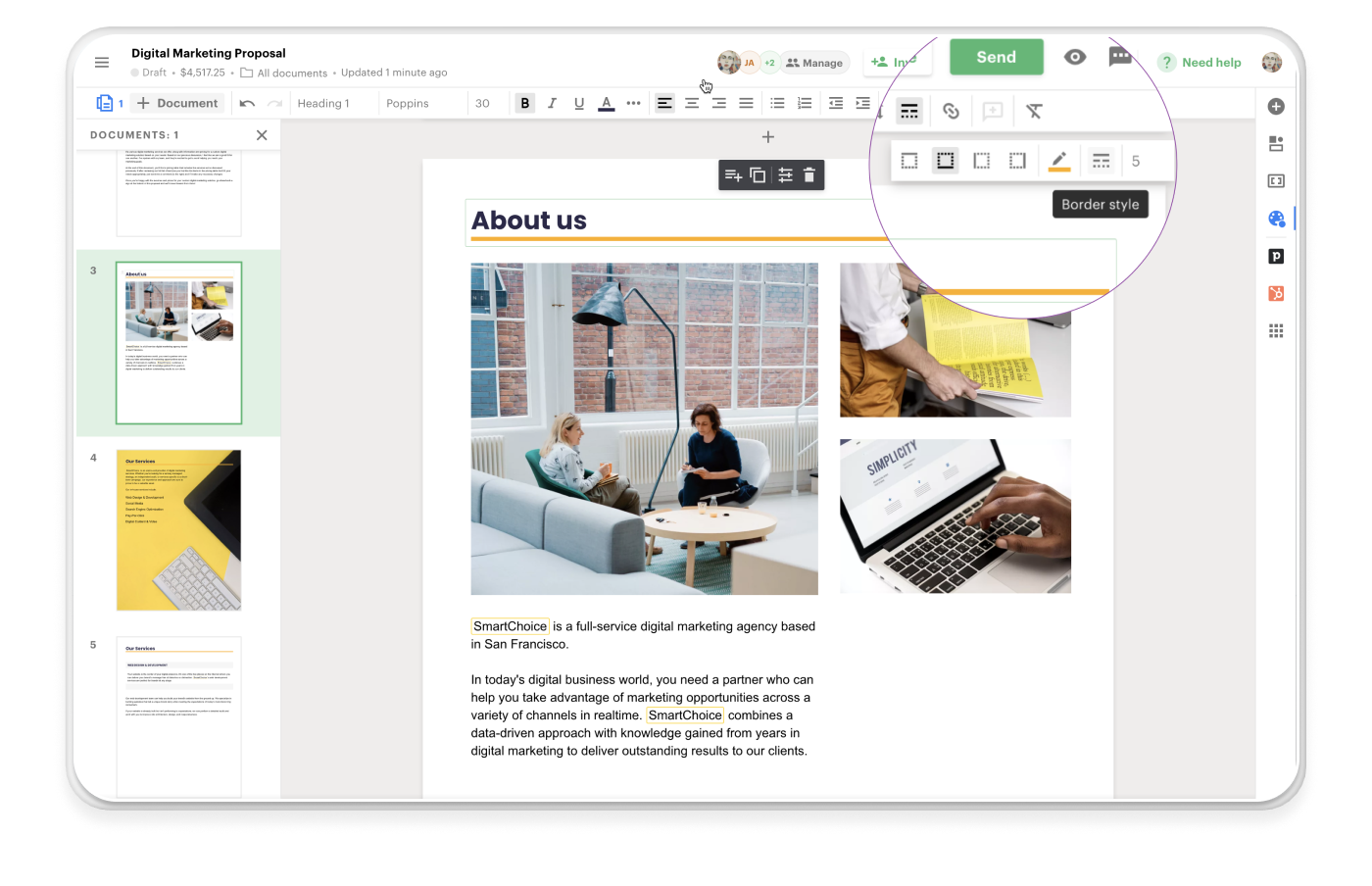
Proposals here are treated as structured system outputs—generated from CRM data, routed through approvals, logged for compliance, and executed with minimal human intervention. The value shows up once document volume increases and manual coordination starts causing errors, delays, or audit risk.
This makes PandaDoc a strong choice for RevOps-led organizations that care about traceability, consistency across document types, and predictable execution.
The tradeoff is persuasion, though. PandaDoc proposals often feel utilitarian because the platform prioritizes correctness over craft. If your deals are complex internally but emotionally straightforward externally, PandaDoc shines. If winning depends on narrative, visual polish, or sales-led nuance, the experience can feel rigid and transactional. For other options, see our guide to PandaDoc alternatives.
Standout features
- Approval workflows: Route documents through internal reviewers before they reach clients. Assign specific approvers based on conditions (dollar amount, discount level, contract type) and track who approved, when, and what feedback they provided. Approvers receive email notifications and can approve, reject, or comment directly.
- Content library: Centralize pricing tables, legal clauses, product descriptions, and brand assets that team members can drag into documents.
- Document analytics: Track when recipients open documents, time spent on each page, and completion status. View engagement patterns to understand which sections get the most attention and when prospects share documents internally.
- Bulk send: Send personalized versions of the same document to multiple recipients simultaneously. Upload a CSV file or pull from CRM to auto-populate recipient-specific details in each document.
- Live document editing: Make changes to documents after sending and recipients see updates in real-time without receiving new links. Version history tracks all edits with timestamps and user attribution.
- Embedded payments: Accept credit card, ACH, or digital wallet payments through Stripe, PayPal, or Square integrations. Recipients can sign and pay in one session rather than waiting for separate invoices.
Pricing
- Free: $0
- Starter: $19/seat/month (annual) or $35/seat/month (monthly)
- Business: $49/seat/month (annual) or $65/seat/month (monthly)
- Enterprise: Custom pricing
- 14-day free trial: Full access to Starter plan features, no credit card required
Note: Some features like bulk send, Salesforce integration, and forms require add-on fees even on the Business plan.
| Pros | Cons |
|---|---|
Approval workflows built into template level | Essential features like CRM integrations require Business plan ($49/user minimum) |
Native CRM integrations eliminate manual data entry | Template-based approach works better for standardized documents than custom proposals |
Bulk send handles high-volume document distribution | Some users report slow loading times with large documents |
Content library maintains document consistency across teams | Template-based approach works better for standardized documents than custom proposals |
3. Proposify: Best proposal automation for professional services
Proposify centralizes content libraries, enforces brand standards across sales documents, and tracks client engagement through detailed analytics.
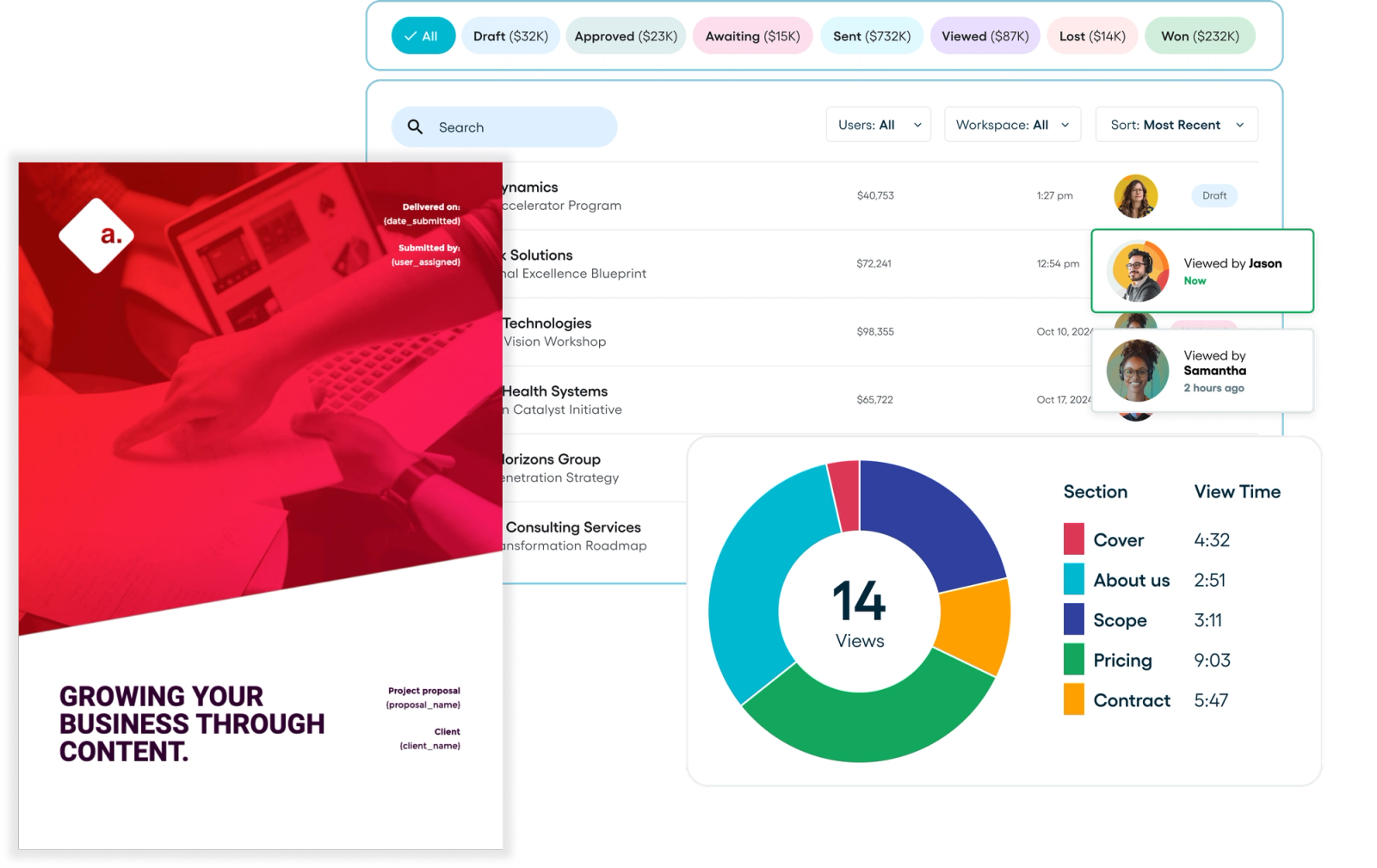
Proposify provides a centralized content library where marketing teams store approved messaging, pricing tables, and design elements that reps reuse across all proposals. You also get detailed analytics showing which proposal sections prospects viewed, how long they spent on pricing pages, and when they shared documents with colleagues.
The platform works best when brand consistency matters more than speed, when multiple stakeholders need visibility into proposal performance, and when marketing teams want control over approved messaging without bottlenecking sales.
While Proposify supports approvals and pricing reuse, it’s less suited to highly negotiated, line-by-line deal construction or scenarios where pricing logic changes materially from deal to deal. Its governance is scoped to proposals—there’s limited native support for complex RevOps orchestration or post-signature workflows. Proposify excels when proposals need to be predictable sales assets and it’s less compelling when proposals are just one step in a larger, systems-driven revenue process. For other solutions, explore our Proposify alternatives comparison.
Standout features
- Content library with reusable sections: Store approved content blocks (pricing tables, terms and conditions, case studies, bios) in folders organized by service type or project phase.
- Fee Library: Save and reuse pricing and fee line items, helping reps build accurate quotes without re-entering numbers each time.
- Interactive pricing tables: Clients adjust quantities and select optional add-ons directly within proposals, with totals recalculating automatically in real-time—checkboxes for optional items and editable quantity fields give prospects control over final pricing.
- HubSpot and Salesforce integrations: Create proposals directly within CRM opportunity records, pulling contact details and deal information automatically—completed proposals sync back to CRM, updating deal stages and triggering follow-up tasks.
- Electronic signatures with Stripe payments: Clients sign proposals and submit credit card payments in one workflow—Stripe integration collects payment at acceptance, eliminating separate invoicing steps.
- Approval workflows: Route proposals requiring manager or legal sign-off through internal review before sending to prospects—assign approvers based on deal size, discount levels, or custom terms requiring oversight.
Pricing
- Basic: $19/seat/month (annual) or $29/seat/month (monthly)
- Team: $41/seat/month (annual) or $49/seat/month (monthly)
- Business: $65/seat/month (starts at $3,900 billed annually)
- 14-day free trial on all plans, no credit card required
| Pros | Cons |
|---|---|
Content library maintains brand consistency across all reps | Template and pricing table editor can be difficult to resize elements |
Detailed analytics show exactly which sections prospects read | Limited customization options compared to competitors |
Interactive pricing tables let prospects customize packages themselves | Automation is lighter compared to CPQ-style tools |
Template editor enforces design standards without restricting customization |
4. Nusii: Best proposal automation for freelancers and small teams
Nusii strips proposal software down to essentials—templates, tracking, e-signatures, and basic payment collection—without the feature bloat that inflates pricing on competing platforms.
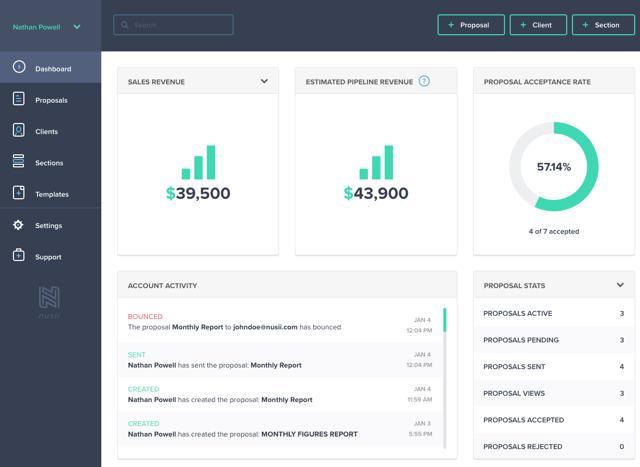
The emphasis is on simplicity: clean templates, fast setup, and just enough structure to avoid mistakes without introducing process overhead. This makes Nusii a strong fit for freelancers, studios, and small agencies where the same person is selling, delivering, and managing the relationship.
The limitation appears as soon as scale or specialization enters the picture. Nusii offers a content library, section reuse, and tracking, but lacks deeper controls around pricing reuse, approvals, or content governance. It’s intentionally minimal, which keeps it approachable, but also means it doesn’t grow with complex sales motions. Nusii works best when proposals are administrative necessities, not strategic sales assets.
Standout features
- Reusable sections: Save any proposal section (project scope, pricing, terms, case studies) to your content library and insert it into future proposals with one click.
- Variables system: Add client placeholders ({{client_name}}, {{company_name}}, {{project_title}}) to automatically populate throughout proposals when you assign a client.
- Custom domain and branding: Host proposals on your own domain (proposals.yourcompany.com) and customize colors, fonts, and logos. Clients don't see Nusii branding at all.
- Built-in e-signatures: Legally binding electronic signatures capture client name, IP address, and signature timestamp. Clients sign directly in browser without printing or scanning.
- Stripe payment integration: Request percentage-based deposits (10%, 25%, 50%) or fixed amounts after signature. Clients pay via credit card, ACH, SEPA, or iDEAL through Stripe Checkout before downloading their signed proposal.
Pricing
- Freelancer: $29/month or $290/year
- Agency: $49/month or $490/year
- Business: $129/month or $1,290/year
- 14-day free trial on all plans, no credit card required
| Pros | Cons |
|---|---|
Affordable entry point compared to competitors ($29/month vs. $49-65/month) | Only Stripe payment integration—no PayPal, GoCardless, or other processors |
Clean, uncluttered interface focused on proposal creation | No role-based permissions (all team members see all proposals and client data) |
Reusable sections and variables dramatically speed up proposal generation | Analytics show open/view events but not time spent per section or device details |
Custom domain removes Nusii branding entirely |
5. Bonsai: Best all-in-one business management suite for freelancers
Bonsai bundles proposals, contracts, invoicing, time tracking, project management, and client management into one platform specifically designed for freelancers and agencies under 20 people.
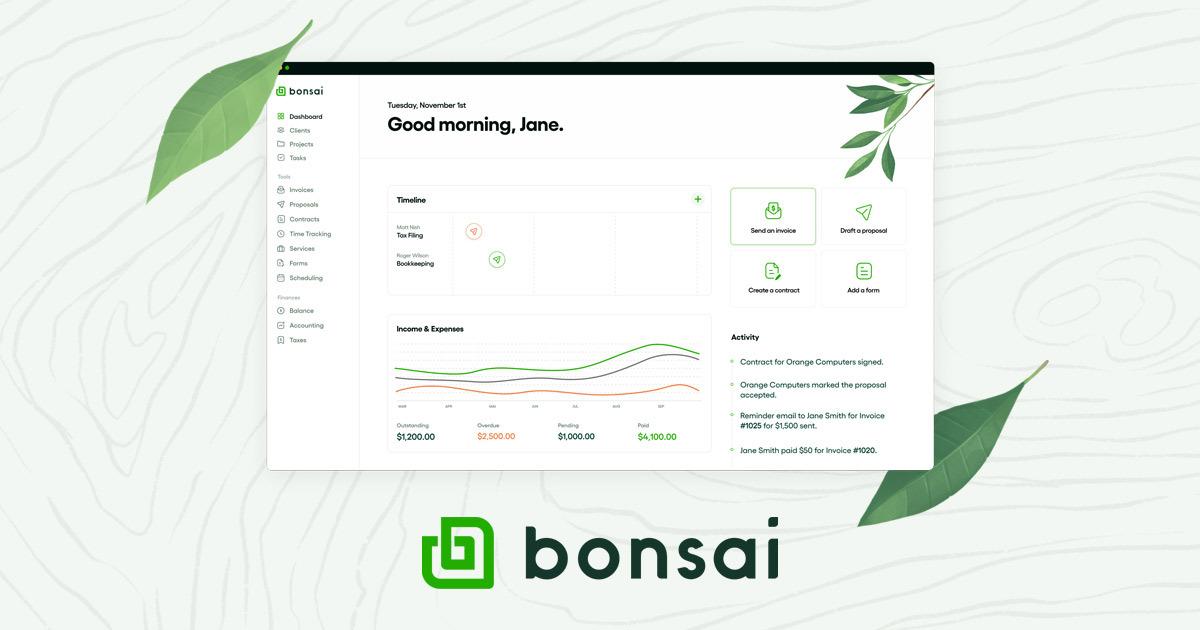
Rather than specializing in proposals alone, it treats them as one step in the complete client lifecycle, from initial proposal through signed contract, time tracking, and final invoice.
Freelancers and creative agencies (designers, consultants, marketers, developers) use Bonsai to eliminate tool-switching between separate proposal, contract, invoicing, and project management platforms. The platform's proposal templates connect directly to its contract templates, which auto-generate invoices based on accepted terms, creating an integrated workflow from pitch to payment.
Bonsai proposals are intentionally simple, though, with limited flexibility around pricing structures, approvals, or reuse at scale. There’s little separation between “sales” and “delivery,” which works well for freelancers but breaks down for teams with specialized roles. Bonsai is excellent when proposals are administrative steps toward paid work, but it’s not built for competitive sales environments where proposals need to differentiate, persuade, or scale across reps.
Standout features
- Proposals, contracts, and invoices in one flow: Create proposals that convert to contracts with one click, which then generate invoices automatically based on accepted pricing. Client information populates across all documents without re-entering.
- Time tracking and project management: Track hours against projects with an integrated timer. Assign tasks, set budgets, monitor team capacity and utilization rates. Gantt charts and Kanban views for project visualization.
- Automatic payment reminders: Schedule automated email reminders for overdue invoices. Accept payments via Stripe, PayPal, or bank transfer.
- Client portal: Centralized space where clients view proposals, sign contracts, approve invoices, upload files, and communicate with you. Reduces email ping-pong.
- Multi-currency support: Bill international clients in their local currency. Set exchange rates and taxes on per-client basis.
Pricing
- Basic: $9/seat/month (annual) or $15/seat/month (monthly)
- Essentials: $19/seat/month (annual) or $25/seat/month (monthly)
- Premium: $29/seat/month (annual) or $39/seat/month (monthly)
- Elite: $49/seat/month (annual) or $59/seat/month (monthly)
- 7-day free trial (debit or credit card required)
| Pros | Cons |
|---|---|
Proposals flow directly into contracts and invoices without re-entering information | No role-based permissions—all team members see all client data and financial information |
Client portal centralizes communication and document management | Proposal features less sophisticated than dedicated proposal software (limited analytics, basic templates) |
Multi-currency billing supports international clients | Project management capabilities basic compared to dedicated PM tools |
Time tracking integrates with project budgets and invoicing | Limited automation compared to competitors (no variables system, basic content library) |
6. Jotform: Best form-based proposal solution for simple quotes
Jotform approaches proposals through its form builder rather than dedicated proposal software, making it suitable for businesses that need basic quote collection and data gathering more than polished sales presentations.
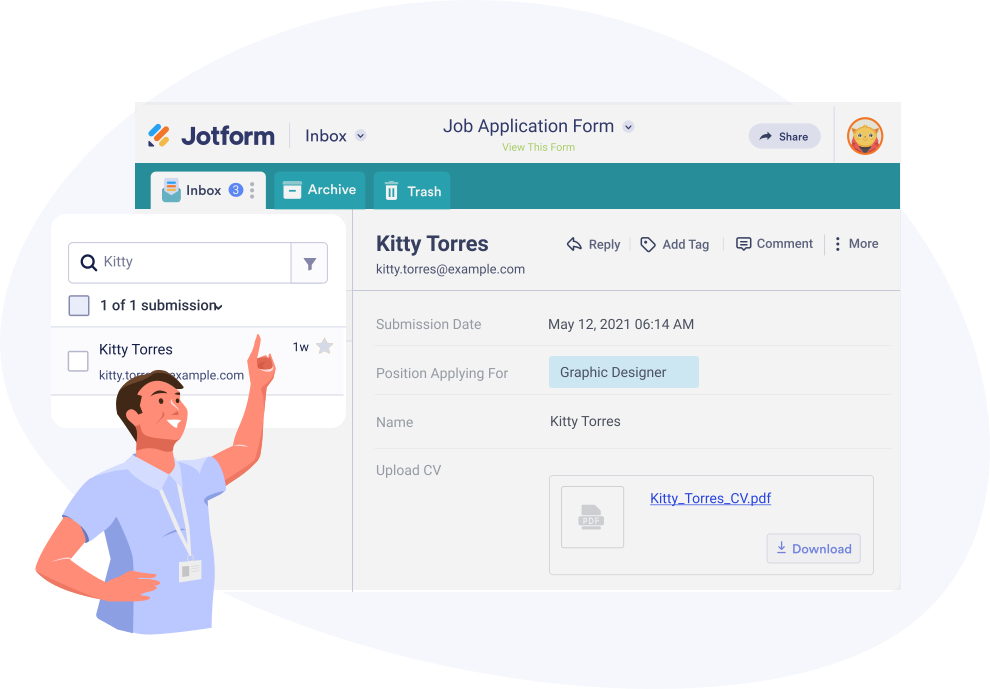
The platform targets businesses already using Jotform for other forms (registration, surveys, applications) who want to handle proposals through the same interface. Teams can add e-signature fields via Jotform Sign, collect payments through 40+ payment integrations (PayPal, Stripe, Square), and route submissions to Google Sheets, Salesforce, or other connected systems automatically.
The strength of Jotform is precision. Conditional logic, calculations, approvals, and integrations allow teams to standardize how information is gathered and routed internally. Service businesses collecting structured proposal information (event planning, consulting intake, project quotes) benefit from Jotform's form-first approach.
The weakness is persuasion. While Jotform can generate documents and collect signatures, the output rarely feels like a sales asset. Jotform works best when proposals are a gate in a process, not a moment to influence a buying decision.
Standout features
- 10,000+ form templates: Pre-built templates for project proposals, service quotes, client intake, and RFP responses. Templates include fields for contact information, project scope, timeline, budget, and file uploads.
- Drag-and-drop form builder: Visual editor with 30+ field types (text, dropdown, date picker, file upload, payment fields). No coding required to create custom proposal forms.
- Conditional logic: Show/hide fields based on previous answers. Example: Display pricing options only if prospect selects specific services, or request additional information when budget exceeds certain threshold.
- Jotform Sign integration: Add e-signature fields directly into forms for legally binding signatures. Captures signer name, IP address, and timestamp.
- 100+ integrations: Connect forms to Google Sheets, Salesforce, HubSpot, Mailchimp, Dropbox, Slack, Trello, QuickBooks, and other business tools. Automatically route form data to connected systems.
Pricing
- Starter: Free (5 forms, 100 monthly submissions, 100MB storage)
- Bronze: $34 per month
- Silver: $39 per month
- Gold: $99 per month
- Enterprise: Custom pricing
| Pros | Cons |
|---|---|
Already familiar to teams using Jotform for other business forms (surveys, registrations, applications) | Form-based approach lacks narrative flow and visual storytelling of traditional proposals |
Unified data ecosystem when proposals feed into same database as other form submissions | PDF output offers limited design customization and branding control |
Mobile app allows creating and editing forms on phones/tablets | Steep learning curve for conditional logic configuration |
HIPAA compliance available on higher tiers for healthcare/sensitive data | Not built for collaborative proposal editing or approval workflows |
7. QuoteWerks: Best desktop-based CPQ for technical product resellers
QuoteWerks operates primarily as Windows desktop software that connects sales teams directly to distributor price lists and vendor catalogs for real-time pricing on technical products.
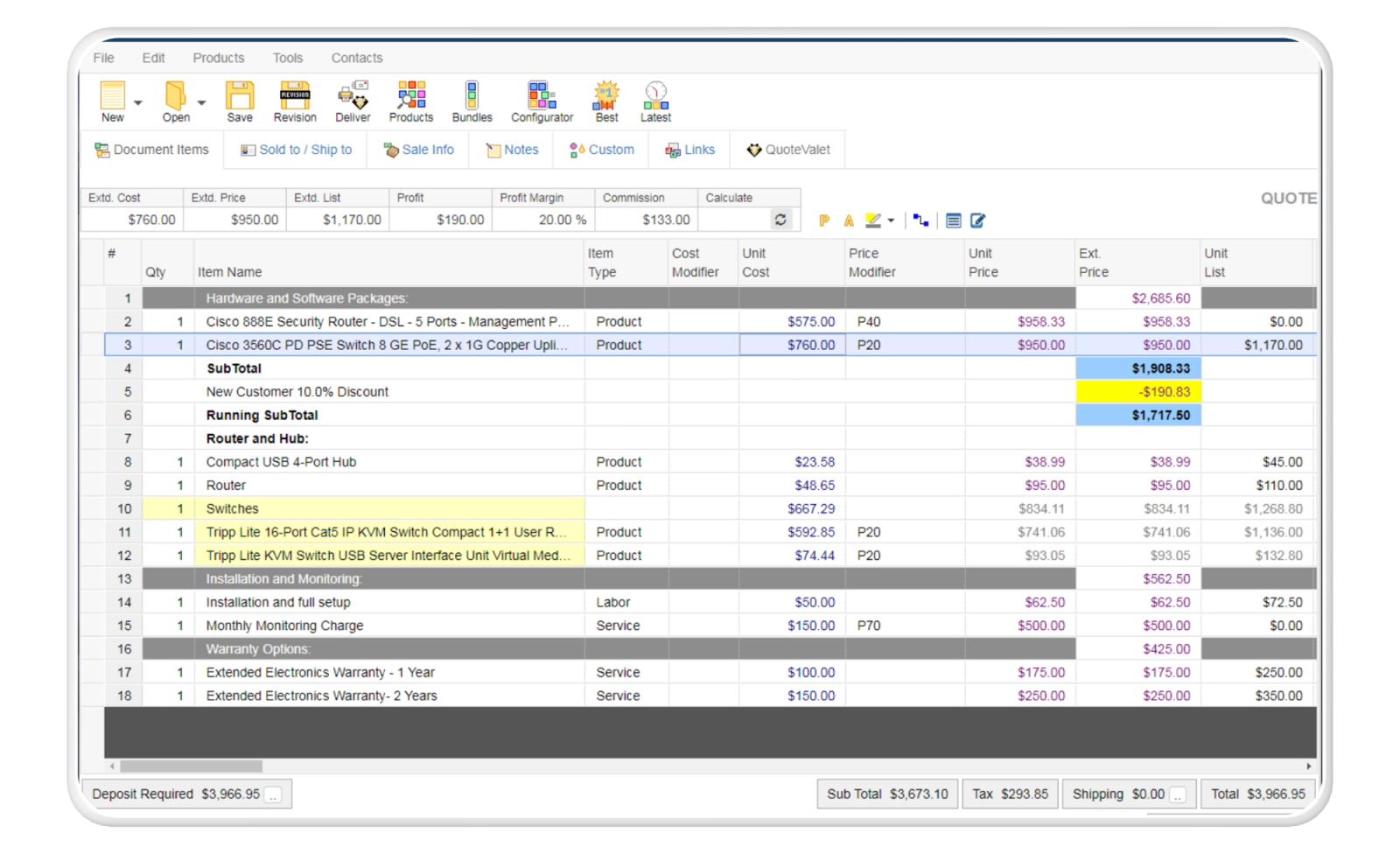
Unlike web-based proposal tools, it functions as a quoting engine where reps select products from connected databases, apply margins, and generate quotes with current availability and pricing data pulled automatically from sources like Ingram Micro, Tech Data, and Dell. The platform targets value-added resellers (VARs), managed service providers (MSPs), manufacturers, and distributors who quote complex product configurations with multiple line items.
QuoteWerks' desktop-first architecture creates a dependency on Windows machines that becomes problematic in mixed-device environments—Mac users must run virtualization software, and mobile access requires purchasing the separate QuoteValet subscription rather than being included in the base product. Maintaining product catalogs when vendors change prices or discontinue SKUs requires manual database updates that Capterra reviewers call "a nightmare."
Standout features
- Real-time distributor pricing: Direct connections to 80+ distributors and vendors pull current pricing, warehouse availability, product descriptions, and images into quotes automatically. Compare prices across multiple distributors for the same product to identify the best cost. Distributors include Ingram Micro, Tech Data (TD Synnex), Dell, CDW, Amazon Business, Staples Business, and industry-specific suppliers.
- Product database management: Store internal product catalogs with descriptions, pricing, cost data, and margin rules. Link to external databases (Excel spreadsheets, SQL databases, QuickBooks product lists) or import vendor price lists. Create product bundles and kits that automatically calculate pricing when quantities change.
- Concurrent user licensing: License model charges for concurrent users rather than named users, allowing multiple team members to share licenses if they don't use the system simultaneously. Seven team members using QuoteWerks at different times could share two licenses rather than purchasing seven separate seats.
- Configurator and bundling: Build product bundles that link parent items to child components. When parent quantity changes, associated labor charges, accessories, and related items automatically adjust quantities. Set rules for volume discounts, tiered pricing, and conditional add-ons within product configurations.
- CRM and PSA integrations: Native connections with ConnectWise, Autotask, Salesforce, HubSpot, Zoho, MS Dynamics CRM, ACT!, and 55+ other platforms. Pull contact data and deal information into quotes, then push signed quotes back to CRM as closed-won opportunities. Sync product catalogs with accounting systems like QuickBooks and Sage 50.
Pricing
- Essential: $50/user/month (monthly billing) or $45.83/user/month (annual billing)
- Balanced: $78/user/month (monthly billing) or $71.50/user/month (annual billing)
- Pinnacle: $102/user/month (monthly billing) or $93.50/user/month (annual billing)
Note: Concurrent user model means multiple named users can share licenses if they don't use QuoteWerks simultaneously.
| Pros | Cons |
|---|---|
Real-time distributor pricing eliminates manual price lookup and reduces quote errors | Desktop architecture requires Windows (Mac users need virtualization software like Parallels) |
Concurrent licensing model reduces per-user costs for teams with staggered usage | QuoteValet web portal requires separate subscription to create interactive online proposals |
Extensive CRM and accounting integrations (55+ platforms) | Template building and reporting features less intuitive than competing platforms |
Product database handles thousands of SKUs with margin management | No native mobile access—web features available only through QuoteValet add-on |
8. Better Proposals: Best proposal automation for small teams prioritizing speed over control
Better Proposals emphasizes design quality and client-facing experience over back-end workflow automation, creating web-based proposals that clients read in their browsers rather than downloading PDFs.
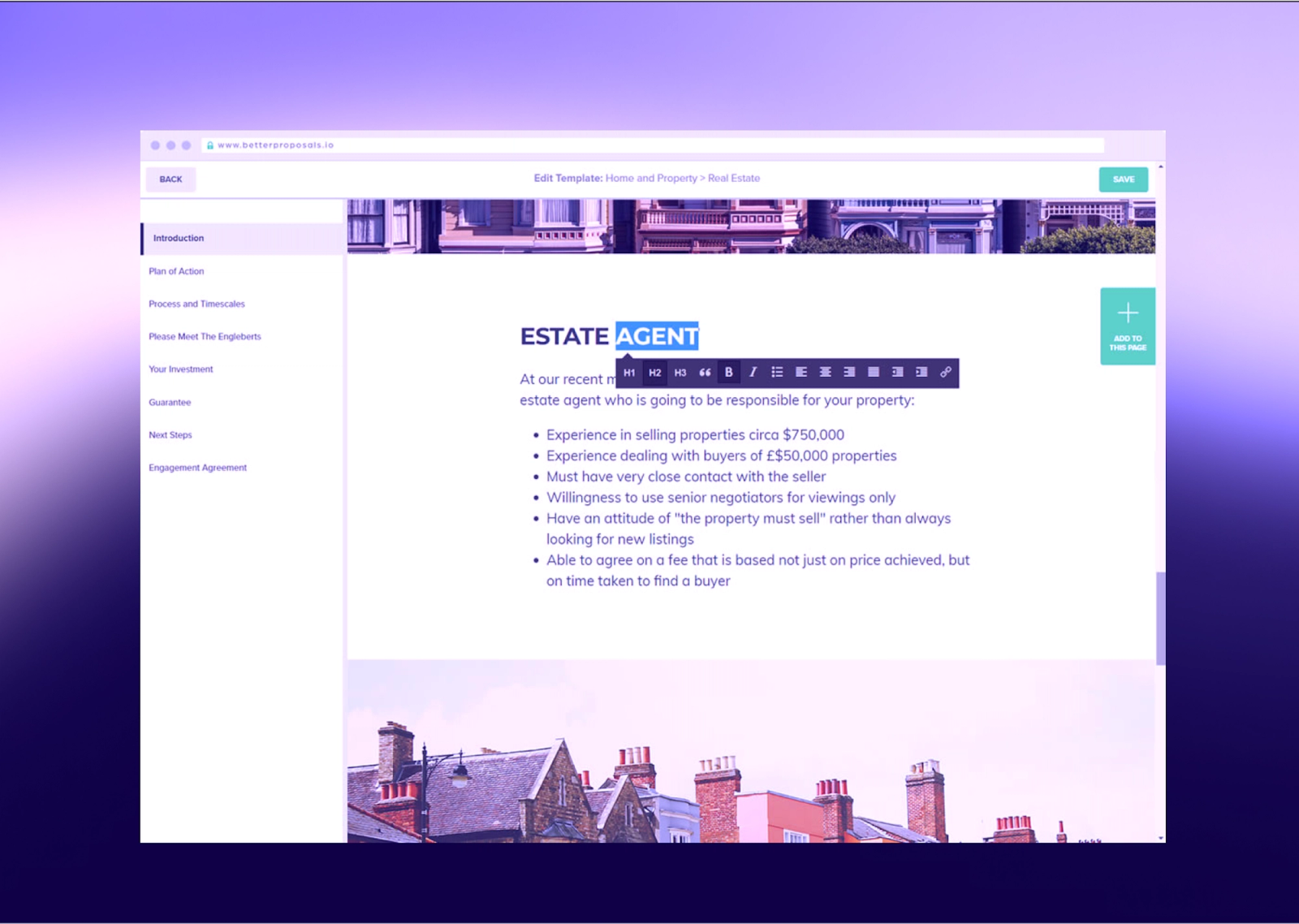
The platform targets freelancers and small agencies (1-10 people) in creative industries who compete on presentation quality and want proposals that visually differentiate them from competitors sending Word documents or PDFs.
The browser-based viewing experience includes embedded videos, image galleries, interactive pricing tables, and live chat—elements that static PDFs can't support—making proposals feel more like modern websites than traditional documents.
That same simplicity becomes the limitation. Better Proposals offers limited control over content reuse, pricing governance, or approvals across a team. Customization beyond templates is constrained, and proposals can start to feel interchangeable over time.
Better Proposals works best when proposals are frequent, low-risk, and relatively similar. It’s less suited to teams that need tight oversight, evolving pricing logic, or differentiated sales narratives as they scale. Compare with other options in our Better Proposals alternatives guide.
Standout features
- 250+ professional templates: Industry-specific templates for marketing, consulting, web design, photography, events, and more. Templates include cover pages, project scope, timeline, pricing, case studies, and terms sections pre-formatted with professional design.
- Web-based proposal viewing: Clients receive email links to view proposals in their browsers on any device.
- Real-time editing: Make changes to proposals after sending and clients see updates immediately when they refresh. No need to send new versions or retract sent proposals.
- Embedded videos and images: Insert YouTube, Vimeo, or Wistia videos directly into proposals. Add full-width images, wrap text around images, or create colored feature blocks to break up pages.
- Live chat integration: Prospects can ask questions through chat widget embedded in proposals. Messages route to your inbox for immediate response during proposal review.
Pricing
- Starter: $19 per month (1 user, 50 monthly proposals)
- Premium: $29 per month (3 users, unlimited proposals)
- Enterprise: $49 per month (unlimited users, unlimited proposals)
- 14-day free trial available
Pros | Cons |
Unlimited proposals on all paid plans (no monthly sending limits like competitors) | Limited layout customization options restrict matching exact website branding |
Real-time collaboration allows multiple team members to edit simultaneously like Google Docs | No advanced approval workflows for internal review before sending |
Document Checker analyzes proposals against industry data and suggests improvements | Integration ecosystem smaller than competitors (50+ vs. 100+ for others) |
Automatic formatting handles spacing and sizing so non-designers create polished documents | Lacks robust CRM features or project management capabilities beyond proposals |
How to choose the right proposal management software
Proposal management software costs between $19 and $65 per user monthly, with team size, integration requirements, and automation complexity driving price differences. Choose based on your specific workflow bottlenecks—whether that's CRM data entry, approval delays, or tracking prospect engagement—rather than feature checklists. Here's how to evaluate options.
1. Map your proposal workflow pain points
Identify what slows down your proposal creation process today. Like:
- Do sales reps spend hours rebuilding proposals from scratch for each prospect?
- Does getting legal approval on contracts take a week?
- Are you losing deals because competitors deliver more polished, interactive proposals?
Document these bottlenecks and match them to specific software capabilities. Teams creating highly visual sales proposals for creative pitches need design-focused tools with template flexibility. Companies managing RFP responses with compliance requirements need document assembly features and approval tracking. Sales teams sending 50+ similar proposals monthly need content libraries and automated personalization.
2. Prioritize features that solve immediate problems
Start with the three proposal creation tasks that consume the most time, then evaluate tools that address them directly. If reps waste 45 minutes copying client information from CRM to Word documents, native CRM integration becomes essential. If prospects never open your PDF attachments, web-based proposal delivery with tracking moves to the top of your list.
Common requirements include:
- Customizable templates (reduces creation time from hours to minutes)
- E-signature capabilities (eliminates back-and-forth with external signature software),
- Proposal analytics (shows exactly when prospects view and share documents)
- Content libraries (maintains consistent sales enablement content across teams), and interactive pricing tables (lets prospects configure options without requesting new versions)
Ignore features you won't use in the first quarter—they complicate onboarding and distract from core functionality. Our guide to choosing proposal software provides a complete decision framework.
3. Test the interface with real proposal scenarios
Look for proposal software with intuitive interfaces that allow your team to create professional documents without design expertise or lengthy training. Complicated interfaces lead to inconsistent proposals, frustrated teams, and eventual abandonment of the tool.
During vendor demos, request that they build an actual proposal from your company's materials while you observe. Can they add your logo, insert pricing tables, embed videos, and generate a preview in one session without switching screens?
Warning signs: interfaces requiring pixel-perfect positioning, templates that break when you add custom sections, or design tools that assume graphic design expertise. Positive indicators: drag-and-drop content blocks, real-time preview, mobile-responsive output, and intuitive formatting controls that work like consumer apps your team already uses.
4. Verify critical integrations work in practice
Proposal software integrations connect your CRM, content management systems, and e-signature tools to eliminate duplicate data entry and keep prospect information synchronized. Without proper integrations, teams manually copy deal details, company names, and contact information between platforms—wasting time and introducing errors that damage credibility. Data quality is also a real constraint: only 35% of sales professionals completely trust the accuracy of their organization’s data.
Sales automation eliminates these manual handoffs. Confirm native integrations exist for your core systems:
- Salesforce, HubSpot, or Pipedrive for CRM data
- Google Drive or SharePoint for content storage
- DocuSign or built-in e-signature for approvals
- Slack or Microsoft Teams for notifications
Pro tip: Review our guide to the best sales tools for complete tech stack recommendations.
Test integrations during your trial by creating a proposal, tracking when the prospect opens it, collecting a signature, and verifying the deal automatically updates to "closed-won" in your CRM without manual intervention.
5. Assess brand customization and content flexibility
Your proposals represent your company's brand and differentiate you from competitors. Software should let you match your visual identity without requiring a designer for every proposal: upload logos and brand assets, apply custom color schemes and typography, control headers and footers, and adjust layouts to match your marketing materials.
Beyond visual branding, evaluate content flexibility. Can you create different proposal structures for various offerings (service agreements versus product sales)? Adjust legal terms by region or deal size? Embed videos, ROI calculators, or interactive demos? Maintain multiple versions for different buyer personas?
Qwilrs offer extensive customization without coding, while more rigid platforms force all proposals into predetermined templates regardless of deal context.
6. Evaluate collaboration and approval capabilities
Complex proposals involve input from sales, product specialists, legal counsel, and executive sponsors before reaching prospects. Without proper collaboration features, teams send proposals through email chains, lose track of versions, and struggle to incorporate feedback efficiently.
Essential collaboration features include comment threads attached to specific proposal sections, version history tracking every change with timestamps and attribution, approval workflows routing documents automatically to required reviewers, and real-time co-editing allowing simultaneous work by multiple team members.
Look for tools that separate internal collaboration from customer-facing presentation—Qwilr shows internal comments and revision history to your team while prospects see only the polished final proposal. For deals requiring three or more approvers, proper collaboration tools typically reduce approval cycles from 5-7 days to 24-48 hours.
8. Plan for team growth and evolving needs
Select software that scales with your organization without forcing expensive migrations or platform changes within a year. Evaluate how pricing structures change as your team expands—some vendors charge linearly per user while others implement dramatic price jumps at specific thresholds (10 users, 50 users, 100 users).
Beyond pricing, assess functional scalability. Can you add custom fields, build new templates, and expand your content library without hitting artificial limits? Does the platform maintain fast performance with thousands of stored proposals? Can you implement role-based permissions for different teams, regions, or business units? Will you need IT involvement to make future configuration changes?
9. Test support responsiveness during evaluation
Vendor support quality becomes critical when proposals block deal closings or technical issues prevent sending time-sensitive documents. Test their responsiveness during your trial period by submitting questions through available channels and measuring both response time and solution quality.
Compare support options across pricing tiers: 24/7 live chat versus business-hours email, phone support versus ticket-only systems, dedicated success managers versus shared support queues, and onboarding assistance versus self-service documentation.
Review recent feedback on G2, Capterra, and TrustRadius specifically about support experiences. Entry-level plans typically provide email support with 24 to 48-hour responses. Premium tiers usually include priority support with 2-4 hour response guarantees and dedicated account management. This distinction matters most during quarter-end pushes, contract renewals, or when high-value deals depend on proposal delivery.
Find proposal software that matches your workflow
The right proposal software eliminates administrative friction that keeps sales reps from selling. For teams tired of manually copying data between systems, losing track of which prospects are engaged, and sending static PDFs that prospects can't interact with, Qwilr turns proposals into trackable web pages that update automatically from your CRM. See exactly when prospects view your proposals, which sections they read, and get notified when they share internally with colleagues.
About the author

Kiran Shahid|Content Marketing Strategist
Kiran is a content marketing strategist with over nine years of experience creating research-driven content for B2B SaaS companies like HubSpot, Sprout Social, and Zapier. Her expertise in SEO, in-depth research, and data analysis allow her to create thought leadership for topics like AI, sales, productivity, content marketing, and ecommerce. When not writing, you can find her trying new foods and booking her next travel adventure."