Most teams build proposals in a way that would make sense only inside their own walls. Think version 7 from last quarter, rewriting introductions from scratch, or emailing the latest pricing table because no one is sure which one is current.
It feels harmless enough (and honestly a bit comforting), but it also slows everyone down far more than we admit.
Repetitive tasks have a sneaky way of eating hours, and switching between formatting, quoting, and rewriting breaks focus every single time. The work still gets done, but at a cost that compounds across the team. That’s where reusable sales templates come in.
If you’re a Qwilr user or someone exploring whether reusable sales templates could help your workflow, this guide will walk you through a clear strategy for building a system that speeds up every proposal from here on.But before we jump in, there’s one question sales teams always jump to, so let’s start there…
How much time do reusable sales templates save for small and big teams, anyway?
Most teams assume the gains will be small. A few minutes here, a few clicks there. But the real impact only shows up once you look at the full workflow and not the isolated tasks. And that’s why this data point matters.
One company was in this exact position until they switched to reusable templates in Qwilr. They now save about an hour per deal. With more than 2,000 deals closed, that turned into more than 2,000 hours they could put back into selling and customer work. Not bad for a change that feels deceptively simple, right?
Do reusable templates support scale?
If you are already reading about reusable templates, you likely understand their value. The short answer is…’yes, they do’.
So here is a quick recap of how they support scale as your proposal volume grows, along with what that impact looks like for your own team.
- They keep every rep selling from the same playbook: When the structure is consistent, deals stop going out with different layouts, mixed messaging or random formatting. If your team sends 20 proposals a month, removing even 10 minutes of cleanup per draft gives you more than three extra hours back to sell!
- They reduce the back-and-forth that slows deals down: Most delays happen because of wrong pricing, missing sections, or formatting issues. If you cut even one review round per proposal, that is fewer blockers, fewer Slack pings, and a smoother path to “yes.”
- They help new reps ramp faster and hit quota sooner: A good template shows reps exactly what “good” looks like. Instead of taking weeks to figure out what to include or how to present value, new sellers can get their first proposals out in days, not weeks.
- They stop manual work from eating into selling time: Five minutes here, ten minutes there… it adds up. If your team sends 40 proposals a month and you remove just 5 minutes of repetitive work from each, that is over 3 hours of regained selling time. Increase your volume, and that time compounds fast.
A strong template system is made up of multiple reusable components, not a single file. Let’s break down those components so you can build a system that speeds up every proposal your team sends.
The ‘Reusable Template System’: 4 components that reduce proposal time
Now that we have seen the value of reusable templates, let’s look at four key components that work together to make that transformation possible.
1. Pages and Template libraries that scale your entire workflow
If you want a proposal process that feels fast and repeatable, the place to start is with the base template your team builds everything from. A strong template becomes the anchor for consistency, speed, and easier personalization across every proposal.
Qwilr makes this simple. You build one solid master template, and every new proposal starts from that foundation. Cloning the template to individual pages keeps the layout and structure exactly the way you designed it. Snippets and saved sections pull in reusable content without hunting for old versions. Template locks protect the parts that should stay consistent, like your intro, your process, or your legal terms. Tokens are used to populate client-specific data either straight from your CRM or with manual input. This way, your reps never start from scratch.
If you want to see how quickly this comes together, this walkthrough shows the flow:
Symmetry Media built their workflow around this idea. Executive Producer James Carr shared,
“We trialled Qwilr, fell in love with it and now it’s a huge pillar of our business. We have built six templates for different tiers of production and tailor them as a new job comes up.”
This approach also shortens onboarding. New reps can produce polished proposals within minutes because the layout, narrative flow, and core content are already defined. Essence of Email saw the same lift.
Founder Xiaohui shared,
“The quality of our work has increased significantly… we have landed more work, in less time, at a much lower cost.”
In a nutshell, templates give your team a repeatable, scalable starting point. Once the base is set, everything else — blocks, styles, and pricing — becomes easier, faster, and more consistent.
2. Styles and branding that keep every proposal consistent
Look at these two Adidas logos. Now imagine you bought a new pair of Sambas and the box arrived with the version on the right. You would question it immediately. That tiny inconsistency is enough to shake trust.

The same thing happens with your proposals. Buyers form opinions fast, and inconsistent branding sends the wrong message. Research shows it takes 5–7 brand impressions for people to remember your brand. If every proposal looks slightly different, that recognition never sticks.
Studies also show that mismatched logos, tones, or visuals make companies appear less reliable, which isn’t ideal when you are trying to win a deal.
This is precisely why Saved Styles in Qwilr matter. They keep every proposal aligned with your brand without asking reps to think about fonts, colors, or spacing. Instead of rebuilding the look and feel each time, you set your brand once and let Qwilr handle the formatting.
It is one of the easiest ways to eliminate brand drift and keep your team selling from the same visual foundation.
And the payoff is real, too. Review cycles become shorter because sales leaders no longer have to correct layout issues or fix mismatched visuals. Even saving five minutes of formatting per proposal adds up when you multiply it across deals, reps, and months.
Fuse Recruitment felt this difference immediately. Before Qwilr, they tested online PDF builders, but none improved the actual usability of their documents.
Nicole Hart, their Marketing Manager, shared, “We looked at a few different online PDF builders, but really, they just let you put in some animations. None of it really made the document better to use.” After switching, their workflow changed entirely: “I’ve seen a number of times where the Qwilr page led to us getting a second meeting with a potential client.”
3. Using Blocks to build a library of reusable content
You probably know the sections in your proposals that never change. The product overview. The timeline. The case study everyone defaults to. The testimonial that always gets a reaction. If your team can list them off instantly, chances are they’re rewriting them far more often than they should.
Destined, a Salesforce partner company, was in that exact spot. Their reps were spending way too much time hunting for the “right” version of a paragraph, copying text from old proposals, or tweaking the same explanations over and over, depending on the client.
Nothing was wrong with the content itself, but the time they lost trying to find it, rewrite it or clean it up was massive.
That’s where Blocks in Qwilr make a real difference. You save your high-value sections, such as product descriptions, outcomes, testimonials, case studies, SOW details, and timelines once, and reuse them anytime you need, thereby completely removing any reformatting!
If you’re looking to get started with saving and reusing blocks in Qwilr, our handy guide is here to help.
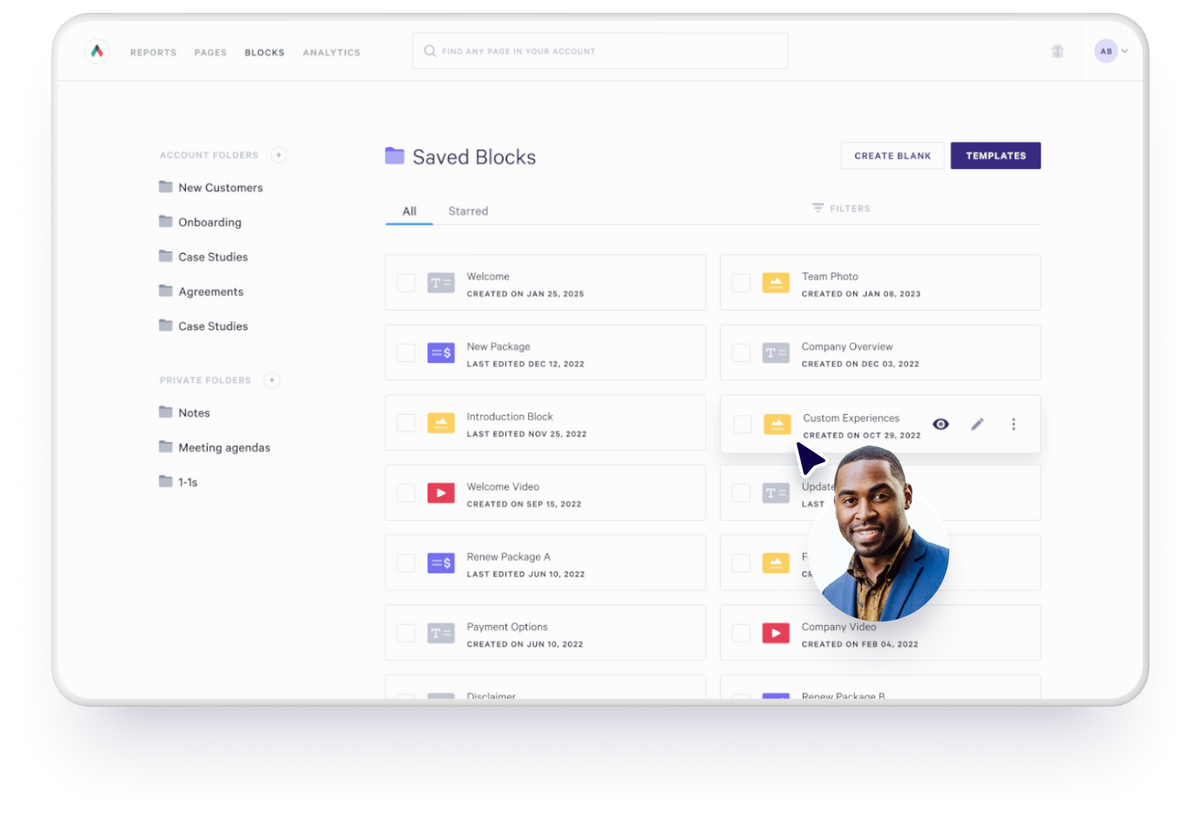
Destined now works from a central library of blocks organized around what their clients care about. When a prospect wants to understand integrations, they pull the integrations block. When someone wants proof of results, they grab a success story block. It still feels tailored, but reps build it in minutes instead of rebuilding it from scratch.
4. Quotes for building consistent, accurate pricing every time
The truth about proposals is that pricing is the part your buyer zooms in on first. They might skim your intro, glance at the case studies, nod along to your solution… but when they hit pricing? That’s where the real decision-making starts.
Now ask yourself, how many times has a deal slowed down because of a small quoting mistake? A wrong number. An old price list. A discount someone swore was “approved last quarter.”
Those tiny errors lead to extra approvals, follow-up emails, fresh PDFs, and a buyer who suddenly has too much time to compare you to competitors, not to forget that 50 percent of sales go to the first company to respond. If your quote requires fixing, rechecking, or recreating, you’re already behind.
This is where Quote Blocks in Qwilr save the day. Instead of manually building pricing tables or copying numbers from a spreadsheet, you create a reusable quote structure:
- your pricing
- your descriptions
- your configurations
- your optional add-ons
- your tiered packages
- your auto-calculations
Everything stays accurate because it is maintained once at the system level and reused across every proposal.

If you prefer a quick visual explanation, this short demo walks through the process clearly:
For your team, the outcome is straightforward:
- quotes become faster to assemble
- pricing stays consistent
- errors disappear
- approval cycles shrink
- buyers get the information they need without delays
With Qwilr, pricing becomes one of the most reliable parts of your process — precise, repeatable, and ready to send the moment your prospect asks.
How to build a reusable template system your team will actually use
Now that you know the components behind a scalable template system — pages, blocks, styles, and pricing — the next step is putting them together in a way your team can adopt quickly. Think of this as a simple blueprint you can follow to get your system working, whether you are starting from scratch or refining what you already have.
1. Identify the proposals you create most often
Start with the proposal types your team sends the most. If you’re a digital marketing company, for example, your core templates might be a digital marketing proposal template and a digital marketing contract template. If you’re an agency, you might opt for a customer onboarding template and so on.
These become your master templates in Qwilr— the ones you clone for every new deal so reps always start from a solid foundation.
2. Build one baseline template
Create one clean, well-structured baseline template before scaling. This removes guesswork and gives reps a clear starting point. For example, if your web agency sends a proposal template for most new clients, build the strongest version once and clone it. The structure stays consistent, and reps only personalize what matters.
3. Use tokens to personalize cloned pages
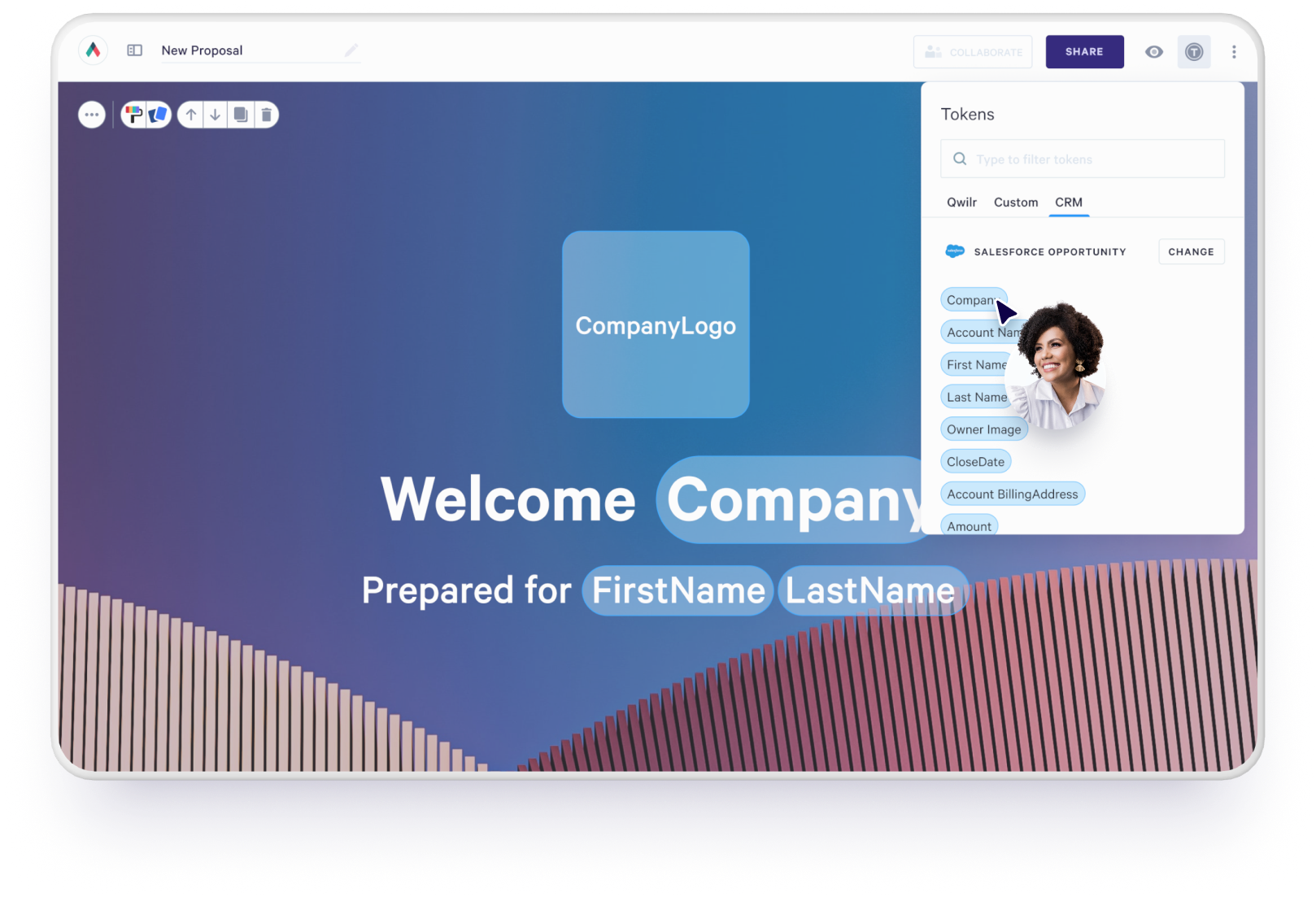
One of the easiest ways to turn a Qwilr page into a truly reusable template is by adding tokens. Tokens act as placeholders for key details—like your client’s name, company, renewal date, pricing notes, or even your own reps’ contact info. When you clone the page for a new prospect, those tokens automatically populate with the right information, either directly from your CRM or by manually filling in the token fields when you create a new page.
Adding tokens to your master template means never having to rewrite the same details again. Personalized, polished pages become your default, not your extra effort.
4. Organize templates into folders
Structure matters. Organize your templates by industry, persona, or deal tier so reps can find the right starting point fast. No more guessing where the digital marketing proposal template or real estate listing proposal lives.
5. Add permissions or locks
Lock the sections that should never change, like legal terms or standard process explanations. This keeps proposals accurate and consistent across the team while still giving reps room to personalize.
6. Test with a small group and refine
Start with a few reps and watch how they use the templates, gather feedback, refine, then roll out. When the system feels intuitive, adoption happens naturally.
Build reusable sales templates that help your team move faster
When your team has strong templates that your sales reps can reuse, everything gets easier. Proposals come together faster, pricing stays accurate, and your brand shows up the same way every time. It’s why teams using reusable templates in Qwilr consistently save hours each week — time they put back into selling, following up, and talking to customers.
If you want to see how this works in real life, we’d love to show you. Book a demo to see how reusable templates in Qwilr help your team move faster and produce polished proposals in minutes.
About the author

Taru Bhargava|Content Strategist & Marketer
Taru is a content strategist and marketer with over 15 years of experience working with global startups, scale-ups, and agencies. Through taru&co., she combines her expert skills in content strategy, brand management, and SEO to drive more high-intent organic traffic for ambitious brands. When she’s not working, she’s busy raising two tiny dragons. She's on a first-name basis with Mindy Kaling.
Frequently asked questions
Qwilr templates give reps a complete starting point with structure, branding, blocks, and pricing already set. Reps clone the template, personalize the client-specific sections, and send — no rebuilding or formatting required.
Yes. Qwilr integrates with CRMs like HubSpot, Salesforce, and Zoho. Templates can auto-fill client details, deal data, and personalization fields directly from your CRM, reducing manual entry.
Yes. Templates can include locked sections, version control, and consistent structures that make internal reviews faster. Many teams reduce approval cycles because templates already follow the required standards.
Yes. Qwilr provides analytics on views, time spent and and section engagement. This helps reps follow up with better timing and more context.