
Sales reps spend 70% of their time on non-selling tasks like data entry, quote creation, and administrative work, according to Salesforce's 2024 State of Sales report surveying 5,500 sales professionals. That leaves just 30% of the week for actual selling—the work reps were hired to do.
Manual quote creation in Word or Excel leads to pricing errors, version control issues, and approval bottlenecks. Sales quote automation eliminates these issues with templates and automated workflows.
The payoff: automated calculations catch pricing mistakes before quotes go out, CRM integration means reps enter customer data once instead of twice, and tracking shows when prospects open quotes and which sections they spend time reviewing. The best setups go one step further and let you send the quote and collect payment in one document.
This guide compares nine quoting platforms for different business sizes, from solo freelancers to 500-person enterprise sales teams.
| Tool | Best For | Pricing (Key Tiers) | G2 Rating |
|---|---|---|---|
Qwilr | Interactive web-based quotes + proposals for sales-led teams | Business: $35–$39/user/mo; Enterprise: $59/user/mo (10-user min) | 4.6/5 |
Harvest | Time tracking & invoicing for freelancers/small teams | Free; Pro: $11–$13.75; Premium: $14–$17.50 | 4.3/5 |
Salesforce CPQ | Rules-based quoting for complex enterprise deals | CPQ: $75; CPQ Plus: $150 (plus Salesforce license) | 4.2/5 |
Nusii | Simple proposal creation for agencies/consultants | Freelancer: $29/month or $290/year; Agency: $49/month or $490/year; Business: $129/month or $1,290/year | 4.5/5 |
PandaDoc | Quotes + contracts + e-signature for small/mid teams | Free; Starter: $19; Business: $49; Enterprise: custom | 4.7/5 |
QuoteWerks | Distributor-integrated quoting for hardware/VARs | Essential: $45.83—$50/month; Balanced: $71.50—$78/month; Pinnacle: $93.50—$102/month | 4.4/5 |
Responsive (RFPIO) | RFP/RFI response + collaboration workflows | Custom pricing (contact sales) | 4.5/5 |
Billdu | Mobile invoicing + quotes for freelancers/field service | Lite: $4.99–$7.99; Standard $9.99–$14.99; Premium $19.99–$27.99 | 3.3/5 (limited reviews) |
Quotient | Visual quotes with accounting sync | Solo: $28; Team: $48; Team Plus: $88 | 4.7/5 |
*Pricing as of December 2025
1. Qwilr: Best quoting software for mid-market and enterprise sales teams
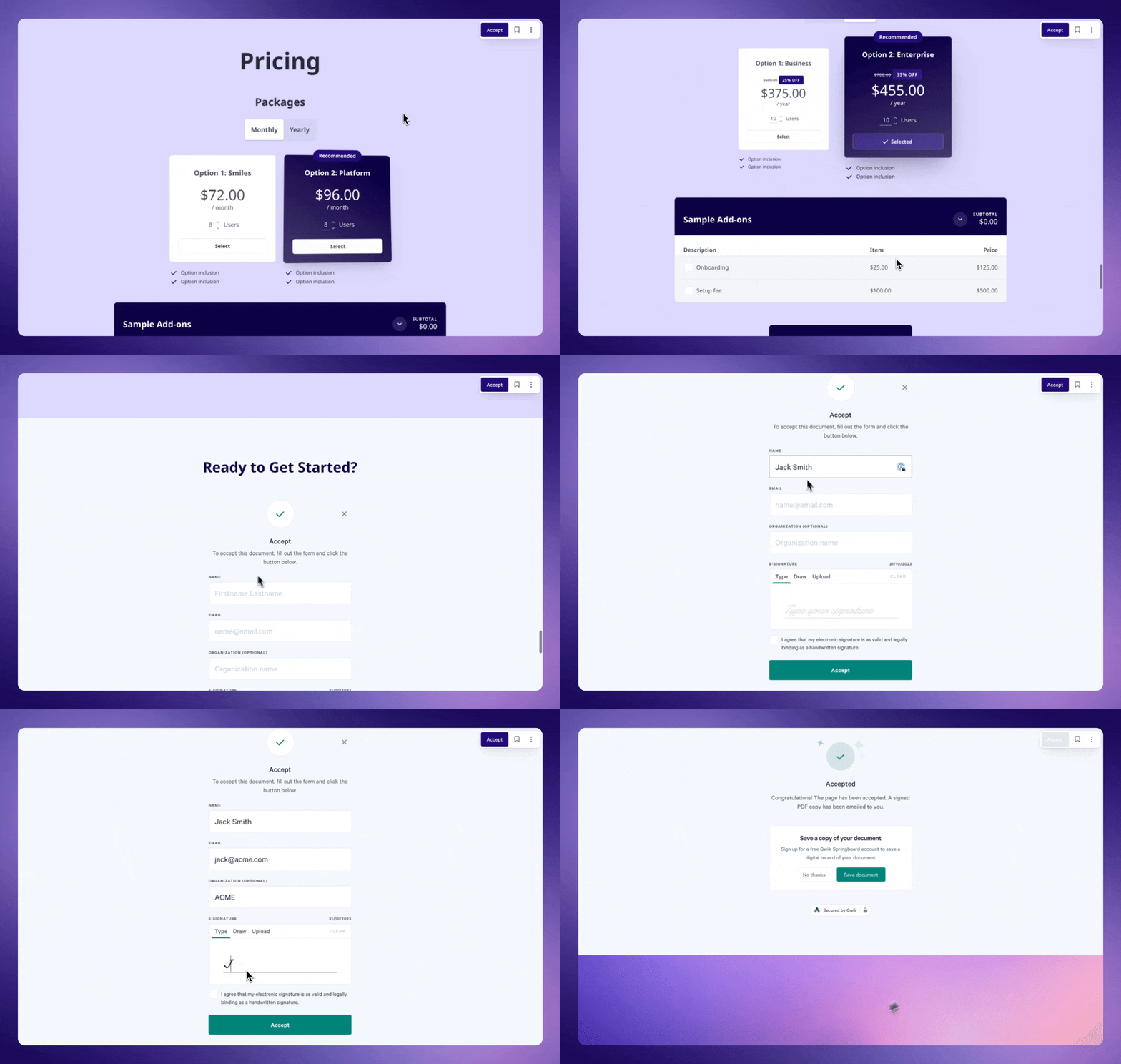
Qwilr allows mid-market and enterprise sales teams to create interactive web-based quotes that replace static PDFs. Prospects can adjust quantities, toggle pricing options, select add-ons, compare tiers, and view revised totals immediately.
Each quote includes embedded e-signatures and integrated payment collection, enabling prospects to approve and pay in the same workflow without switching tools.
Qwilr is great for teams that need quotes to function as customer-facing sales assets rather than simple attachments. Because the quote is delivered as a secure web page, sales teams control branding, layout, and pricing presentation while gaining detailed insight into how buyers engage with each section.
The platform also supports multi-step sales processes. Reps can combine pricing, proposal content, case studies, product explanations, and legal terms in a single document, giving buyers everything they need to evaluate and finalize the purchase. Qwilr’s page-level permissions also let teams restrict sensitive information or allow separate approval paths when needed.
Primary use cases: Qwilr is best B2B SaaS companies, agencies, consulting firms, and other project-based businesses to build sales quotes, proposals, pricing pages, onboarding documents, and renewals.
Standout features
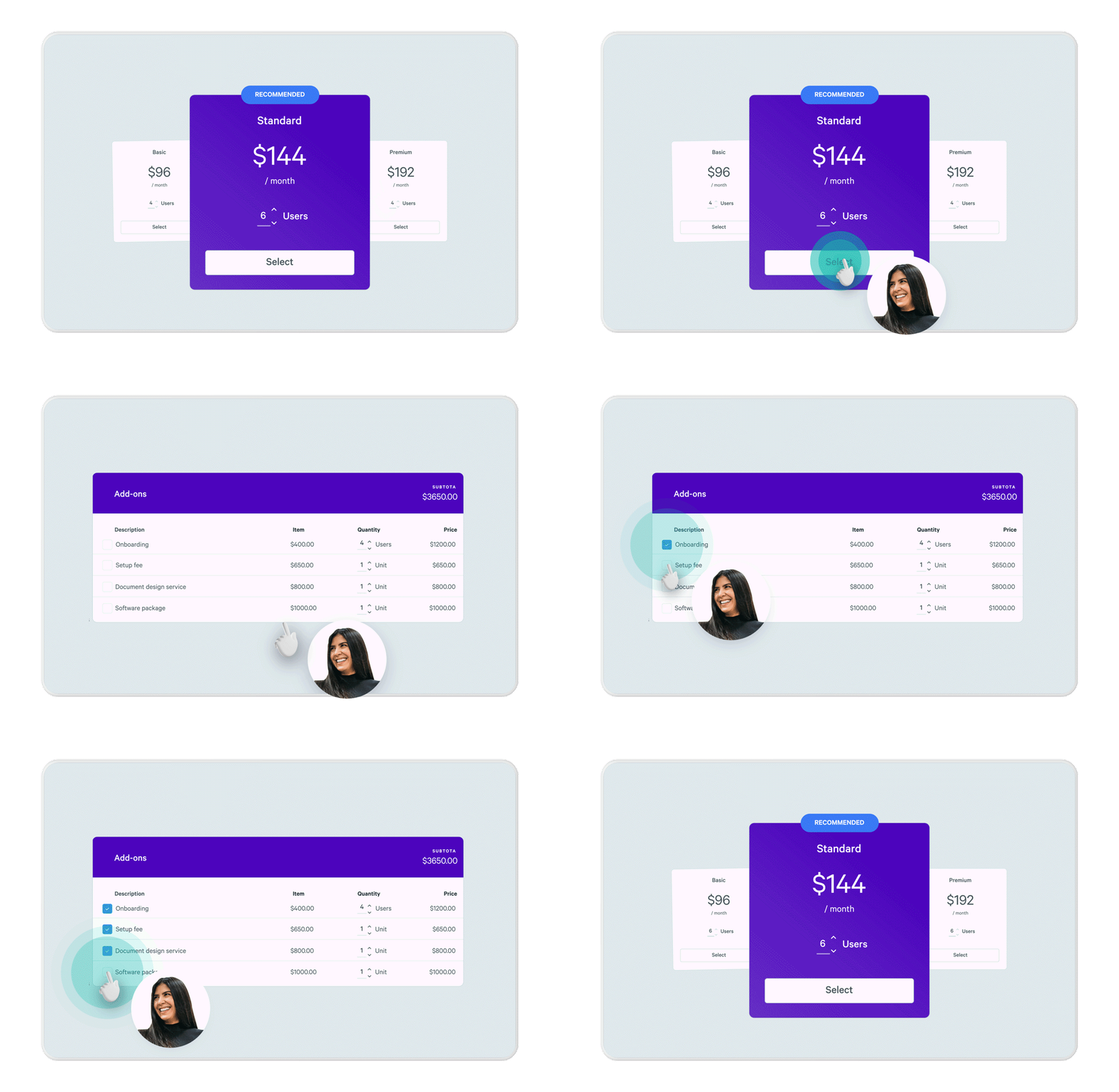
- Interactive pricing tables: Prospects select options, adjust quantities, and watch totals recalculate instantly—showing sales reps exactly which configuration buyers prefer. Supports tiered pricing plans, optional add-ons, discounts, and quantity-based pricing in one view to simplify complex pricing bundles.
- QwilrPay embedded payments: Collect payments via credit card, ACH, or digital wallets directly within quotes at the moment of acceptance.
- CRM-automated quote generation: Pull customer details, product catalogs, and pricing automatically from Salesforce, HubSpot, or Pipedrive using tokens.
- Real-time proposal analytics: Track when prospects open quotes, time spent on each section, which pricing options they hover over, and when they share quotes internally with colleagues. Email and Slack notifications alert reps the moment prospects engage to enable perfectly timed follow-ups.
- Reusable content blocks: Build a library of pre-approved pricing tables, product descriptions, case studies, and legal terms that reps drag into quotes. Ensures brand consistency and reduces quote creation time.
- E-signature with quote acceptance: Prospects accept pricing and sign contracts in one action. Supports single and multi-party signatures with audit trails storing timestamps, IP addresses, and signer identity for legal compliance (ESIGN Act, UETA).
- 140+ quote templates: Pre-built templates for SaaS quotes, agency proposals, consulting agreements, and service quotes with pricing tables and signature blocks already configured.
Pricing
- Business: $35 per user/month (billed annually) or $39 per user/month (billed monthly)
- Enterprise: $59 per user/month (billed annually, 10-user minimum)
- Add-ons: Identity Verification (+$10/user/month), Custom Branding (+$10/user/month)
- 14-day free trial: Full access to Business plan features, no credit card required
| Pros | Cons |
|---|---|
Interactive pricing tables with live recalculation | No rules-based product configuration |
Clean, modern design vs. PDF-based quotes | Not built for strict pricing governance |
Real-time engagement analytics (opens, section views) | |
Native CRM integrations (Salesforce, Zoho, Pipedrive, HubSpot) | |
Quotes, e-signatures, and payments in one web page |
Verdict: I’d choose Qwilr when quoting is the sales experience, not just a pricing step. It’s the tool I’d reach for when I want a quote to feel persuasive, interactive, and easy for a buyer to say yes to. I’ve found it especially strong for sales-led teams selling services, SaaS, or multi-option packages—where visual presentation, optional add-ons, and embedded payments actually influence deal momentum. The ability to track engagement, collect signatures, and take payment in the same flow removes a lot of back-and-forth. I wouldn’t use it for purely transactional or SKU-heavy quoting, but if my goal is to close faster and control how my offer is experienced, Qwilr is hard to beat.
2. Harvest: Best for Freelancers
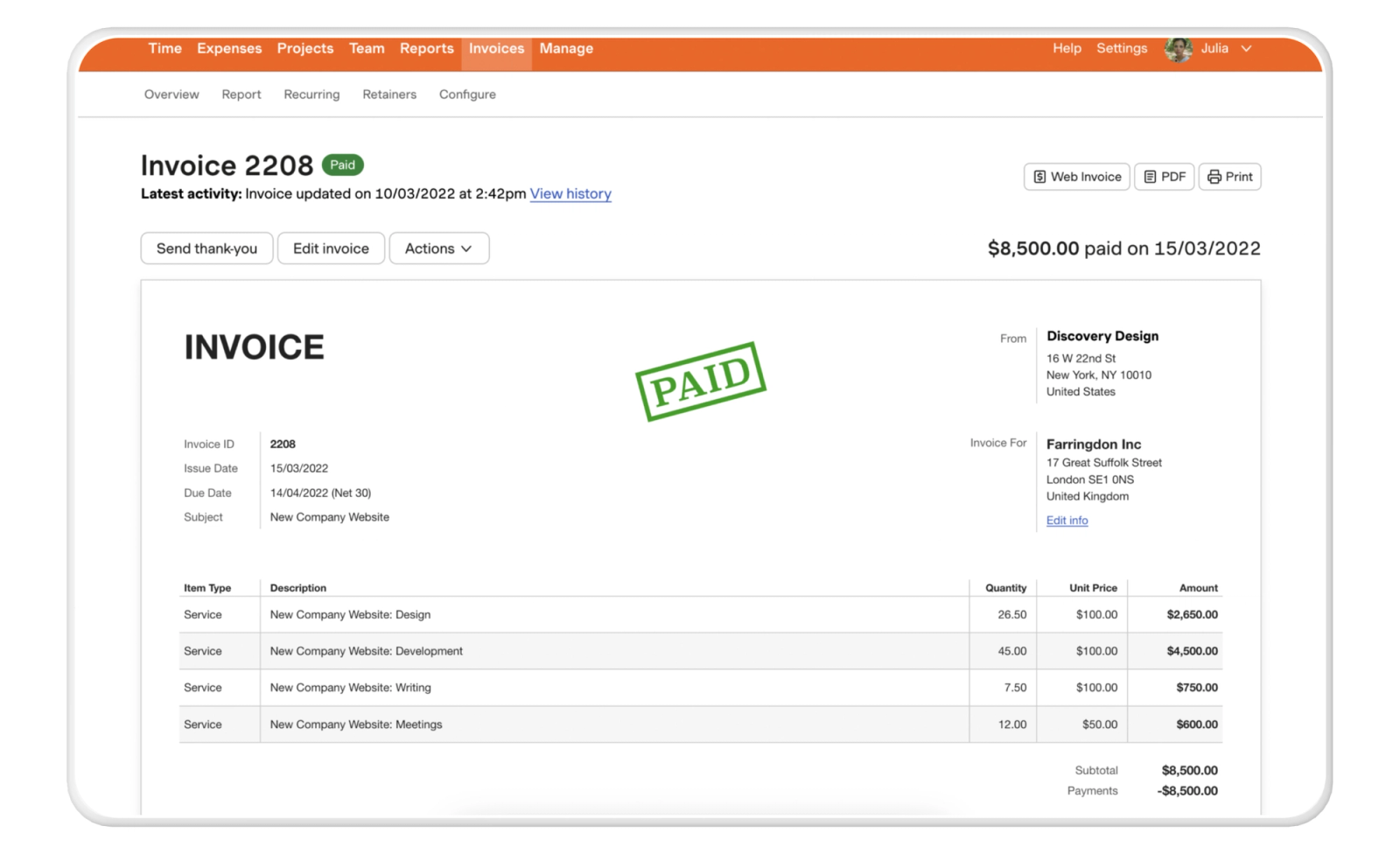
Harvest provides freelancers with accurate time tracking and automated invoice creation in one system.
Time entries convert directly into invoices, reducing administrative work and ensuring billing accuracy. The platform supports expense tracking and basic profitability reporting without requiring additional accounting software.
Harvest is fundamentally an invoicing and time-tracking tool, not a quoting platform in the traditional sales sense. It lacks pricing configurators, approval workflows, and quote versioning, which makes it unsuitable for multi-stakeholder sales processes. Customization is intentionally minimal, which can feel restrictive once services or pricing structures become more complex.
Primary use cases: Freelancers, consultants, designers, and developers use Harvest to log billable hours, invoice clients, track project expenses, and review profit margins across multiple client engagements.
Standout features
- One-click invoicing from timesheets: Convert tracked hours directly into itemized invoices showing task breakdowns, hourly rates, and time totals.
- Automatic payment reminders: Schedule follow-up emails for overdue invoices without manual tracking.
- Stripe and PayPal integration: Clients pay invoices directly through embedded payment links.
- Expense tracking with receipts: Photograph receipts on mobile, attach to projects, and bill expenses back to clients.
- Mobile time tracking: Start and stop timers from iPhone or Android apps while on-site with clients.
Pricing
- Free
- Pro: $11/seat/month (annual) or $13.75/seat/month (monthly)
- Premium: $14/seat/month (annual) or $17.50/seat/month (monthly)
- 30-day free trial: Full access to Pro plan features, no credit card required
| Pros | Cons |
|---|---|
Accurate time tracking with direct invoice conversion | Not a true quoting or proposal tool |
Simple, intuitive interface | No pricing configurators or approvals |
Reliable billing for hourly and retainer work | Not suited for sales-led workflows |
Verdict: I’d use Harvest if quoting is an extension of billing rather than a sales activity. It’s ideal when accuracy, speed, and clean invoicing matter more than persuasion. For freelancers selling time-based work, it removes friction. I wouldn’t recommend it for sales-led teams or anyone managing negotiated or multi-option deals. It’s less well-suited for sales-led teams or workflows that involve negotiated, multi-option deals.
3. Salesforce CPQ: Best for products that require rules-based pricing and structured approvals
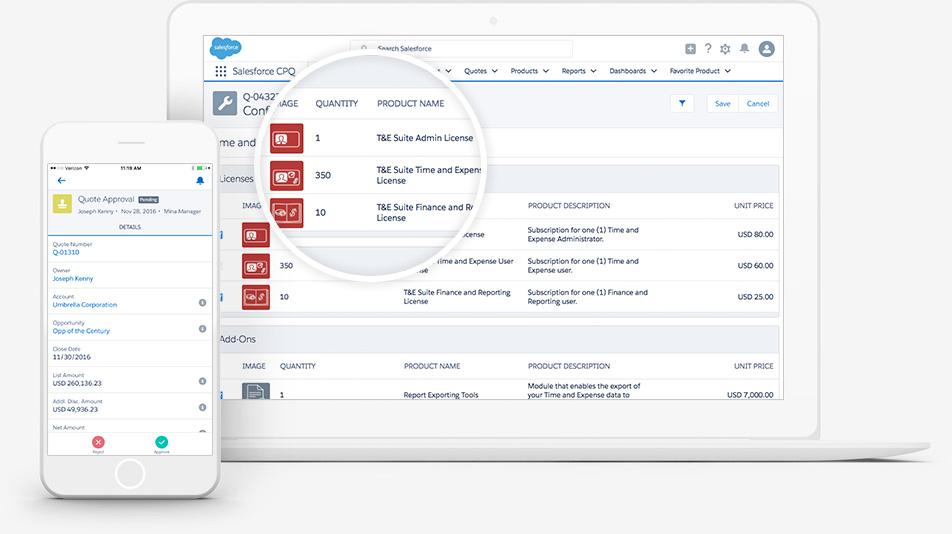
Salesforce CPQ is built for companies whose products or services can’t be quoted freely because they depend on specific configurations, pricing rules, or approval requirements.
and follow mandatory approval steps. This reduces quoting errors and keeps pricing consistent across large sales organizations.
Salesforce CPQ comes with a steep implementation and maintenance burden, often requiring dedicated admins or consultants to manage pricing logic and workflows. Many teams report long onboarding timelines and slower rep adoption due to UI complexity. It also inherits Salesforce’s cost structure, making it impractical unless Salesforce is already deeply embedded.
Primary use cases: Salesforce CPQ is used to generate quotes for offerings that involve tiered pricing, usage-based pricing, optional add-ons, contract-specific terms, or multi-level approvals.
Standout features
- Guided selling workflows: Step-by-step question flows help reps configure products correctly by asking qualifying questions, then showing only compatible options based on answers.
- Product bundling with constraints: Build bundles where selecting one component automatically filters available choices for dependent features.
- Advanced approval workflows: Route quotes requiring discounts beyond threshold percentages (e.g., >15% off list price) through manager approval chains.
- Contract amendments and renewals: Handle mid-contract changes, upgrades, downgrades, and renewals without creating entirely new quotes.
- Product catalog management: Centralize all product definitions, pricing rules, discount schedules, and bundling logic in Salesforce.
Pricing
- CPQ: $75/user/month (annual contract)
- CPQ Plus: $150/user/month (annual contract)
- Requires Salesforce Sales Cloud license ($25-$500/user/month depending on edition) as foundation—CPQ pricing is additive
- Free trial available
| Pros | Cons |
|---|---|
Enforces pricing rules and product constraints | Long implementation timelines |
Guided selling prevents invalid configurations | High admin and maintenance overhead |
Advanced approval workflows | Complex UI slows rep adoption |
Verdict: I’d only choose Salesforce CPQ when pricing control and compliance matter more than speed. It’s powerful, but unforgiving. If your business can’t afford pricing mistakes and already runs on Salesforce, CPQ makes sense. It’s better suited for larger, structured sales organizations; smaller teams, fast-moving sales cycles, or groups without dedicated RevOps support may find the overhead hard to justify.
4. Nusii: Best for creative agencies
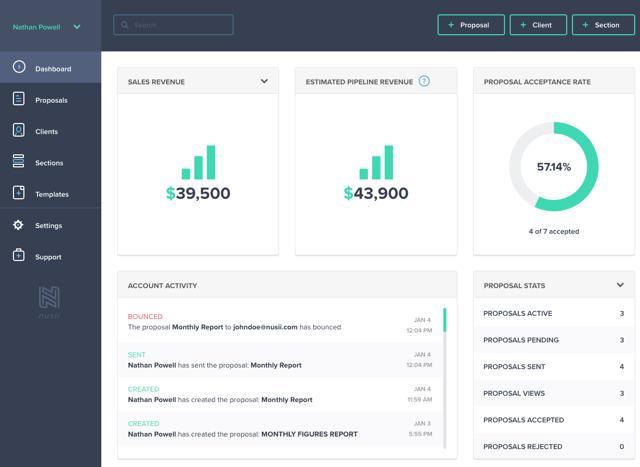
Nusii is built for creative agencies and independent consultants who need to produce polished proposals quickly without the setup demands of larger sales platforms.
The tool focuses on speed and simplicity, allowing teams to assemble branded proposals using reusable content blocks, saved sections, and prebuilt templates that reflect their service offerings.
Nusii excels at speed, but payment processing requires Zapier integration with Stripe rather than native embedding like Qwilr. Prospects accept your proposal in Nusii, then receive a separate Stripe payment link, adding steps to the payment process.
Primary use cases: Nusii is used to create sales proposals for creative and professional services where branding, visual consistency, and fast document creation are essential.
Standout features
- Reusable content sections: Save contract terms, SLAs, case studies, and service descriptions as content blocks that insert with one click, eliminating 80% of proposal writing time according to user testimonials
- Real-time proposal tracking: Get notifications when prospects open emails, view proposals, download PDFs, or sign documents, with detailed analytics showing time spent on each section
- Video embedding: Add YouTube or Vimeo videos directly into proposals to showcase portfolio work, client testimonials, or project walkthroughs
- Custom branding: Use your own domain (proposals.yourcompany.com), email address, logo, fonts, and colors to maintain brand consistency
- Variables system: Set up client name, company, project details, and contact information once, then automatically populate them across all proposal sections
Pricing
- Freelancer: $29/month or $290/year
- Agency: $49/month or $490/year
- Business: $129/month or $1,290/year
- 14-day free trial on all plans, no credit card required
| Pros | Cons |
|---|---|
Fast proposal creation with reusable blocks | No native payment collection |
Strong visual design and branding control | Limited pricing logic |
Real-time proposal tracking | Not built for complex approvals |
Verdict: I'd pick Nusii if I'm sending 10 to 30 similar proposals monthly (agency retainers, consulting projects, creative services) where speed matters more than embedded payment collection. The reusable content blocks genuinely save time once you've built your library, and the pricing makes sense for solo consultants or small agencies. However, if I need to collect deposits immediately upon proposal acceptance, Zapier-based payment flow adds friction compared to native integrations.
Pro tip: Templates speed up creation, but acceptance depends on structure and content. See what gets business proposals accepted.
5. PandaDoc: Best for micro-businesses with small teams
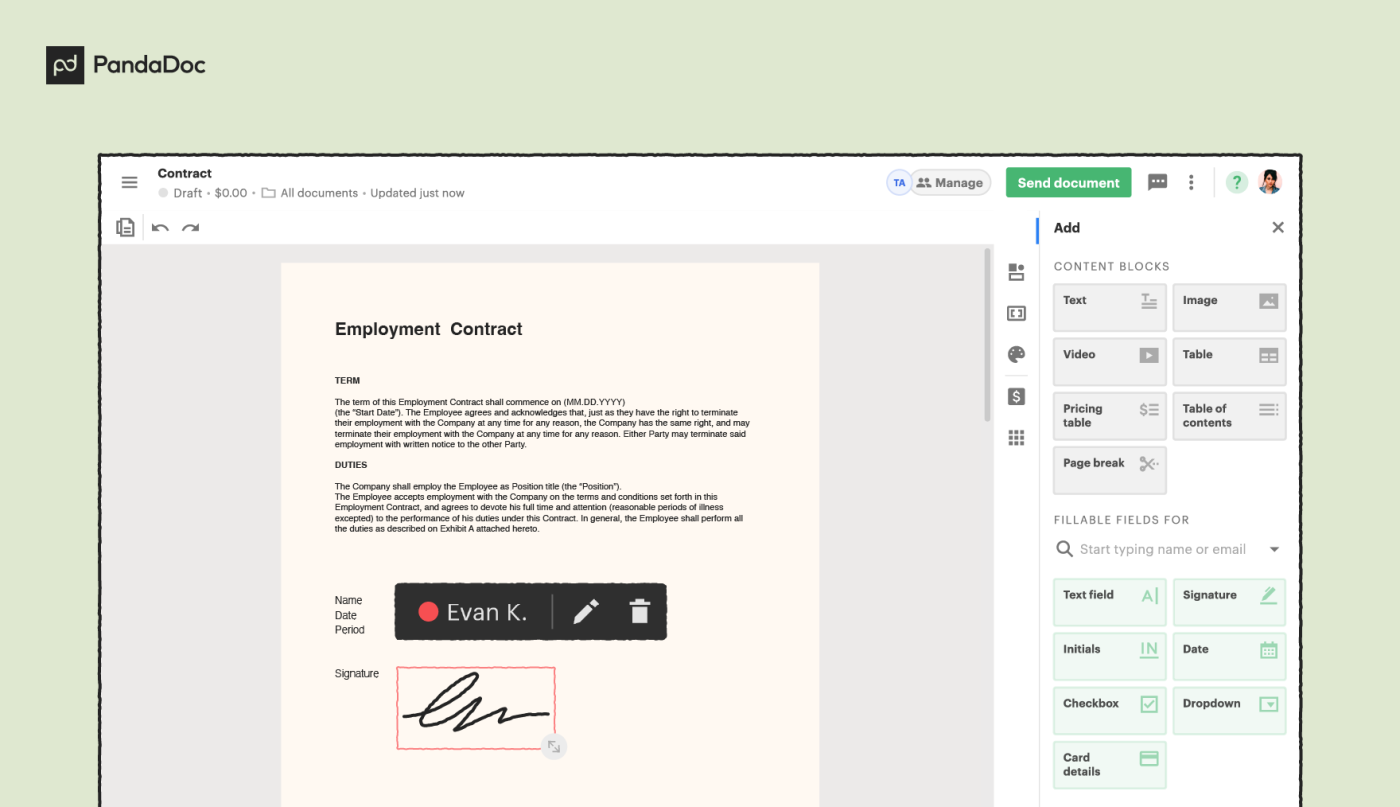
PandaDoc enables small teams to create quotes, capture signatures, and collect payments within a single platform.
PandaDoc's drag-and-drop editor is genuinely intuitive, and non-technical users can build branded quotes using pricing tables and product catalogs. Embedded payment processing removes the need for separate invoicing or billing tools. CRM integrations are limited to the Business plan ($49/seat/month) though, so smaller teams paying for Starter get no Salesforce or HubSpot sync, despite these being core selling points in PandaDoc's marketing.
Primary use cases: PandaDoc supports professional services firms, agencies, construction companies, healthcare practices, and small B2B teams that need to generate sales quotes, proposals, contracts, and agreements. To see how it compares, check our guide to PandaDoc alternatives.
Standout features
- Approval workflows: Route quotes through internal stakeholders (legal, finance, management) for sign-off before sending to clients. Each approver receives notifications, can comment inline, and approve or reject with one click—cutting approval time from days to hours.
- Product catalog: Store all products and services with descriptions, SKUs, pricing tiers, and images in one centralized library. Drag items into quotes instead of manually typing details—ensuring pricing consistency across all quotes.
- Deal Rooms: Create dedicated spaces for complex deals where prospects view proposals, quotes, contracts, and supporting materials in one organized hub. Track which documents they review and in what order—revealing their decision-making process.
Pricing
- Free: $0
- Starter: $19/seat/month (annual) or $35/seat/month (monthly)
- Business: $49/seat/month (annual) or $65/seat/month (monthly)
- Enterprise: Custom pricing
- 14-day free trial: Full access to Starter plan features, no credit card required
| Pros | Cons |
|---|---|
Quotes, e-signatures, and payments in one platform | CRM integrations locked behind higher tiers |
Drag-and-drop editor with pricing tables | Per-seat pricing scales quickly |
Product catalog ensures pricing consistency | Heavy for very simple quoting needs |
Verdict: I'd choose PandaDoc for micro-businesses (2-10 people) who need quotes, e-signatures, and payments in one place without learning separate tools. But essential features like CRM sync are locked behind the $49/month Business plan, meaning you're paying $588/year per user just to avoid manual data entry between systems.
6. QuoteWerks: Best for manufacturers
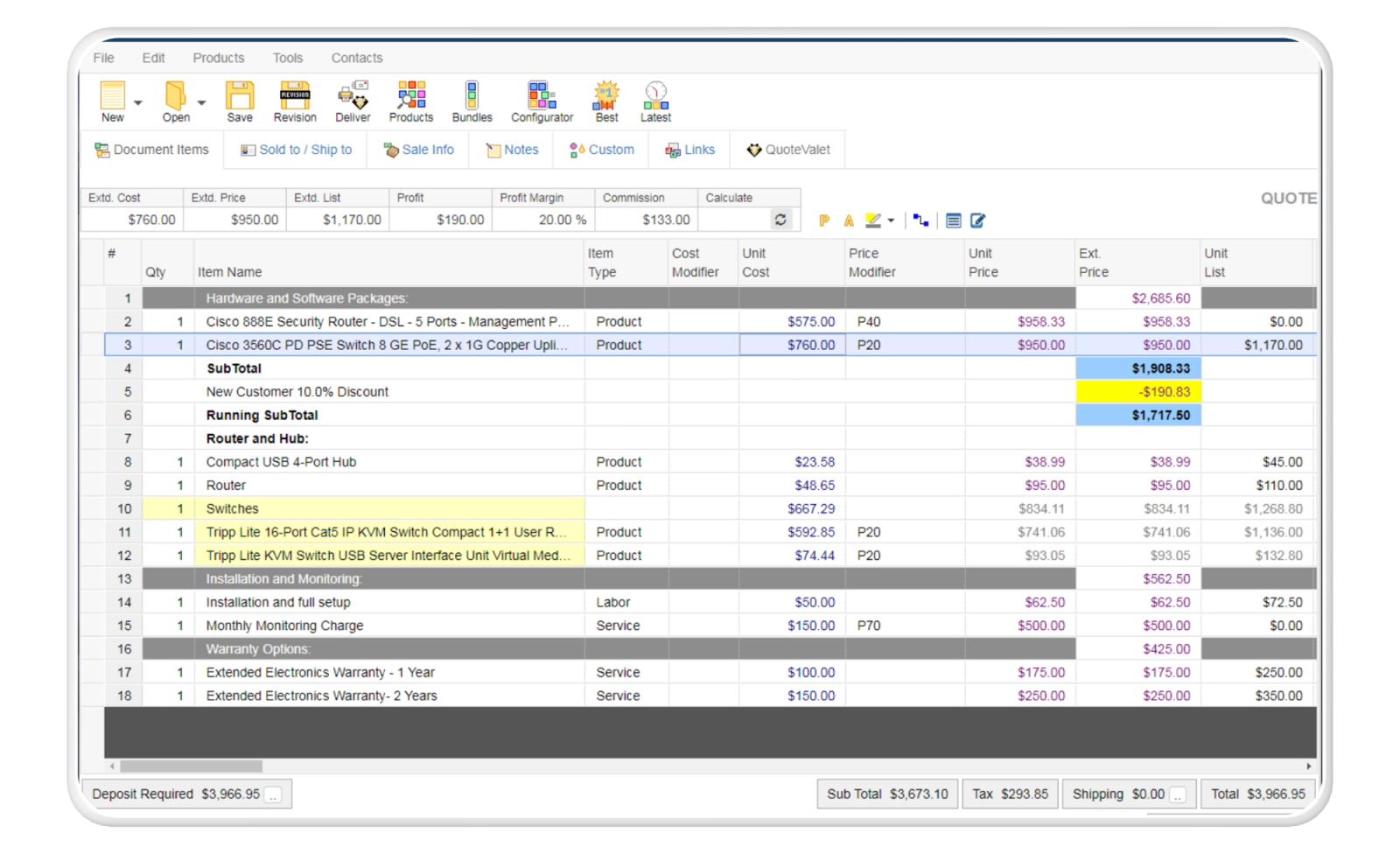
QuoteWerks gives manufacturers and IT solution providers access to real-time pricing and availability from distributors such as Ingram Micro, Tech Data, Synnex, Dell, and CDW. Sales reps pull accurate product data directly into quotes without manual vendor checks. The platform also supports multi-vendor comparisons and integrates with major PSA systems.
QuoteWerks' real-time distributor pricing is genuinely valuable for manufacturers and VARs who quote hardware—pulling current pricing beats manually checking vendor sites—but the Windows-only desktop app feels dated compared to web-based competitors. The interface has improved from its early-2000s roots, yet it still requires more clicks than modern alternatives for basic tasks.
Primary use cases: Manufacturers, manufacturer reps, MSPs, VARs, AV integrators, HVAC contractors, and security system installers use QuoteWerks to generate equipment quotes, service proposals, and configuration-based pricing that depend on up-to-date supplier information.
Standout features
- Real-time distributor pricing: Connect to Ingram Micro, Tech Data, Synnex, D&H, and 100+ distributors to pull current pricing, stock levels, and ship dates automatically.
- Consumer pricing lookup: Retrieve pricing from Amazon Business, CDW, Staples, Dell, and other consumer vendors to compare against distributor costs.
- Product configurator: Build complex configurations with dependent options—selecting one component automatically filters compatible choices for subsequent selections.
- Vendor RFQ automation: Send request-for-quote emails to vendors not in automated distributor feeds, track responses, and import pricing back into quotes.
- Quote synchronization: Share product catalogs, pricing rules, and templates across multiple users or office locations.
Pricing
- Essential: $50/user/month (monthly billing) or $45.83/user/month (annual billing)
- Balanced: $78/user/month (monthly billing) or $71.50/user/month (annual billing)
- Pinnacle: $102/user/month (monthly billing) or $93.50/user/month (annual billing)
| Pros | Cons |
|---|---|
Real-time distributor pricing feeds | Windows-only desktop application |
Multi-vendor quote comparisons | Dated interface vs. web-based tools |
Product configurator with dependent options | E-signatures require separate subscription |
Verdict: I'd use QuoteWerks only if real-time distributor pricing integration is essential to my business—meaning I'm quoting hardware, telecom equipment, or AV installations where margins are thin and pricing changes daily. The distributor connections genuinely save hours per quote for VARs building multi-vendor configurations.
However, if I'm in professional services, SaaS, or any industry where distributor feeds aren't relevant, I'd choose web-based alternatives like Qwilr or PandaDoc immediately. The desktop-first architecture and separate e-signature subscription feel outdated compared to modern cloud-based tools.
7. Responsive [Formerly RFPIO]: Best for RFI-specific quoting
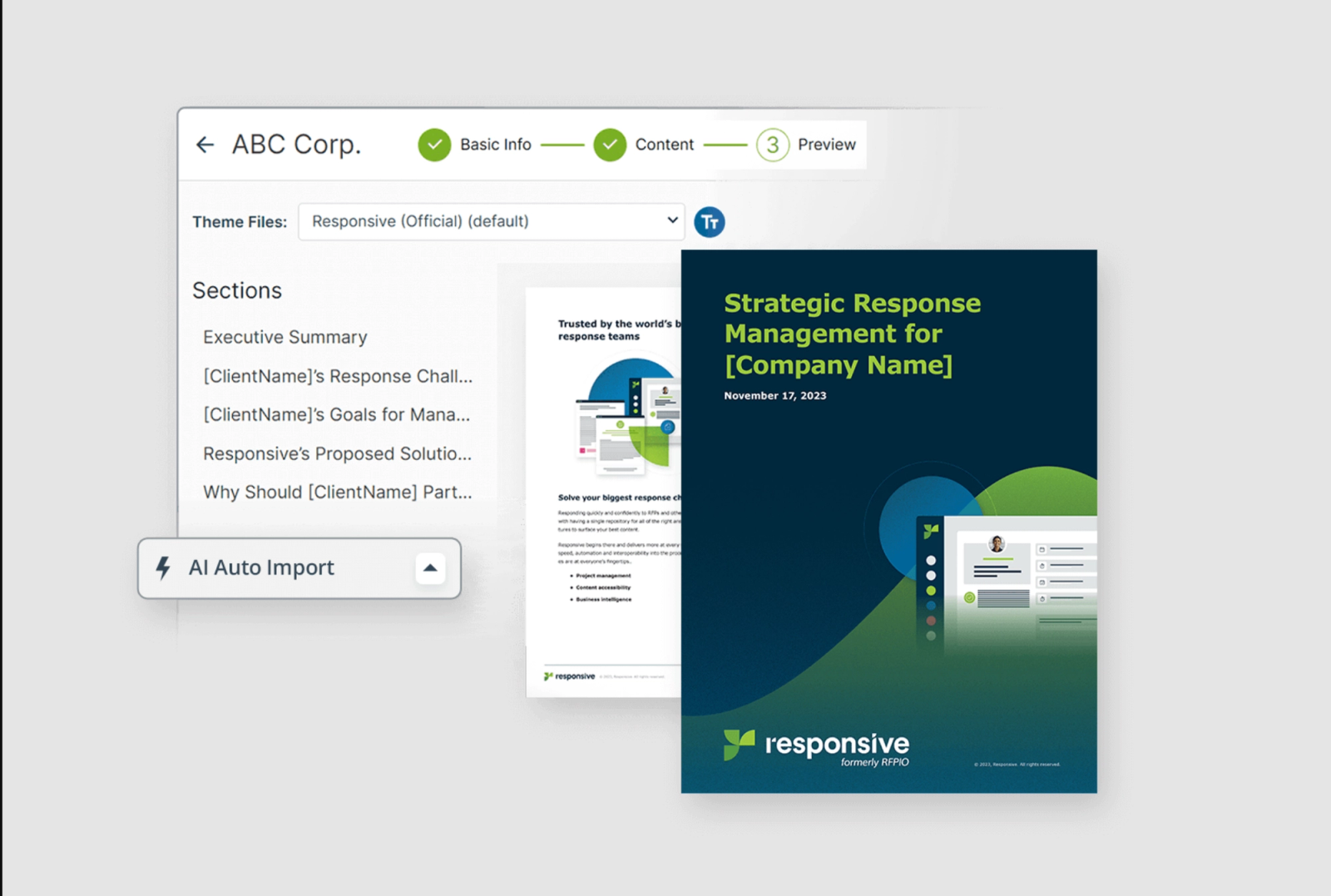
Responsive is for organizations that manage a high volume of RFPs, RFIs, DDQs, and security questionnaires and need a structured way to respond consistently. The platform uses an AI-supported answer library, collaboration tools, and approval workflows to help sales, proposal, and security teams produce accurate responses without rebuilding content from scratch.
Responsive's AI answer recommendations use keyword matching and semantic similarity to suggest content from your library. According to G2 reviews, users report the search functionality "constantly misidentifies what I'm searching for and shows completely unrelated results," requiring manual searches through the library to find the right answers.
Primary use cases: Responsive is used to complete RFPs, vendor assessments, security questionnaires, and due-diligence documents that require coordinated input from sales, product, legal, security, and compliance teams.
Standout Features
- AI Answer Library: Centralized Q&A repository with AI-powered recommendations that suggest relevant answers based on keyword matching and semantic similarity/
- Intelligent document import: Auto-detects questions, tables, dropdowns, and subsections from RFP documents (Word, PDF, Excel, Ariba) with patented AI technology.
- Collaborative workflows: Assign questions to subject matter experts, set deadlines, track completion status, and route answers through multi-level approval chains with automatic email reminders.
- Content governance: Assign content owners to Q&A pairs, track revision history, set review schedules, and maintain multilingual consistency across 22+ supported languages.
- Unlimited content storage: No limits on answer library size, enabling teams to build repositories of 10,000+ Q&A pairs for complex product portfolios.
Pricing
Responsive does not publish pricing publicly—contact sales for custom quotes
| Pros | Cons |
|---|---|
Centralized RFP and questionnaire answer library | Overbuilt for low RFP volume |
Cross-team collaboration workflows | Search accuracy requires manual refinement |
Content ownership, versioning, and approvals | Enterprise pricing only |
Verdict: I'd choose Responsive if I'm managing 20+ RFPs monthly with 5+ stakeholders contributing answers across sales, legal, and technical teams—the collaboration workflows and content governance justify the investment. But if I'm handling fewer than 10 RFPs monthly or working mostly solo, I'd use a combination of Google Docs and ChatGPT rather than paying for enterprise RFP software. The platform feels over-engineered for teams that don't live in the RFP world daily.
8. Billdu: Best for small businesses and freelancers
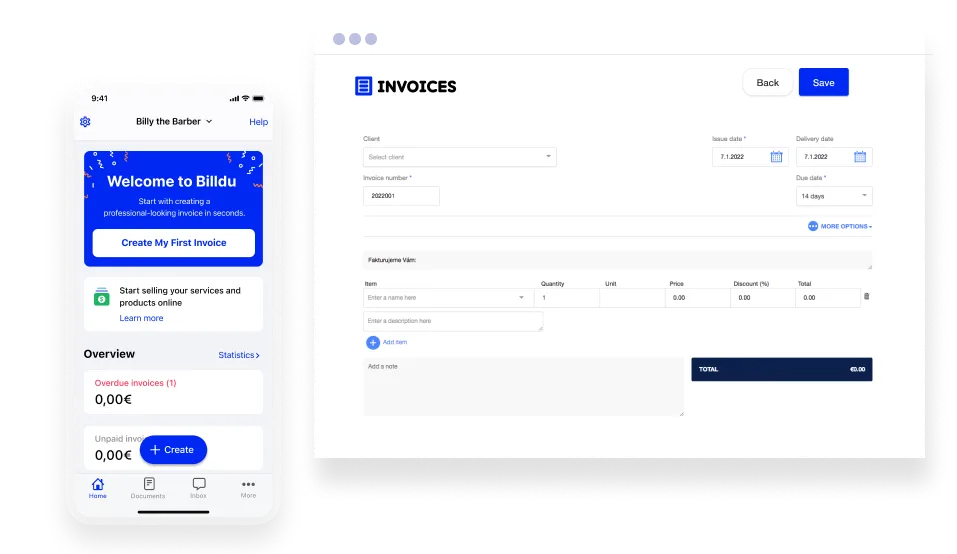
Billdu focuses on fast, mobile-friendly invoicing for freelancers and small service providers who work on-site and need to create invoices immediately after completing a job.
Unlike broader accounting platforms, Billdu is built specifically for service businesses that need quick, field-ready invoicing rather than full financial management.
Billdu's mobile app is excellent—contractors genuinely invoice clients on-site in minutes—but the client limits on lower tiers are restrictive (10 clients on Lite, 50 on Standard) for businesses that grow quickly. Recurring invoices only appear on the Premium plan ($19.99/month), forcing freelancers with retainer clients to upgrade even if they don't need the other Premium features like API access or 10 team members.
Primary use cases: Billdu is used to create invoices, issue quotes, track payments, and manage client information from a mobile device. It’s best for small service providers who work away from a desk and need real-time invoice creation, such as contractors, cleaners, handymen, and other field-service professionals.
Standout features
- On-the-spot invoicing: Create and send invoices immediately after completing jobs using mobile app (iOS/Android) with offline mode, enabling cash flow acceleration by 3-5 days
- Integrated payment collection: Add "Pay Now" buttons to invoices with Stripe or PayPal integration, allowing clients to pay via credit card, debit card, or bank transfer directly from invoice (no separate payment processor account needed for Stripe)
- Receipt scanner & expense tracking: Photograph receipts with mobile camera for automatic OCR extraction of date, vendor, amount, and category, maintaining real-time profit/loss visibility
- Automated payment reminders: Schedule automatic email reminders for upcoming, due, and overdue invoices at customizable intervals, reducing manual follow-up time by 80%
- Multi-company management: Manage multiple businesses from single account with separate branding, clients, and financial reports for each entity
Pricing
Annual pricing shown below (save 30% vs. monthly):
- Lite: $7.99/month (billed monthly) or $4.99/month (billed annually)
- Standard: $14.99/month (billed monthly) or $9.99/month (billed annually)
- Premium: $27.99/month (billed monthly) or $19.99/month (billed annually)
7-day free trial with all Premium features unlocked, no credit card required.
| Pros | Cons |
|---|---|
Mobile-first invoicing for on-site work | Client limits on lower-tier plans |
Fast invoice creation after job completion | Recurring invoices gated to higher tiers |
Integrated Stripe and PayPal payments | Not suited for negotiated sales |
Verdict: I'd use Billdu if I'm a mobile-first service provider (handyman, cleaner, contractor) who needs to invoice immediately after completing jobs and serves fewer than 50 clients. The $4.99/month Lite plan undercuts competitors dramatically, and the offline mode is genuinely useful when working in areas with poor connectivity.
9. Quotient: Best for trade and service businesses
Quotient helps trade and service businesses create visual quotes with embedded images and optional pricing tiers, then convert accepted quotes into Xero or QuickBooks invoices with one click.
The platform targets small contractors, consultants, and creative agencies who need client-facing quotes with acceptance tracking and seamless accounting integration.
Quotient's one-click Xero/QuickBooks integration is genuinely seamless—accepted quotes become invoices instantly—but this also means you're limited to those two accounting platforms (no QuickBooks Desktop, Sage, or NetSuite support). The quote tracking shows view counts and timestamps, yet it can't distinguish between prospects genuinely reviewing your proposal versus leaving it open in a background browser tab.
Primary use cases: Creating detailed service quotes with images and pricing options for construction projects, IT implementations, and creative services. Converting accepted client quotes directly into the accounting system invoices without re-entering data.
Standout features
- One-click invoice creation – Automatically generate Xero or QuickBooks Online invoices from accepted quotes with all line items, quantities, prices, customer details, and permanent quote reference links transferred instantly.
- Visual quote builder – Embed images, PDFs, videos, and files directly into quotes to showcase products, services, portfolio work, or technical specifications
- Client interaction features – Clients can accept quotes with legally binding e-signature checkbox, ask clarifying questions directly within the quote interface, and all communication is logged automatically
- Auto-follow-up reminders – Set expiry dates on quotes and schedule automated follow-up emails for quotes that haven't been opened or accepted
- Quote analytics dashboard – View acceptance rates, average quote value, and conversion statistics by month, quarter, or year to identify high-performing templates
Pricing
- Solo: $28/month
- Team: $48/month
- Team Plus: $88/month for 10 team members
21-day free trial available
| Pros | Cons |
|---|---|
Visual quotes with images and pricing tiers | Limited to Xero and QuickBooks Online |
One-click invoice creation from accepted quotes | Shallow engagement analytics |
Built-in quote acceptance tracking | No advanced sales automation |
Verdict: I'd choose Quotient if I'm already committed to Xero or QuickBooks Online and I send visual quotes for trade work, construction projects, or creative services where embedded images matter. The optional pricing tiers genuinely shift client conversations from "yes/no" to "which package," increasing average deal values. However, if I need automatic follow-up workflows (not just reminders I manually schedule), I'd look at alternatives since Quotient excels at quote creation and accounting sync but stops short of full sales automation.
How to choose the right quoting software solution
The quoting software market reached $2.9 billion in 2024 and is projected to grow to $7.2 billion by 2033, according to Verified Market Reports, driven by businesses automating manual pricing and quote creation processes. Sales teams seeking end-to-end sales enablement software often integrate quoting tools as part of a broader tech stack.
Prices range from $5/month for basic tools to thousands for enterprise platforms. The best fit depends on your sales workflow and the level of support your team needs. Consider these factors when evaluating quoting software:
1. Define your needs
Identify what slows down your quoting process today.
- Do reps spend 30 minutes searching for pricing in spreadsheets?
- Does legal review add three to five days to quote turnaround?
- Are you losing deals because competitors respond faster?
Map these pain points to software features and consider whether you need a dedicated quoting tool or a broader proposal software solution. Configurable products (software packages with add-ons, manufacturing equipment with custom specs) require CPQ tools with product configurators and rules engines. On the other hand, approval delays call for built-in workflow automation. Pricing errors signal the need for automated calculation validation. Match the feature to the specific problem.
2. List essential features
Start with your top three quote creation bottlenecks, then find tools that solve them.
- Reps wasting time reformatting Word documents? Drag-and-drop builders become essential.
- Pricing mistakes costing you margin? Automated calculations move to the top.
- No visibility into which quotes prospects actually read? Analytics becomes critical.
Common must-haves include template libraries (saves 15-20 minutes per quote), e-signature integration (eliminates printing and scanning), CRM sync (prevents double data entry), proposal tracking capabilities, and mobile access (lets reps quote on-site). Skip features you won't use within 90 days, since they just complicate training and slow adoption.
3. Evaluate for user-friendliness
User-friendly quoting software allows sales reps to create quotes in minutes without IT support or training documentation. Complex interfaces slow quote delivery, frustrate teams, and often lead to tool abandonment.
Test this during demos by asking vendors to build a real quote from your product catalog while you watch. Can they add line items, apply discounts, and generate a PDF in one sitting?
- Red flags include: menus buried three clicks deep, features requiring admin access to use, or interfaces that look like tax software from 2005.
- Good signs: intuitive drag-and-drop, inline editing, keyboard shortcuts for common actions, and preview modes showing exactly what customers see.
The simpler the learning curve, the faster teams adopt it and the sooner sales team leaders see ROI.
4. Integration capabilities
Quoting software integrations connect your CRM, accounting system, and payment processors to eliminate manual data entry and keep information synchronized across platforms. Without these connections, teams waste time copying customer details, pricing, and deal information between systems while risking data entry errors.
Check for native integrations with your existing stack:
- Salesforce, HubSpot, Pipedrive for CRM; Stripe or PayPal for payments
- QuickBooks or Xero for accounting or payment acceptance for Stripe or PayPal
- Slack for notifications
- Ask vendors for API documentation when using custom tools.
Test the sync during your trial: create a quote, accept it, and verify the deal stage updates in your CRM without manual input.
5. Customization options
Your quotes should match your brand guidelines without requiring a designer for every edit. Look for tools that let you upload logos, set brand colors, choose fonts, and customize headers and footers to match your website and sales collateral.
Beyond visual branding, check for flexible content customization: can you adjust legal terms by region, add product videos or ROI calculators, incorporate bundle pricing structures, create different templates for new business versus renewals?
Tools like Qwilr offer drag-and-drop editors that non-designers can use. Payment integration (Stripe, PayPal) embedded directly in quotes shortens sales cycles by letting customers pay immediately instead of waiting for separate invoices.
6. Collaboration features
Complex B2B deals typically involve sales, legal, finance, and product teams reviewing quotes before they go out.
Look for comment threads on specific quote sections, version history showing who changed what and when, approval workflows that route quotes automatically to stakeholders, and real-time co-editing so multiple people work simultaneously. Teams managing sales contracts often need additional approval layers because contracts introduce legal, financial, and compliance risks that require review from stakeholders beyond sales.
Qwilr separates internal reviews from customer-facing views and sales teams see comments and revision history while customers see clean, professional quotes. For deals with three or more internal reviewers, collaboration features typically cut approval time from days down to hours.
7. Reporting and analytics
Quoting software analytics track conversion rates, response times, discount patterns, and rep performance to identify what's working in your sales process and what's not. These insights highlight patterns—like which product bundles close faster, which pricing structures get selected most, or when prospects typically make decisions—so you can refine your approach.
Basic analytics show quote views and acceptance rates. Advanced platforms like Qwilr reveal which sections prospects spend time reading, when they share quotes internally with colleagues, and which pricing options they examine before deciding. This behavioral data signals exactly when reps should follow up and which objections need addressing.
Look for reporting that answers these questions:
- Which quotes convert and which stall?
- How long do quotes sit before acceptance or rejection?
- Which products or services get discounted most frequently?
- Which reps close quotes fastest?
- What patterns emerge by day of week, deal size, or industry?
The goal is moving beyond "how many quotes sent" to understanding why certain quotes win and others don't.
8. Scalability
Choose software that grows with your team without requiring a platform migration in a few months.
Evaluate whether pricing increases linearly with headcount or jumps dramatically at tier thresholds.
- Can you add custom fields, workflows, and product catalogs as your offerings evolve?
- Does performance stay fast with 10,000+ stored quotes?
- Can you set role-based permissions for different teams and regions?
9. Customer support
Test vendor support quality during your trial period to check how they'll treat you when problems arise. Send a question through their chat or email and track response time and solution quality.
Check what's included at each pricing tier:
- 24/7 live chat versus business-hours-only email
- Phone support versus ticketing systems
- Dedicated account managers versus shared support queues
Read recent G2 and Capterra reviews specifically about support responsiveness. Budget tools under $20 per month typically offer email-only support with 24 to 48 hour response times. Premium tiers ($50+ per user monthly) usually include priority support with sub-4-hour response guarantees. This matters most during quarter-end or when quotes block deal closings.
Choose the quoting software that fits your workflow
The right tool depends on your team size, how complex your quotes are, and what other software you already use.
Start with your biggest headache: Do quotes take hours to format? Do prospects ignore your PDFs? Does getting approval take three days? Find the vendor above that solves that problem, then test it during their free trial.
Most platforms offer 14-day trials. Use them to create real quotes with your actual products and prices. Build three quotes—one small, one medium, one complex—and see how they work compared to what you do now.
Want quotes that prospects actually engage with? Sales teams use Qwilr to create interactive web pages with pricing tables, videos, and analytics showing exactly how prospects read your proposals. Teams cut their quoting time in half and get better visibility into what clients care about. Book a demo to see Qwilr in action.
Getting the best-quoting software for your team
Whether you're a service-based company, a manufacturing powerhouse, or an innovative tech startup, finding the best-quoting software tailored to your specific needs is paramount. Choosing the right tool can streamline your quoting process, eliminate errors, enhance customer satisfaction, and boost your bottom line.
Remember, no matter the size or scope of your business, the right quoting software is more than just a tool – it's a strategic investment in your success. So take the time to explore the options, consider your unique requirements, and make an informed decision.
And if you are a sales or enterprise team looking to simplify invoicing and quotes, why not give Qwilr a try? From proposal templates with several styles of quoting options that help cut through the noise to analytics and 24/5 customer support, you’ve got yourself a winning tool. Speak to the team or book a demo to get started.
About the author

Kiran Shahid|Content Marketing Strategist
Kiran is a content marketing strategist with over nine years of experience creating research-driven content for B2B SaaS companies like HubSpot, Sprout Social, and Zapier. Her expertise in SEO, in-depth research, and data analysis allow her to create thought leadership for topics like AI, sales, productivity, content marketing, and ecommerce. When not writing, you can find her trying new foods and booking her next travel adventure."