
If you’re like me, MS Word would have been the most comfortable, familiar document tool you leaned on, and so when it came to creating proposals, it became your go-to tool. Quite frankly, it was mine too when I first started my business, until I realized it wasn’t really working for me.
The final straw came when I lost a hot prospect (they wanted to explore different pricing options directly in the proposal, toggle between variations, and forward it internally without friction, and my Word doc couldn’t offer that).
That experience forced me to question something I had taken for granted for a long time. For all its familiarity, Word was quietly shaping how my proposals were being received and how quickly decisions were being made. And yet, like many people creating proposals day in and day out, I wasn’t immediately convinced that switching tools was the answer.
But the more I dug into it, the clearer it became that the issue was less about the tool and more about trying to force a growing proposal process into something that was never designed to support it.
This is exactly what we’re unpacking in this article. What to use instead of Word for sales proposals, when it actually makes sense to switch, and why that shift becomes necessary as your deals and expectations grow.
Dive in!
What changes when you move beyond Word
Before we jump into the nitty-gritty of what to use instead of Word for sales proposals and when it makes sense to switch, let’s take a step back and look at what actually changes when you move beyond it.
Some of these differences may feel obvious at first glance. But a lot of them only become clear when you make the shift and start seeing how proposals are created, shared, and acted on in practice.
| What matters in practice | Using Word | Using a modern proposal system | Why this matters |
|---|---|---|---|
Starting point | Blank doc or reused file | Structured templates | Saves time and avoids reinventing every proposal |
Consistency | Depends on who edits it | Controlled layouts and content | Keeps branding and messaging consistent across deals |
Personalization | Manual edits | Guided inputs and dynamic content | Faster to tailor without breaking structure |
Pricing experience | Static text or tables | Interactive, flexible pricing options | Helps buyers explore options and decide faster |
How it's consumed | Designed for desktop | Optimized for all devices | Matches how buyers actually view proposals today |
Collaboration | Shared via email attachments | Shared via link, easy to circulate | Fits how proposals move across stakeholders |
Visibility after sending | No tracking | Real-time engagement insights | Helps you follow up based on actual signals |
Moving to approval | Separate tools and steps | Integrated flow from review to sign-off | Reduces friction in decision-making |
Version control | Separate tools and steps | Single live version | Avoids confusion and errors |
Speed to close | Slower, more back-and-forth | Slower, more back-and-forth | Keeps sales through the deal cycle |
What actually shapes a buyer’s decision
So far, you’ve seen why proposal software starts to make sense. But is that enough to justify making the switch? And for that, you need to understand how your customers actually experience them and how that experience shapes their decision.
If you’re going to move away from something as familiar as Word, it has to be a considered decision. And that means looking beyond features and focusing on what really matters when a proposal is opened, shared, and acted on.
Here’s what that actually looks like in practice.
1. It’s one of many, and it rarely gets more than a quick glance
If you’re in a competitive field, whether you’re a freelancer, consultant, or part of a sales team, you already know your buyers aren’t just hearing from you. They’re getting approached by multiple vendors, often at the same time, and your proposal is just one of several sitting in their inbox.
In that environment, content still matters, but how it’s presented starts to matter just as much!
Now imagine trying to stand out with a beautifully designed Word document. You can get a designer involved, build templates, and make it look polished, but in the midst of all of this, every change still comes back to manual work. Pricing tweaks, scope updates, last-minute edits, and then your designer takes a day off, or timelines tighten, and hell breaks loose.
This is exactly where things started to unravel for Steve Nathan, Founder of TimeHub, as well. As their sales volume grew, the time required to keep up, while maintaining accuracy and consistency, became harder to manage.
“The main issue was that our sales team were time poor. To try speed things up, I created sales templates in Word that could be changed depending on the client and their business needs. But this still required mail merging and many times, the team would just do what they wanted and would reformat the documents with their own choice of fonts and styles. Also, when the team was creating proposals one after the other, it was easy for them to input wrong numbers in the document. It was little errors like that which crept in and could change how we look professionally”.
And when those small inefficiencies start compounding, the shift usually follows. And that’s exactly why he went looking for a better way.

“I’m all for finding new ways to work quicker and better. I started playing around with Qwilr and knew that I had to roll it out across sales. I’ve now designed a branded template for each member of the team, with similar graphics, videos, and case studies for consistency. They can personalize the templates to their clients, but overall, the tone of voice is the same. This keeps it simple for them”.
2. Most proposals aren’t read the way you think they are
There’s an interesting study by the Content Marketing Institute on how business content actually gets consumed. 55% of marketers prefer to consume work-related content online. 26 % opt for video, 11% prefer listening, and 8% choose print.
It’s safe to say consumption happens online, but more importantly, the experience of it matters.
Because people aren’t sitting at their desks, reading your proposal end to end. They’re scanning it between meetings, on their commute, while grabbing a quick lunch, or even while waiting at the soccer field. They’re looking for something that’s easy to navigate, easy to digest, and works just as well on a phone as it does on a laptop.
What looks structured and polished on a desktop often feels clunky, hard to read, or easy to ignore on mobile. The experience breaks, and with it, so does attention.
This is something Spencer Knisely, Founder and Strategist at Textile, calls out directly:
“Qwilr offers a professional and distinctive presentation of quotes that are easy to accept – and it does it perfectly on mobile. The fact that Qwilr gives the definite impression that design was approached mobile-first sends a subtle signal to our clients that we’re an agency who understands the new web.”
That subtle shift matters more than it seems. Because when a proposal feels easy to engage with, no matter where or how it’s opened, it removes one more reason for a buyer to pause.
3. Your proposal doesn’t stay where you sent it
The way B2B sales happen has changed, and it’s still changing. With more stakeholders involved and AI accelerating how information is accessed and shared, your proposal rarely stays with just one person. It moves across teams, from decision-makers to legal to finance, each with their own questions, priorities, and objections.
And increasingly, buyers prefer it that way. A study by Gartner found that 67% of B2B buyers favor a rep-free experience. They want to explore, evaluate, and build conviction on their own before engaging further.
Now, imagine the amount of work your proposal has to do in that environment. It’s not just about presenting your offer anymore. It has to communicate clearly across different roles, answer questions before they’re asked, and hold up as it gets passed around internally without you in the room.
A lot of companies run into this firsthand. For Clarion Events, the challenge was clear. Buyers needed a more engaging experience, not pages of static content, and commercial leaders needed better insight into how proposals were actually being received.
That’s when they moved away from Word and started using Qwilr.
“We were working with proposals that were pages and pages long. Qwilr lets us lay information out more visually and give clients a much better experience. The interactive drop-downs allow us to reduce the length of the proposal, while still including all the relevant info for buyers that need the details,” Hannah explained, “This gives our clients a better experience when reviewing the proposal.”
4. It’s harder than you think to stay on top of what’s happening
If you’ve been in that situation before, where a deal feels close and then suddenly goes quiet or slips away, you already know how quickly decisions move. And that’s why staying on top of what’s happening becomes just as important as sending the proposal itself.
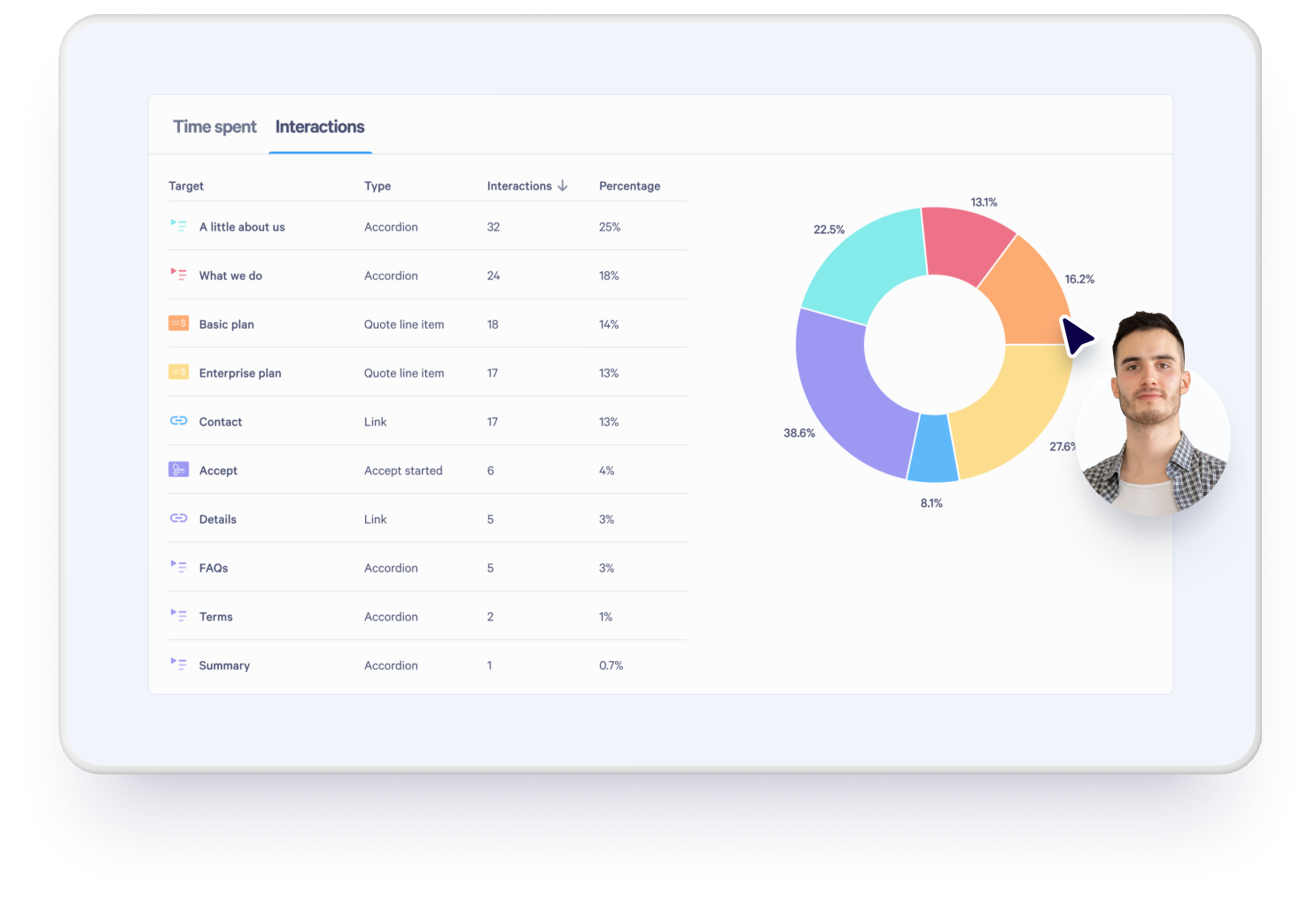
But that’s where a Word document falls short. Once it’s sent, you’re relying on follow-ups, assumptions, and scattered communication to piece together where things stand + you’ll never have answers to:
- If your client opened the proposal?
- If they did, which section they spent time on, or
- What actually caught their attention?
- Was the proposal forwarded internally, or is it sitting untouched in an inbox?
And when you do follow up, are you doing it based on real signals or just timing it based on guesswork?
In a fast-moving sales cycle, that gap matters. Because while you’re waiting for a response, the buyer is still evaluating options, still moving forward, sometimes with someone else who made it easier to stay in sync.
In the modern world, you need solutions that help you stay connected to the deal, and that’s exactly what Ben Childs did when he moved from Word to a proposal software like Qwilr:
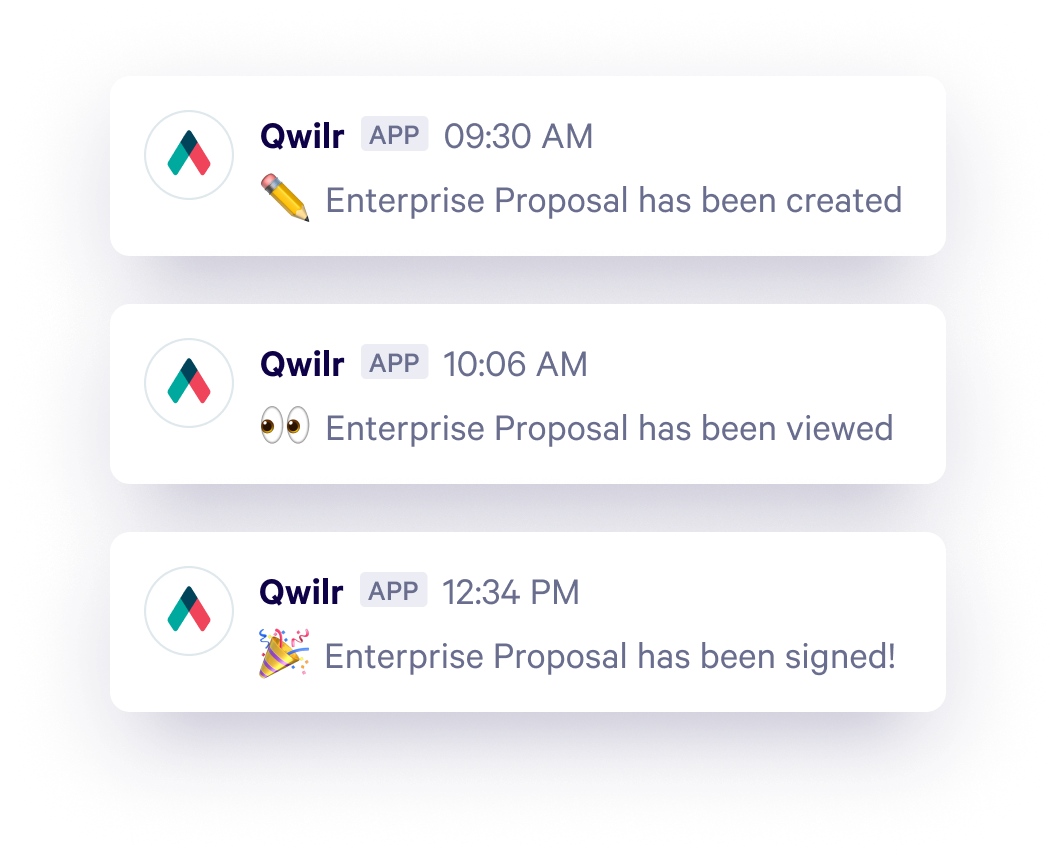
“We love the integration with Slack. Whether I’m on my phone or laptop I get notified whenever a client views or accepts a proposal. These notifications give us a quick snapshot of how a customer is tracking and quickly help keep our remote team on the same page.”
5. The last mile is where most deals slow down
Even when there’s clear intent from both sides, getting from proposal to decision is rarely as straightforward as it should be. A Word document might help you present your offer, but it doesn’t help you close the loop.
Instead, what follows is usually a series of back-and-forth steps. And through all of this, you’re pulled back into the process over and over again just to keep things moving.
It’s true for the buyers as well, and even when they want to move fast, the process itself slows them down. Or worse, they move forward with someone else whose process made it easier to get to a yes (like in my case previously).
As deal size builds up and more stakeholders get involved, you’re not just battling timelines or responses, you’re trying to hold together a process that keeps stretching across people, tools, and conversations. You’re not just creating a proposal. And when all of that sits on top of a static document, the cracks start to show.
If you’ve been with us so far, you might be thinking, then what does a better proposal workflow actually look like?
Well, it starts with structure, then consistency across proposals, clear and flexible pricing, content that adapts to the buyer, visibility into how it’s being received, and a way to move from review to approval without breaking the flow.
How to move beyond Word without overcomplicating your process
By this point, the shift probably makes sense. But the next question is always the same. How do you actually move away from something as familiar as Word without slowing everything down?
The answer isn’t starting from scratch. It’s putting a few simple structures in place that make proposals easier to create, manage, and move forward.
It starts with structure
Most of the friction you’ve felt so far comes down to one thing. There’s no real structure holding your proposals together.
Take a simple example. Say you’re a freelancer sending a digital marketing proposal. You’ve done it before, so you reuse an old document, tweak a few sections, update pricing, adjust the scope, and send it out. Now imagine doing that multiple times a week! It easily adds up to four to five hours spent on something that should take a fraction of the time.
The same is true for sales teams sending SaaS proposals. Each rep is working off a slightly different version, making edits under pressure, and it becomes easy for small mistakes to creep in, inconsistent messaging, outdated numbers, and formatting issues.
This is exactly where a proposal software like Qwilr becomes a better option than Word. So instead of opening a blank page each time, you’re starting with structured proposal templates, with sections that can be saved, reused, and refined over time.
Once that foundation is in place, everything else becomes faster, more consistent, and much easier to manage.
Reusable content keeps your message consistent
Once you have structure in place, the next challenge is ‘consistency.’
If you’re part of a sales team, especially one spread across geographies, products, or segments, you’ve probably seen this firsthand. Each rep has their own version of the proposal. Messaging shifts, case studies get swapped, product descriptions are rewritten, and pricing is explained differently. While it may feel harmless individually, collectively, it starts to fragment how your company shows up to customers.
Reusable content fixes that at the source.
Instead of every rep building from their own version, they get to work from a centralized set of approved sections. Messaging, case studies, product descriptions, pricing, all of it lives in one place and is legally approved upfront. When something changes, it’s updated once and reflected everywhere.
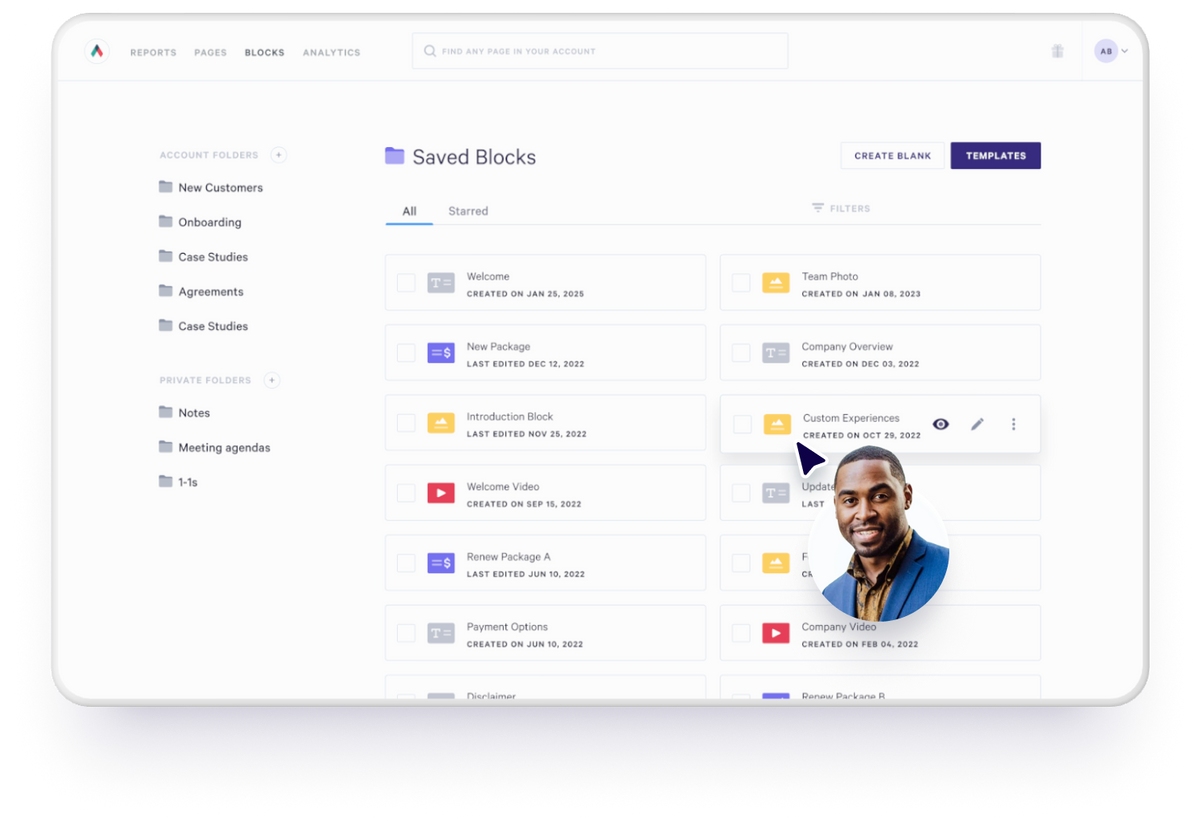
If you’ve been thinking of moving to Qwilr, this is how it’s designed to work. We’ve created reusable content blocks within the tool that are easy to maintain and consistent across every proposal. So your team spends less time fixing inconsistencies and more time moving deals forward, and even when a proposal is sent from Sydney, London, or New York, it carries the same plan and the same level of trust.
Personalization without slowing everything down
This is where most teams get stuck.
You know your proposals need to feel tailored, and every buyer expects to see their context, their challenges, and something that speaks directly to them. But the more you try to personalize, the more time it takes, and at some point, you’re forced to choose between speed and quality.
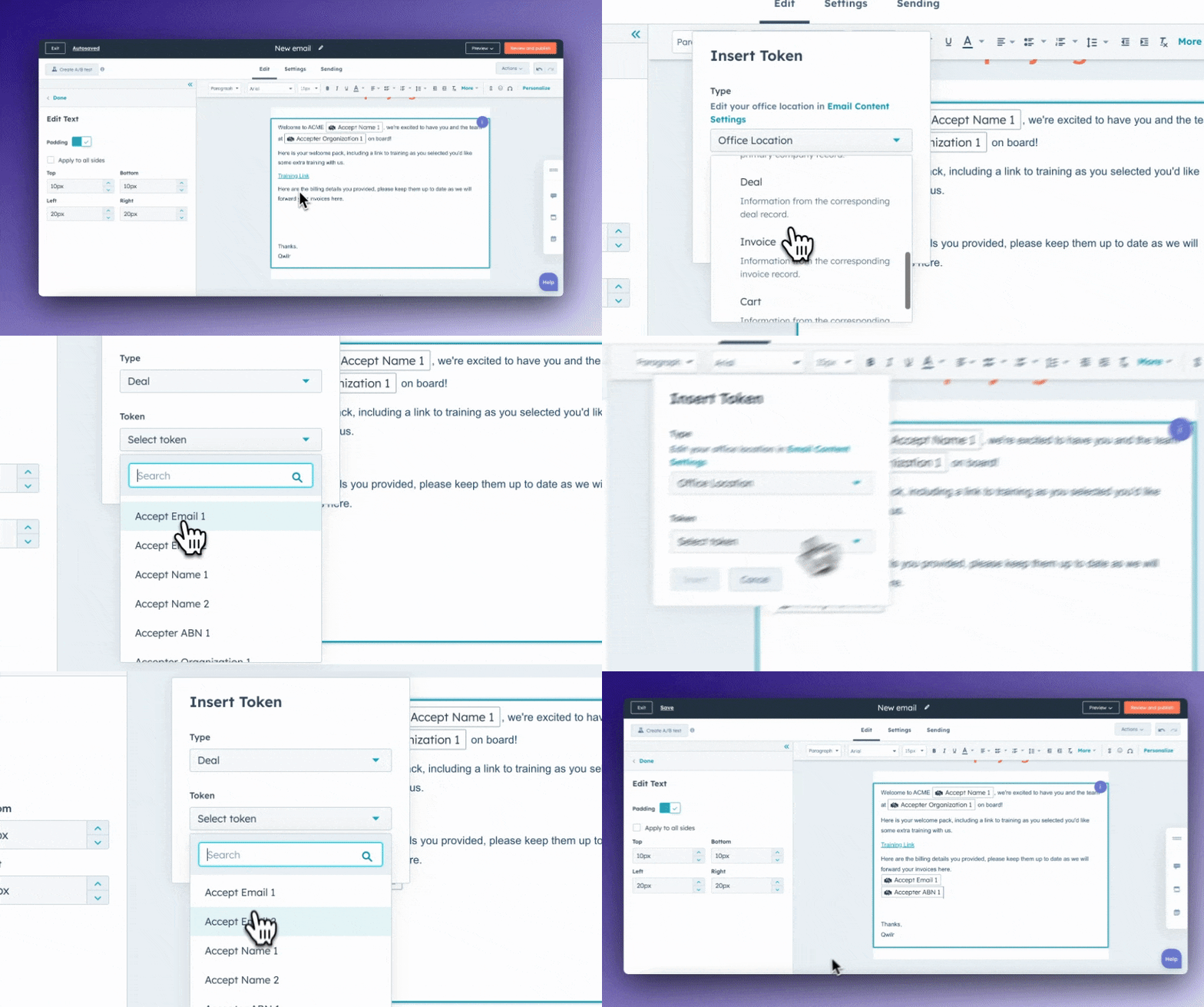
What changes with something like Qwilr’s Smart Proposal Engine is that personalization isn’t something you manually layer in. So instead of starting from scratch or digging through notes, the system pulls in context from call transcripts, CRM data, or meeting notes and uses that to generate key sections like executive summaries, client needs, and even competitor positioning.
Impressive right? But here’s when it starts to get better. Based on simple inputs like plan type, region, or deal context, the right content appears automatically. The right pricing options, the right team, the right supporting sections, all pulled in without the seller needing to think through every combination.
At the same time, it keeps everything within guardrails. You’re not accidentally including the wrong information, misrepresenting an offering, or going off-script. The system ensures that what gets sent is accurate, aligned, and consistent across every deal.
The result is a proposal that feels highly personalized to the buyer, but takes minutes to build, not hours. You’re not choosing between speed and quality anymore. You’re getting both. It’s a win-win.
Keeping everything connected
Earlier in the article, we spoke about how little visibility you have once a proposal is sent from Word. What changes with proposal software is the layer of visibility that lets you understand how your proposal is actually being engaged with.
When companies use a proposal tool, they can see when a proposal is opened, which sections are being viewed, and how it’s being revisited over time, arming you with what to do next, when to follow up, what to focus on, and where the buyer’s attention is.
That insight becomes even more useful when it’s part of your broader workflow. CRM integrations keep deal data connected, so you’re not switching between tools or manually updating information.
Everything stays in sync, from the initial proposal through to the final decision. Slack notifications surface activity in real time, so you know when to act while the deal is still active, not after it’s gone quiet.
Moving from proposal to decision
As Danny Dyton, Business Development Manager at Crown Information Management, puts it, “Not only is it easier for our team to produce proposals, it’s much easier for buyers to say ‘yes.’”
And that’s really the point. No matter how strong a proposal is, if it can’t carry the deal forward, it’s not doing its job.
A smart proposal software brings the entire workflow into one place. Buyers can review options, understand pricing, and move forward without leaving the page, while built-in e-signatures remove the need for another tool or extra step. Contracts can be included as part of the proposal itself, already legally vetted, so there’s no back-and-forth or separate approval cycle slowing things down.
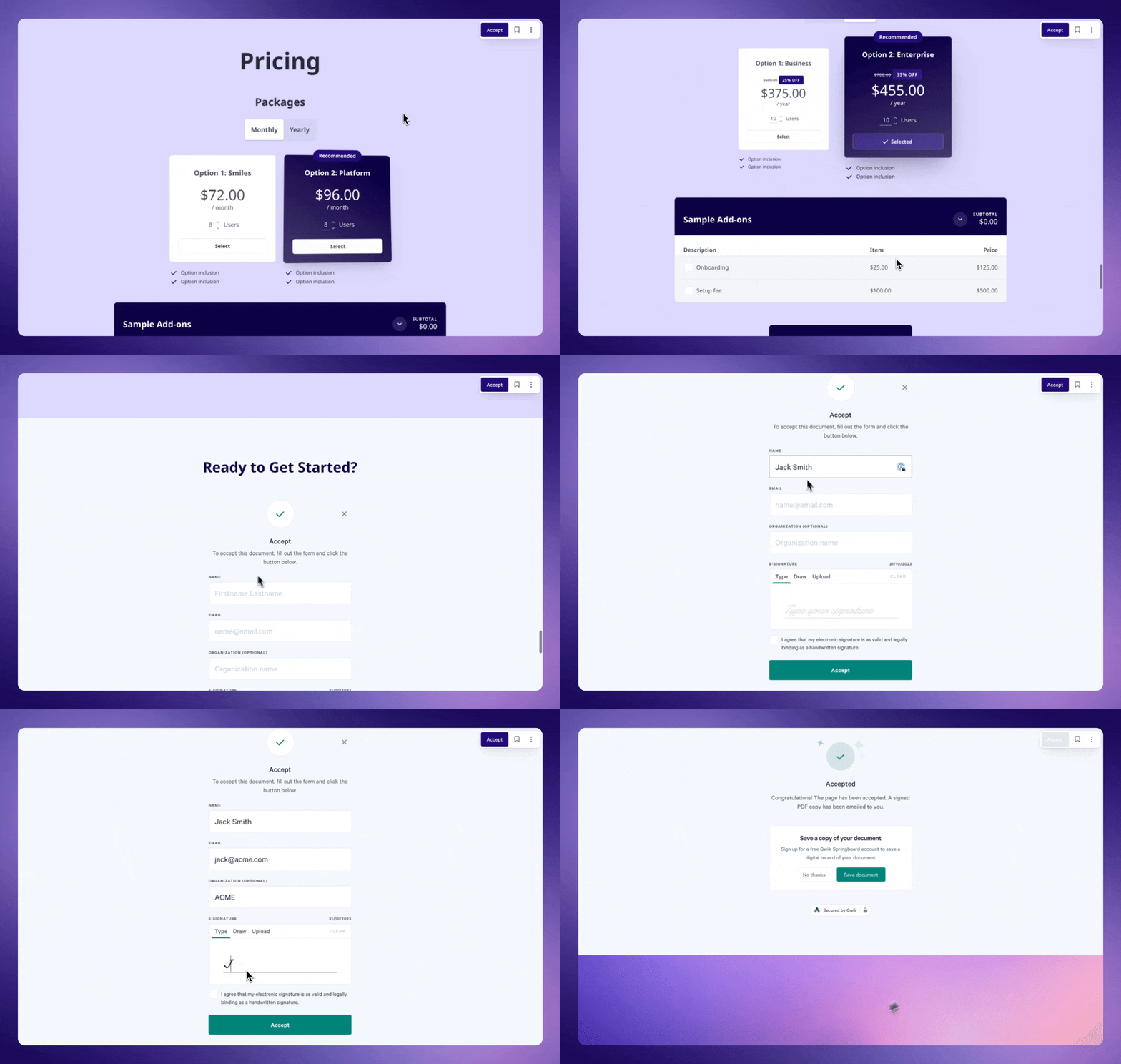
And finally, with QwilrPay, payments become part of the same flow, so once a decision is made, the next step happens immediately without any disconnect or delay.
If you’re using Microsoft Word for proposals, this is what to use instead
If you’ve been wondering what to use instead of Word for sales proposals, the answer is fairly straightforward. A modern proposal software is built for how proposals are actually created, shared, and used to make decisions today.
The harder question is when to switch. And that usually becomes clear the moment your process starts to feel heavier than it should. When proposals take longer to create than they should, when consistency becomes harder to maintain, when you lose visibility after sending, or when closing a deal requires too many steps.
That’s when Word stops being enough.
Making that shift doesn’t have to be complicated. As Heidi Holmes, Founder of Mentorloop, says, “Qwilr has helped us lift our game. It’s always a challenge introducing new software into a business, but Qwilr is so intuitive that anyone in the team can pick it up and create a really good-looking, professional document that is on brand”.
If you’re at that point, it’s worth exploring what a better proposal workflow can look like in practice. And if you want to see how it all comes together, book a demo, and our team at Qwilr would be more than happy to walk you through it.
About the author

Taru Bhargava|Content Strategist & Marketer
Taru is a content strategist and marketer with over 15 years of experience working with global startups, scale-ups, and agencies. Through taru&co., she combines her expert skills in content strategy, brand management, and SEO to drive more high-intent organic traffic for ambitious brands. When she’s not working, she’s busy raising two tiny dragons. She's on a first-name basis with Mindy Kaling.