

A friend of mine in sales recently described his proposal situation to me, and it stuck.
At his last company (a scrappy startup), he was sending proposals on the fly, making do with whatever was available as speed was key. It was quite frustrating, so when he recently joined a new company with proper infrastructure (think Salesforce, Slack, Stripe... the full stack), I couldn't help but ask whether the process had gotten easier.
He laughed and said, "We've got all the right tools, they just don't talk to each other in a way that actually helps me." Despite his belief that a better tech stack would solve it, he's still re-entering the same data and still waiting on separate steps to get a signature, an invoice, and a payment.
If you zoom out from this story, you'll see how integrations can be painted as the villain, but what's really at the heart of it is whether those integrations are built around how deals actually move. Most aren't.
If you've ever closed a deal and still spent the next hour triggering things manually, despite the best tech stack, this article is worth a read. We'll break down which integrations actually matter in a sales workflow, where most setups quietly break down, and what to look for when evaluating whether your current setup is working or just looks like it is. If you already run on HubSpot, the proposal software that integrates with HubSpot is the shortlist to start from.
The difference between connected tools and a connected workflow
You might think that having sales tools in your stack means your sales process is connected. But having tools that can talk to each other is not the same as having a workflow that actually moves deals forward.
Here's some food for thought: according to Gartner's 2024 Sales Survey, sellers use an average of 8 tools to close a single deal, and 42% feel overwhelmed by that number. Overwhelmed sellers are 45% less likely to hit quota.
Another report by McKinsey found that even in 2020, roughly a third of sales tasks were automatable. Today, that number is significantly higher, yet most sales teams still manually bridge the gap between their tools.
So why does this matter? Because every time a rep is not selling, it’s impacting their bottom line. And at scale, across a full team, across a full quarter, that's revenue left on the table.
Connected tools give you the infrastructure, but a connected workflow is what determines whether deals actually close or stall between stages waiting for someone to manually push them along. Teams on Microsoft Dynamics get the same setup through the Dynamics integration.
So let's get specific about which integrations actually do that work, and where they fit.
The integrations that actually matter (and where they fit in your sales flow)
Every sales team has a preferred set of tools, and that's fine. But in our opinion, the integrations that actually strengthen a sales workflow are the ones that sit at the three moments that matter most in any deal: where it's tracked, where it's pitched, and where it closes. Not because we offer automation with these, but because without them connected, every deal still requires someone to manually bridge the gap.Let’s look at them:
CRM integrations: your source of truth
Your CRM is where deals live. Salesforce, HubSpot, Pipedrive, Zoho CRM — whichever one your team runs on, it holds the data every proposal depends on: contact details, deal value, pricing, and decision-makers.
A strong CRM integration means that data flows directly into your proposals without anyone copying it across (without it, you're looking at outdated pricing, wrong contact names, and reps building proposals from last quarter's template)
What good looks like is a proposal that auto-populates the moment a deal reaches a certain stage, and your rep isn't starting from scratch, but simply reviewing.
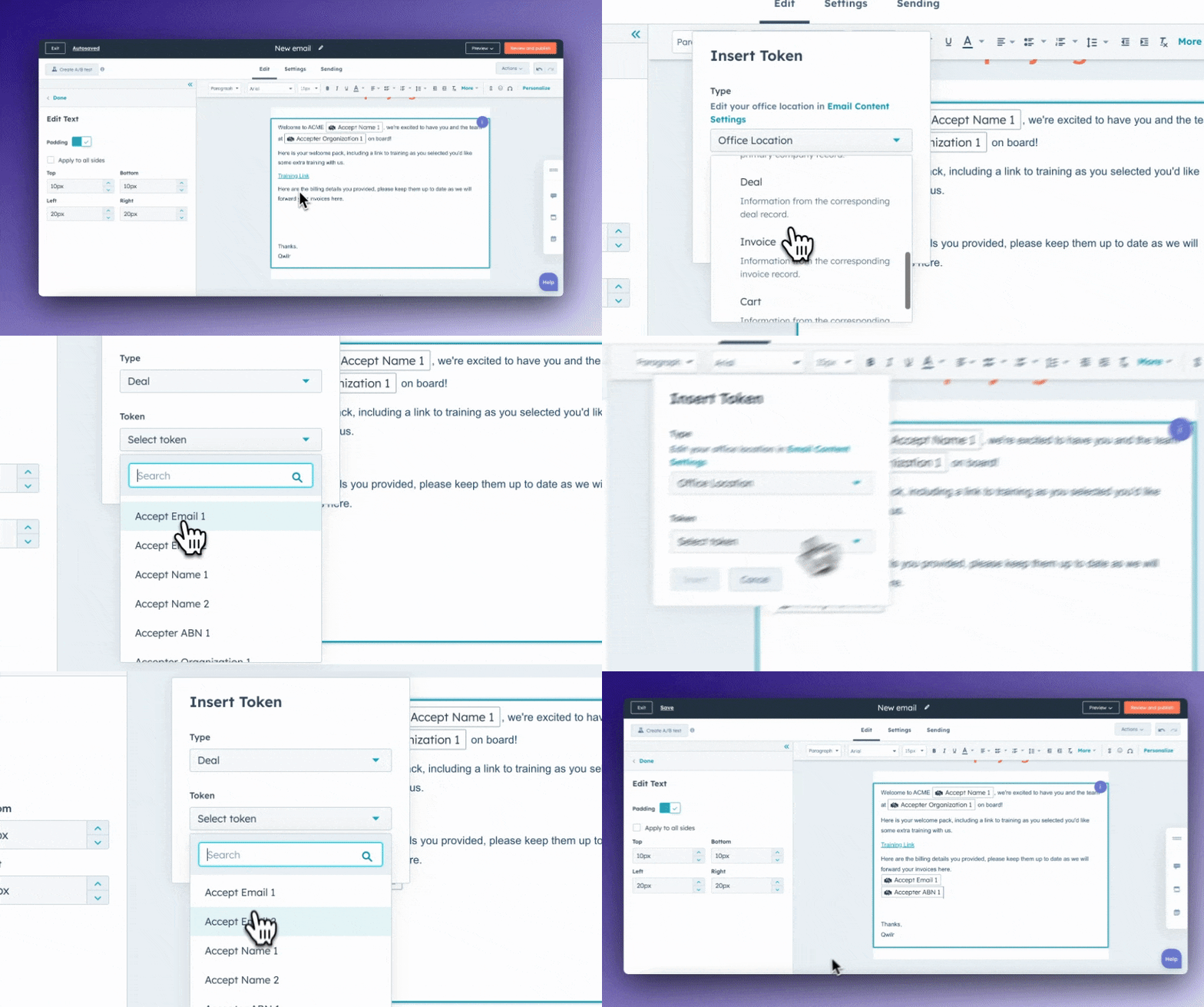
With Qwilr, a rep working out of HubSpot (or Salesforce, Pipedrive & Zoho) can create a proposal in a few clicks directly from the deal record. Company name, pricing, product line items, and contact details are all pulled in automatically from whatever's in the CRM.
When the proposal is sent, HubSpot logs it. When the buyer views or accepts it, the deal stage updates in the pipeline. The same two-way sync applies across Salesforce, Pipedrive, and Zoho CRM.
Take Brisant Secure, a UK-based security hardware manufacturer handling 70+ proposals a week. Their reps were sending multiple size options to customers, then manually forecasting through the production team as a separate step. It worked, until it didn't.
"Sometimes it slipped," said Alex Dutton, Sales Director at Brisant Secure. Once their proposals started pulling pricing and SKU data directly from Pipedrive, that extra step disappeared entirely.
Reps had to enter accurate product information into Pipedrive to generate a proposal, which meant the CRM stayed clean without anyone policing it. Forecasting went from a manual follow-up to something that happened automatically.
That's the difference a connected CRM integration makes, not just faster proposals, but cleaner data and more reliable forecasting, without adding any extra admin.
Payment integrations: closing the loop on closed won
According to Upflow's 2024 State of B2B Payments report, 3 in 4 companies experience late B2B payments.
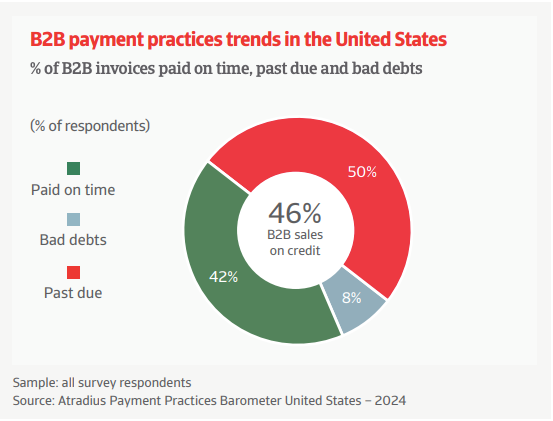
Atradius' 2024 Payment Practices Barometer for the US puts it even more plainly: half of all US invoices are currently overdue. Some of that is buyer behavior, but a meaningful portion starts earlier, i.e., with an invoicing step that was never connected to the deal in the first place.
What we see more often than not is sales teams treating winning a deal and getting paid for it as two separate events. Simply put, when the proposal gets accepted, a separate invoicing process kicks off in a different tool, sometimes with a different team, and this delay quietly eats into revenue that should already be collected.
But payment integrations, like Stripe, make this easier. Once a buyer accepts a proposal, they go from reviewing to paying in a single flow, without being handed off to another step. Without it, you've got a signed proposal sitting in one system and an invoice that hasn't been created yet in another.
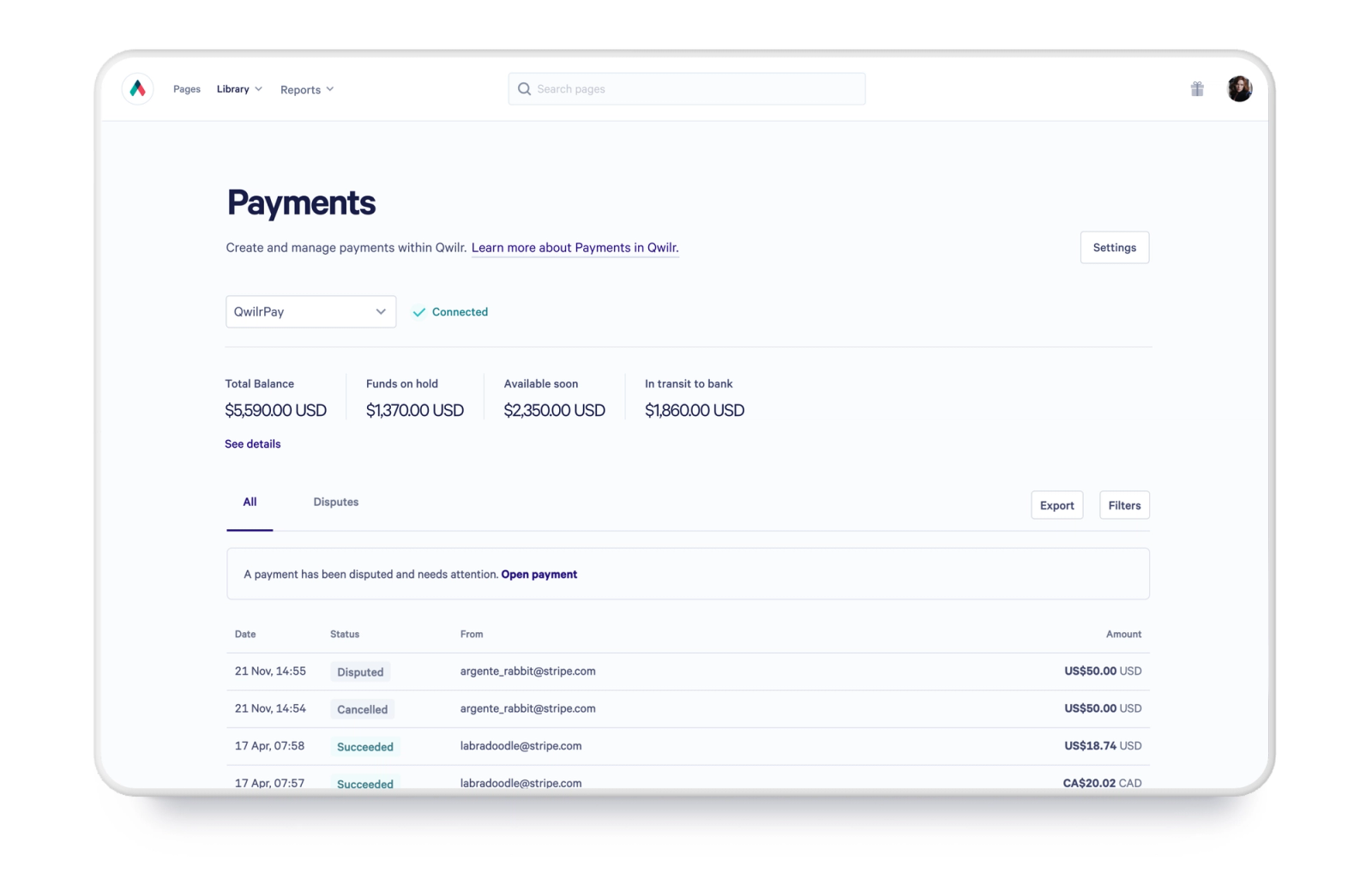
With Qwilr, payments via Stripe are embedded directly into the proposal itself. A buyer can review pricing, sign, and pay in one uninterrupted experience.
For teams using QwilrPay, that same flow works natively without needing a separate Stripe setup.
Workflow and automation integrations: buying back selling time
Do you know how much of what your reps did this week was actually selling versus managing the process around it?
Salespeople spend nearly 70% of their week caught up in the whirlwind of administrative tasks.
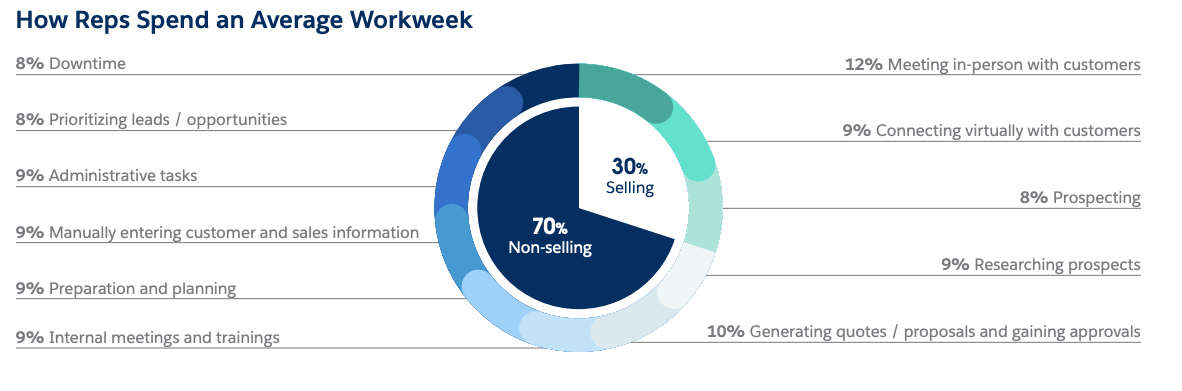
It's worth sitting with that number. To add to it, 78% of sellers missed quota in 2025. Those two facts aren't unrelated.
While the solution is simple, the adoption is slower than it should be ( but that's a discussion for another day). What matters is that tools like Zapier fill this gap. They connect actions across systems so that a completed step in one tool triggers the next without anyone having to remember to do it.
A proposal reaching a certain stage in Qwilr creates a task in the CRM. An accepted deal kicks off an onboarding sequence. None of that requires human intervention once the workflow is set up.
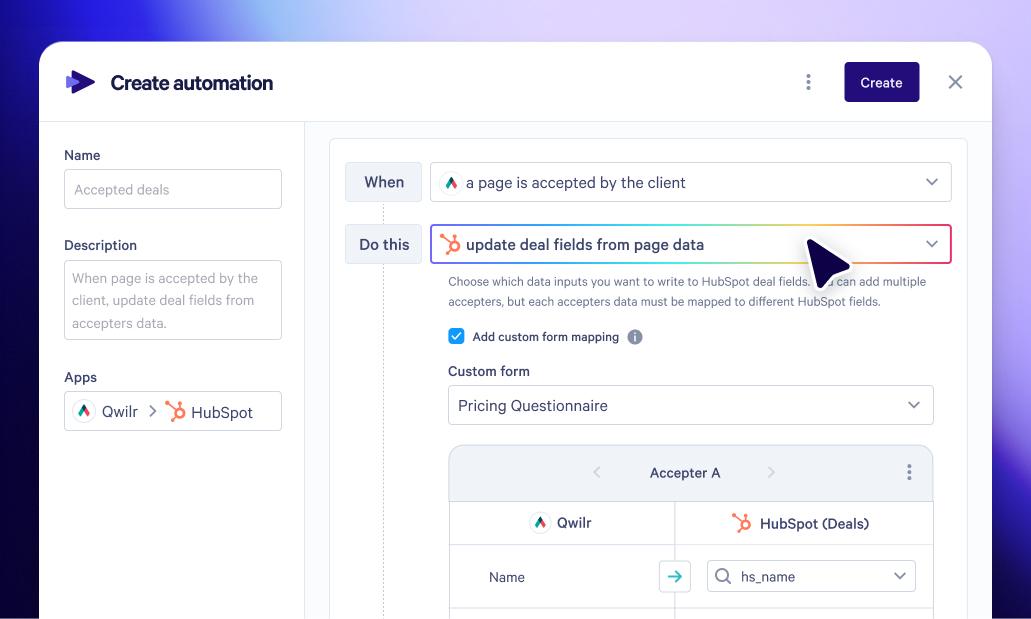
With Qwilr, this automation is built into the proposal layer itself. Deal stages in Salesforce and HubSpot update automatically based on proposal status, keeping pipeline data accurate without anyone manually logging it. For teams using Zapier, Qwilr plugs into wider workflow chains across hundreds of tools.
Qwilr also integrates directly with Slack, which is where the buyer visibility piece comes in. The moment a buyer opens, views, or accepts a proposal, the rep gets a Slack notification in real time. No more sending a proposal into the void and following up on a guess.
Together, Zapier and Slack integrations give your team:
- Fewer manual touchpoints across the sales process
- Follow-ups timed to actual buyer activity, not guesswork
- Pipeline data that stays accurate without anyone manually updating it
- More selling time back in the week
QuickBooks integration: closing the gap between sales and finance
The disconnect between sales and finance is one of the most common post-signature bottlenecks. Sales closes the deal, finance creates the invoice, often with incomplete information pulled from an email or a PDF attachment (not to forget, often days later).
The result is usually a version of the same conversation: "Can you resend the pricing breakdown?" or "Which contact should the invoice go to?" or "What's the correct entity name?"
Here's what a complete cycle looks like with Qwilr:
- Proposal — built from your CRM data, sent directly from Qwilr
- Contract — legally vetted agreements included as part of the same document
- E-signature — collected within the proposal, no separate tool required
- Invoice — automatically pushed to QuickBooks the moment the buyer signs and accepts
Every step happens inside one flow. Finance gets the invoice with the right line items, taxes, and customer data already mapped, without chasing anyone for it. The invoice then goes out while the deal is still warm.
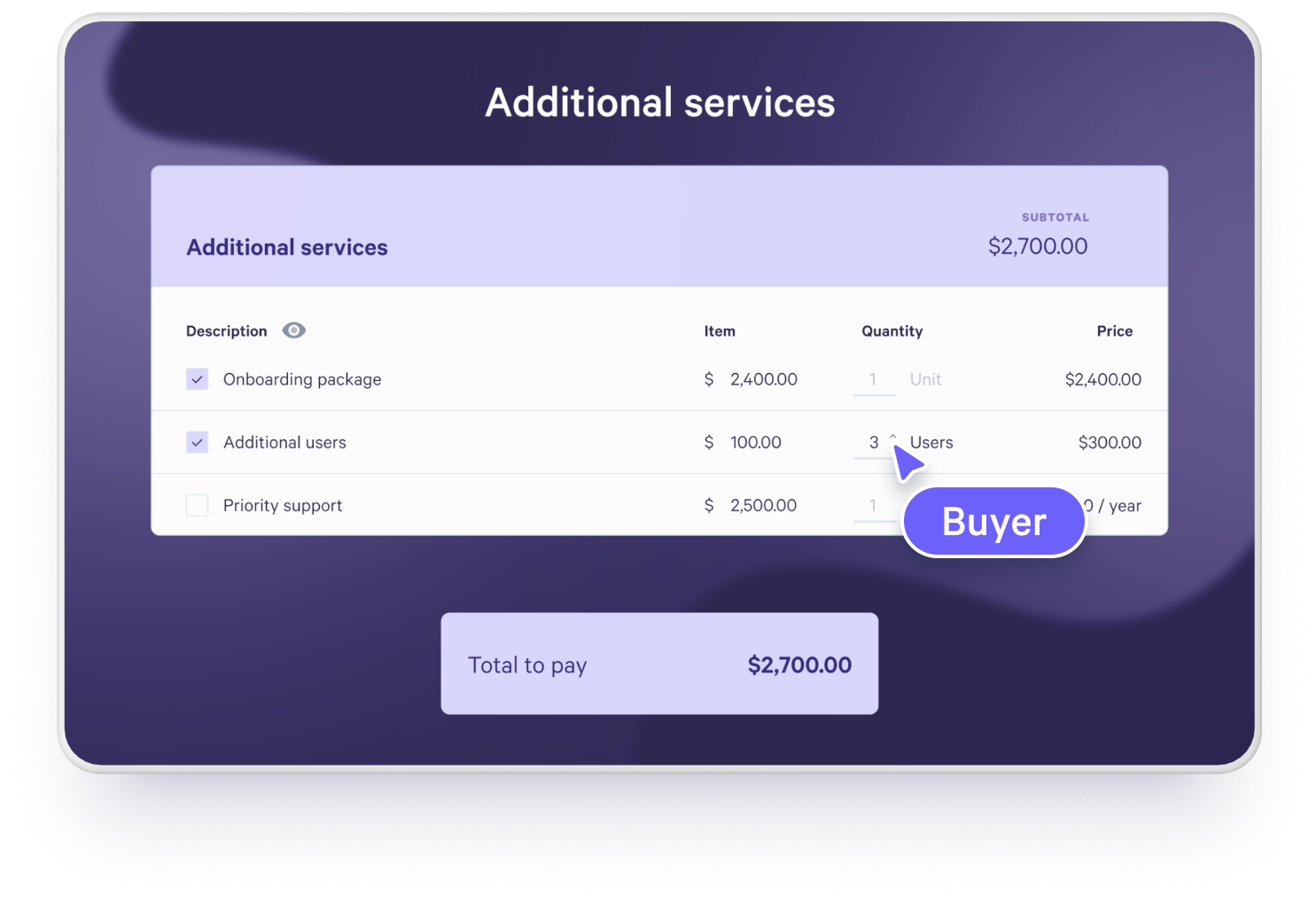
For a sales leader, this means fewer deals slipping into a post-signature grey zone, a cleaner handoff between teams, and revenue that moves from closed to collected without a manual step in between.
How to choose the right proposal software integrations for your team
Now that you've looked at the key integrations, the next question is: which ones are actually right for your team? Because the honest answer is that it depends.
A few factors worth considering before you decide:
- Where your biggest bottleneck sits. Are deals stalling pre-sale because CRM data isn't flowing into proposals accurately? Or is the gap post-sale, where signed deals sit waiting for invoices to be created? The answer changes, which integrations should be your first priority?
- Team size and maturity. A 5-person sales team and a 50-person one have very different ops overhead. Smaller teams often need fewer, simpler integrations that work out of the box. Larger teams need two-way syncs, automation chains, and integrations that scale without breaking.
- Whether you have RevOps or Sales Ops. Integrations like Zapier are powerful, but someone needs to build and maintain the workflows. If you don't have dedicated ops capacity, native integrations that work without configuration are going to serve you better.
- Your current tech stack. Not every tool plays nicely with every other. Before committing to a proposal software, check whether it connects natively to your CRM, payment tool, and accounting software, or whether it relies entirely on third-party connectors to bridge the gap.
- Volume of proposals. Low-volume teams can get away with more manual steps. High-volume teams need automation that removes human touchpoints entirely, or errors and delays compound fast.
- How your buyers move. If your sales cycle is long and multi-stakeholder, buyer engagement visibility matters more. If deals close fast, payment speed is the priority.
There is no universal answer. The right integrations depend on where your workflow is actually breaking down. But the above factors are what determine whether a new integration will genuinely move the needle or just add another tool to manage.
As a sense check, here are the questions worth asking before you commit to any proposal software integration:
- Is the integration native or reliant on connectors?
- Is data sync one-way or two-way?
- Can actions be triggered, or is it just data being pulled?
- Does it connect pre-sale and post-sale, from CRM through to payments?
- Does it reduce steps or just move them around?
- Does it give you visibility into how buyers are engaging?
Ultimately, don't evaluate integrations by how many you have, but by the impact they have on how deals actually move.
If you're looking for a setup that passes that checklist, as you've seen throughout this article, Qwilr connects with each one of these tools.
CRM data from Salesforce, HubSpot, Pipedrive, and Zoho directly into proposals, embeds payments via Stripe and QwilrPay in the same flow, pushes invoices automatically to QuickBooks on acceptance, runs workflow automation through Zapier, and fires buyer engagement alerts through Slack in real time. Pre-sale to post-sale, in one connected system.
If that's the kind of setup you're looking for, we'd love to show you how it works. Book a demo, and our team will walk you through exactly how Qwilr fits into your current stack.
About the author

Taru Bhargava|Content Strategist & Marketer
Taru is a content strategist and marketer with over 15 years of experience working with global startups, scale-ups, and agencies. Through taru&co., she combines her expert skills in content strategy, brand management, and SEO to drive more high-intent organic traffic for ambitious brands. When she’s not working, she’s busy raising two tiny dragons. She's on a first-name basis with Mindy Kaling.