

How many versions of the same proposal template does your team regularly use, each with very minor differences?
Teams who care about personalizing proposals are working with a ton of different templates, with setups like this…
One for companies in the tech sector, with that industry-specific video added in.
One for teams based in Europe, with that image that shows your team over there.
One for larger deals, with that extra security review clause of the contract.
Alternatively, they have one master template which they waste time going through, adding in all the relevant content, removing what doesn’t make sense and double-checking that everything looks correct.
Or even worse, personalization is skipped altogether.
None of these approaches are ideal. So we fixed it.
Our newly enhanced Conditional Content feature helps you build one proposal that adapts itself to your buyer, down to the smallest detail.
You simply use "if [x] then [y]" rules to make sure your buyer only sees relevant content, based on the deal in front of you, right down to a single line of text or a specific image.

Granular control, on any widget
We’ve had conditional logic as part of our AI-powered Smart Proposal Engine for some time, but it used to only work at the block level.
Now it works on individual pieces of content, including text, images, videos, columns, contract clauses and more.
Reps simply connect their CRM and any other sources of deal data (like meeting notes or call transcripts) and using a combination of AI and automation, the Smart Proposal Engine pulls out the details of their deal.
This data is then used to drive the conditional logic, adapting the proposal to each specific buyer.
Reps are left with highly personalized proposals in a matter of minutes.
And you’re left managing fewer templates.
Built for real deal complexity
Real deals aren't always simple "if this, then that" scenarios.
You can combine conditions with and/or logic.
For example, you can conditionally show a table outlining specific next steps if the deal is enterprise-sized AND based in a specific region.
Now available inside agreements
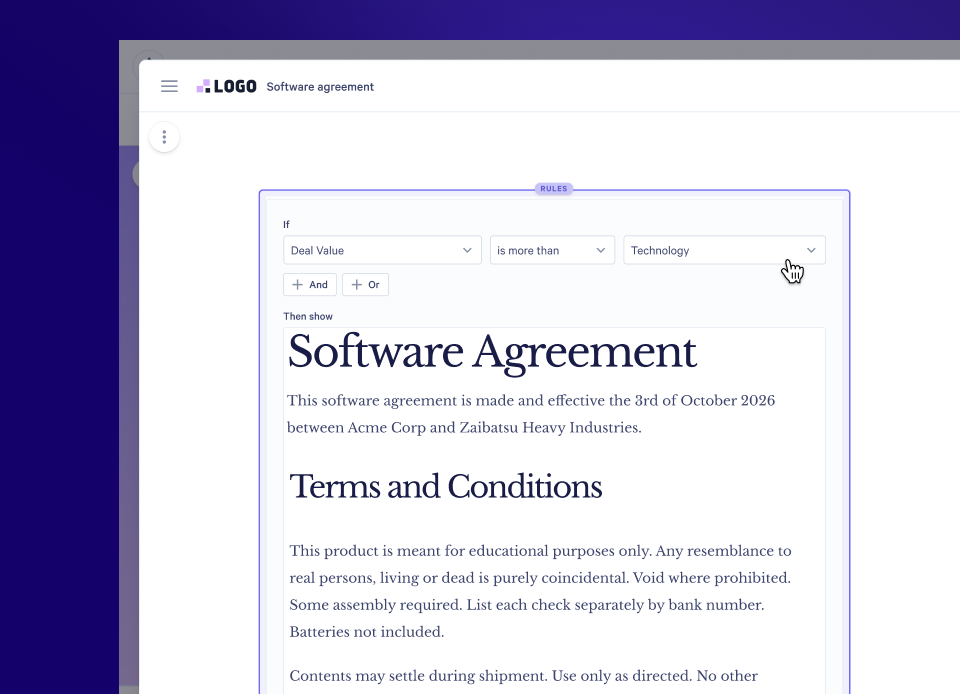
Conditional logic can now also be applied inside agreements.
That means one contract can flex to cover a variety of deal types, automatically showing the relevant clauses that apply, instead of you maintaining a separate contract template for every scenario.
Why it matters
- Personalization at scale: one template adapts to the deal in front of you, so you're not making compromises between speed and quality.
- Faster sales cycles: pulling together high-quality proposals takes far less time.
- Fewer mistakes: the right content and clauses show up automatically, cutting the risk of sending something irrelevant, or wrong, to a customer.
- A better buyer experience: prospects only see what's actually relevant to them, making it easier to say “yes”.
Getting started
- Set up your variables
- Hit “+”, scroll down to Advanced and hit “Rules"
- Determine your "if then [x] then [y]" logic
- Drag the relevant content, or create new content, in the “Then show” area
- You’re good to go!
Check out these help docs for more info, or chat to our Support team if you want a hand.
Conditional Content and the Smart Proposal Engine are Scale-plan features; using the Smart Proposal Engine to build pages draws from your credit balance. Learn more about credits here.
About the author

Guy Hall|Head of Product Marketing at Qwilr
Guy leads product marketing at Qwilr – tackling things like positioning, messaging, sales enablement and more. Guy has a background in content and communications, and has worked across a variety of industries including tourism, telecoms and tech.