Qwilr + Pipedrive: Automating Quotes, Follow-Ups, and Deal Updates From a Single Page
Sales teams want simple, seamless workflows, but CRMs like Pipedrive still fall short on interactive proposals, engagement tracking, and automated deal execution. Qwilr fills that gap by turning static documents into dynamic, trackable web experiences that connect proposals directly to sales progress.
In this article, we’ll explore how the Pipedrive × Qwilr integration empowers sales teams to automate quotes, follow-ups, and deal updates from a single page, driving faster closes and fewer lost deals, all without bouncing between multiple apps.
Why this integration matters
Before diving into the how-to, it’s worth understanding why this integration is such a powerful addition to your sales stack.
- Proposals aren’t a one-off task - they’re a sales catalyst: Proposals are often the first moment a buyer interacts with your pricing, brand, and contract terms in a meaningful way. If your sales documents live outside your CRM or as static PDFs, you lose traction and context.
- Manual admin kills momentum: Research shows that sales professionals spend up to an hour a day on administrative tasks, much of which can be automated. Updating deal stages, pushing document statuses into CRM fields, and triggering follow-ups are prime examples.
- Interactive content drives engagement: Buyers today expect dynamic pricing, embedded media, calculators, and clear next steps. Qwilr’s web-based pages deliver this, while Pipedrive ensures your CRM stays in sync.
Together, Pipedrive and Qwilr eliminate friction, from generating personalized quotes to tracking views and managing pipeline transitions, all from within your CRM.
What the Pipedrive + Qwilr Integration does
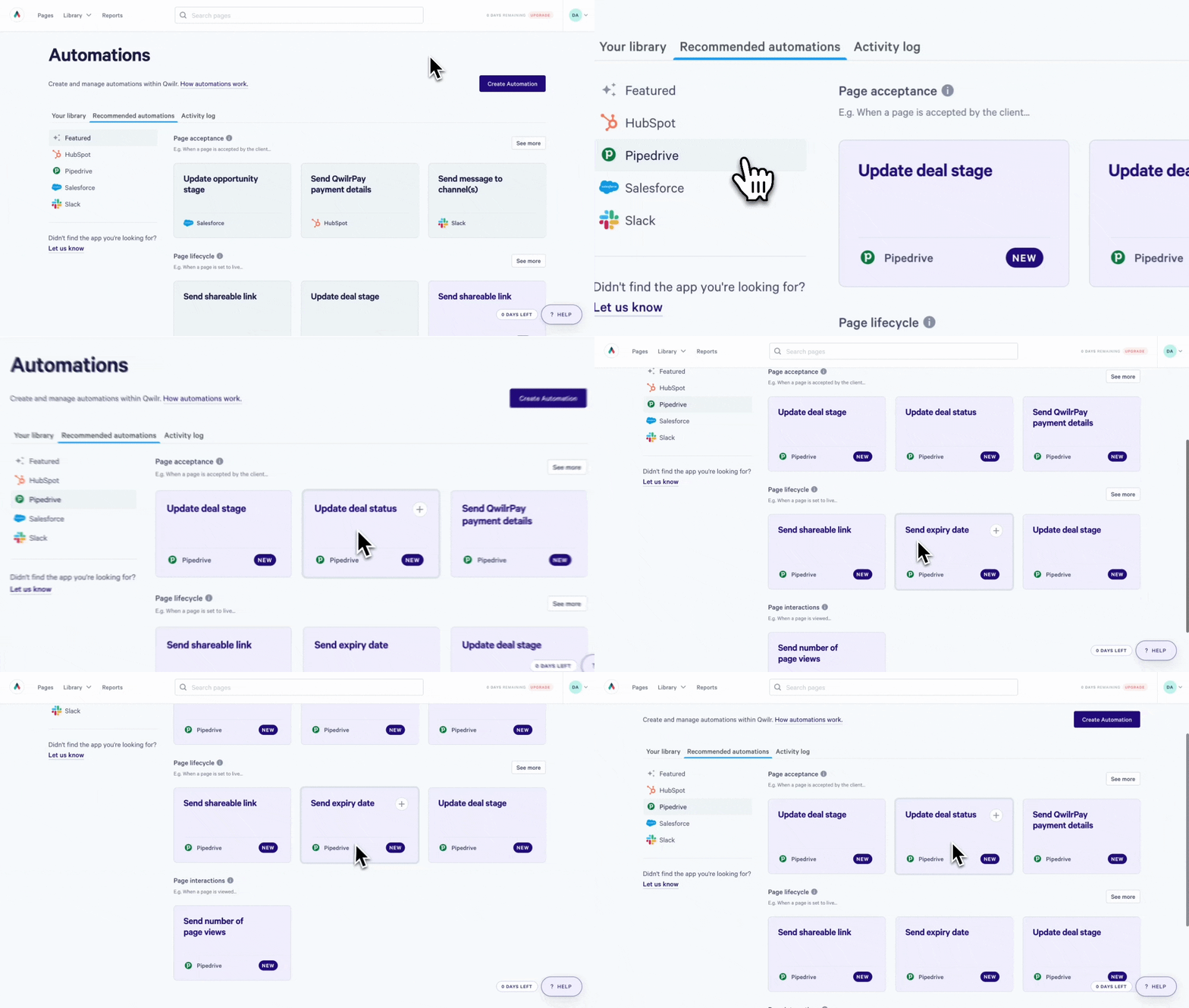
Qwilr integrates natively with Pipedrive to let sales teams create, send, track, and automate proposals directly from their CRM.
From inside a Pipedrive deal, reps can generate interactive Qwilr pages that pull in deal, contact, and company data automatically, track buyer engagement in real time, and trigger follow-ups, deal updates, signatures, and payments based on proposal activity. Every interaction, from proposal views to acceptance and payment, syncs back to Pipedrive, keeping the CRM as the single source of truth for deal progress.
A quick look at what you can automate
Here’s a high-level view of what the Pipedrive + Qwilr integration enables:
- Create personalized, interactive proposals with a single click from Pipedrive
- Pull CRM data directly into proposals using tokens (including custom fields)
- Collect legally binding e-signatures and payments on the page
- Track engagement (views, time spent, accepted/declined) inside Pipedrive
- Use automation triggers to update deal stages, set follow-ups, or launch email sequences
- Update deal amounts, close dates, and other CRM fields based on proposal events
- Use Pipedrive automations to trigger internal activities, reminders, and workflows based on document behavior
These capabilities shift the proposal process from static output to a sales engine.
Setting up the Pipedrive + Qwilr integration
To unlock this power, the first step is connecting your CRM and document platform.
Step-by-step setup
Install Qwilr from the Pipedrive Marketplace
Search “Qwilr” in the Pipedrive App Marketplace and click Install. This connects Pipedrive and Qwilr via OAuth and grants both platforms access to necessary CRM records.
Enable the integration for your team
When prompted, choose whether the integration is visible to all users. This ensures your entire sales org can generate Qwilr pages from within deals, contacts, and organizations.
Verify access permissions
Confirm that the integration has full access to Deals, People, Organizations, and Leads, enabling seamless token injection into Qwilr templates.
Connect templates to CRM record types
Inside Qwilr, edit your template and select the CRM Tokens section. Enable “Use in Pipedrive” and choose the record type - e.g., Deal, Organization, or Person - you’ll be generating pages from.
Crafting the perfect template
The heart of the automation is your Qwilr template. It’s where CRM data meets beautiful, interactive content.
Use tokens to personalize at scale
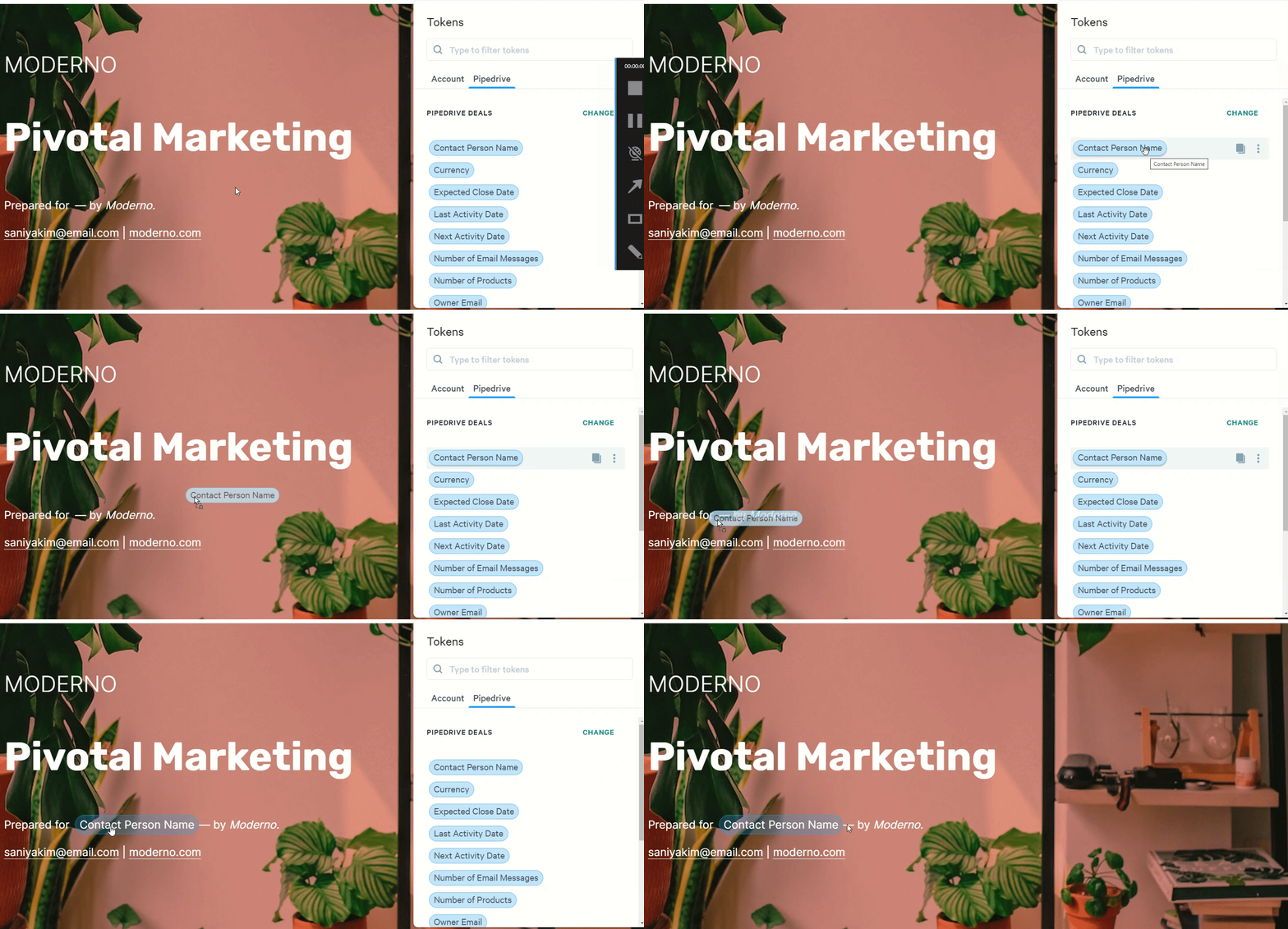
Tokens allow you to pull fields from Pipedrive directly into a Qwilr page. Standard fields include company name, deal value, contact email, and more, and you can also use custom fields from Pipedrive as tokens.
For example:
- {{Deal Title}}
- {{Organization Name}}
- {{Contact Email}}
- {{Custom Field: Renewal Date}}
These tokens make every proposal automatically personalized without copy-paste work.
One-click proposal generation inside Pipedrive
Once templates are configured, your reps can generate proposals without leaving the CRM.
- Open a Deal Record
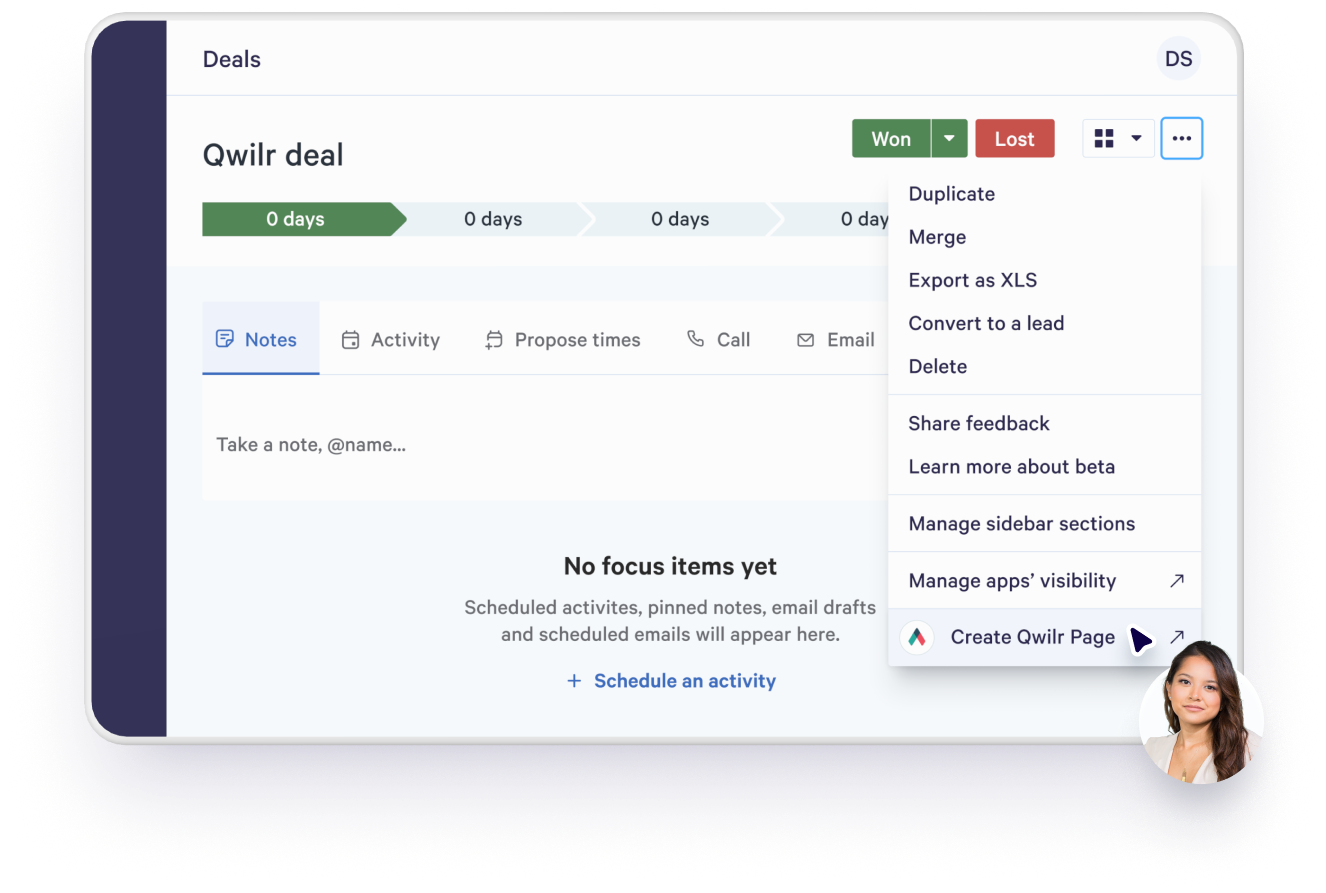
- Click “Create a Qwilr Page” in the Pipedrive sidebar menu
- Select the template and generate the page You can adjust the title, verify token data, and choose where to store it in Qwilr.
Instantly, your proposal is a live, interactive web page - not a static PDF. (Halleluja)
Tracking engagement without leaving Pipedrive
One of the real magic moments of the Pipedrive + Qwilr integration is visibility, not just into what’s been sent, but into what’s actually happening.
The moment a Qwilr proposal goes live, it becomes more than a document. It becomes a tracked sales touchpoint, with every meaningful interaction reflected directly inside the Pipedrive deal record.
Proposal status surfaced where reps already work
Each Qwilr page is attached to the relevant Pipedrive deal, with its current status clearly displayed:
- Live – the proposal has been created and shared
- Viewed – the buyer has opened the page
- Accepted – the proposal has been agreed to or signed
- Completed – the deal has reached its final state
Reps don’t need to open another tab or check a separate dashboard to see where things stand. The proposal’s lifecycle is visible at a glance, directly alongside pipeline stage, deal value, and close date.

Real engagement data, not guesswork
Unlike traditional PDFs, Qwilr proposals send back engagement signals that actually mean something. Inside Pipedrive, teams can see whether the proposal has been viewed, how many times it’s been opened and how long the buyer spent on the page.
This turns follow-ups from awkward “just checking in” emails into informed, well-timed conversations. A rep can see when a buyer has spent five minutes reviewing pricing, or when a proposal hasn’t been opened at all - and adjust their outreach accordingly.
Expiration dates that drive action
Proposal expiration dates are synced directly into the Pipedrive deal record alongside the live Qwilr link, giving sales teams a built-in urgency signal inside the CRM. Reps can immediately see which deals have proposals nearing expiry and prioritize their outreach accordingly, rather than relying on memory or external reminders.
For managers, expiration visibility makes it easy to spot stalled opportunities before they become lost deals. At the same time, automations can trigger reminders or follow-up activities ahead of the expiration date, ensuring timely outreach without manual tracking.
Instead of expired proposals quietly going stale in an inbox, they remain visible and actionable inside the pipeline, keeping momentum alive and deals moving forward.
One source of truth for deal momentum
The result is true pipeline continuity. Every proposal, every interaction, and every buyer signal lives alongside the deal - not buried in an inbox or lost in another tool.
Sales teams get a clear, shared understanding of which deals are active, which buyers are engaged, and which opportunities need attention now
And because it all lives inside Pipedrive, there’s no context switching, no manual updates, and no blind spots - just a continuously updated view of deal momentum, powered by real buyer behavior.
Automating deal updates from proposal events
Here’s where the automation transforms into a workflow engine.
Use Qwilr events as automation triggers
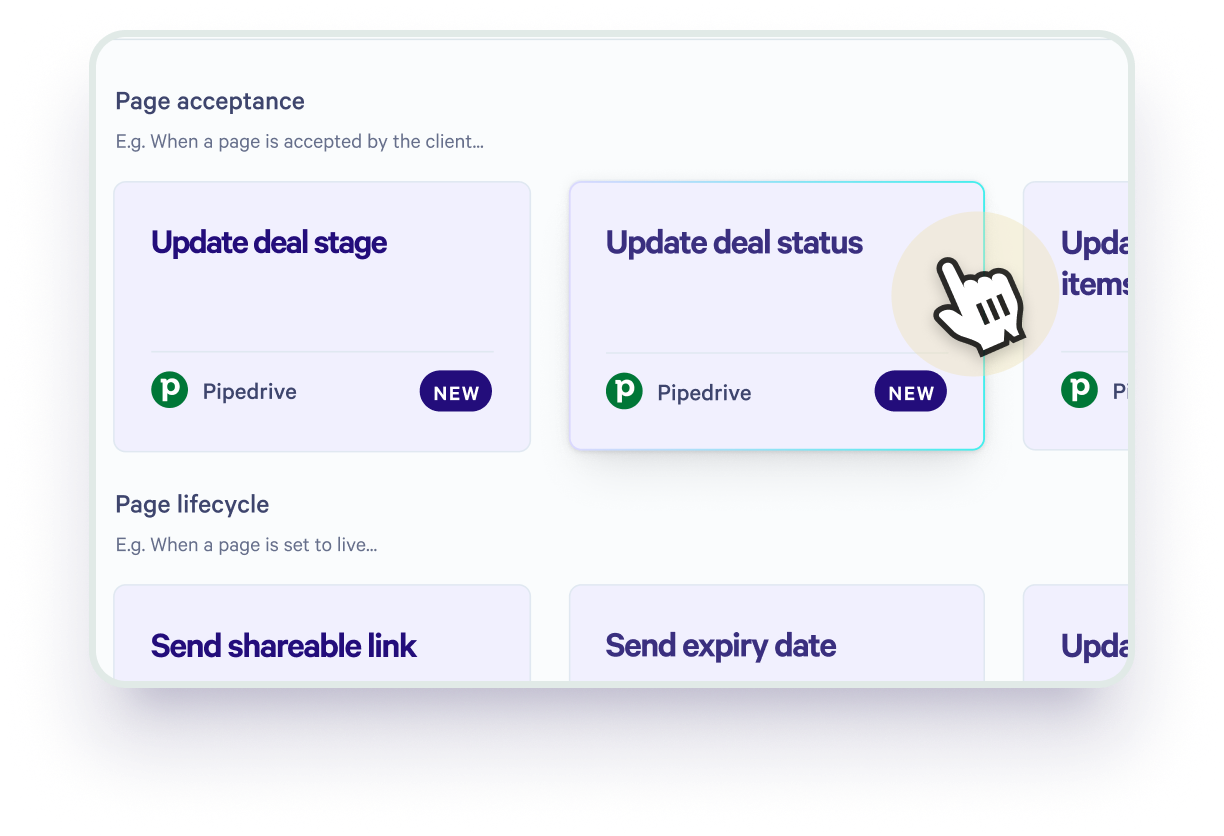
Qwilr pages generate events, like Viewed, Accepted, or Expired. These events can automatically trigger CRM updates in Pipedrive via the built-in automation engine:
- When a proposal is viewed, update a custom field or stage to indicate buyer interest.
- When a proposal is accepted, move the deal to Closed Won.
- When a proposal expires, flag the deal for follow-up.
This isn’t just record syncing. It’s sales automation.
Automations you can build without code
Because Pipedrive’s automation engine can use Qwilr proposal events as triggers, teams can create powerful workflows without writing a single line of code. Proposal activity becomes the starting point for automated actions inside the CRM, turning buyer behavior into immediate next steps.
For example, if a proposal is viewed but not accepted within a set timeframe, Pipedrive can automatically send a follow-up email or create a reminder for the rep. As a proposal approaches its expiration date, a call task can be generated to prompt timely outreach. Once a proposal is signed, an onboarding or handover sequence can trigger automatically, ensuring a smooth transition from sales to delivery.
These workflows reduce cognitive load for reps and make sure every opportunity receives consistent, timely attention - so buyers never slip through unnoticed.
E-Signatures and payments without leaving the page
One of the most common sales bottlenecks isn’t sending the proposal - it’s closing the loop on signature and payment. Deals slow down when contracts, invoices, and payment links live in separate tools.
Qwilr removes that friction by letting buyers review, sign, and pay directly within the proposal.
Built-in, legally binding e-signatures
E-signature fields can be embedded directly into a Qwilr proposal, so buyers can approve terms in context, without being redirected to another document or platform.
When a proposal is signed:
- The acceptance status updates automatically
- The signed date syncs back to the Pipedrive deal
- Reps don’t need to manually mark deals as won
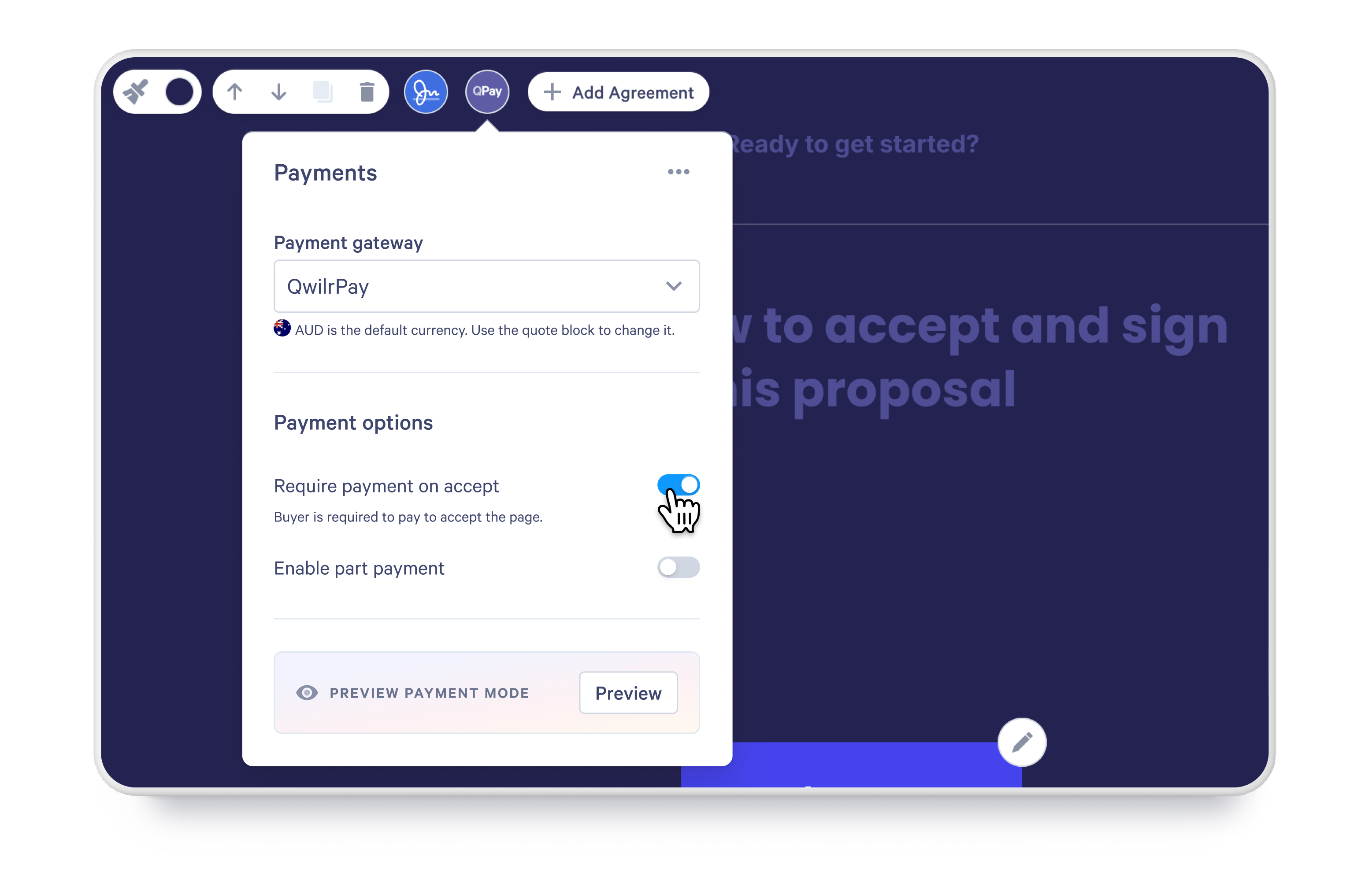
Embedded payments with QwilrPay
With QwilrPay, teams can collect deposits or full payment straight from the proposal page. This shortens the path from approval to revenue and removes the need to generate separate invoices.
Once payment is completed:
- Payment status is reflected in Pipedrive
- Deal data stays accurate and up to date
- Follow-on workflows can trigger immediately
Cleaner handoffs, better visibility
Signature and payment events automatically update the deal record, giving sales, finance, and operations a shared, real-time view of deal progress - without exports, emails, or manual updates.
The result is a smoother close: fewer delays, faster revenue, and a CRM that reflects what’s actually happened, not what someone still needs to log.
How does this change follow-ups?
Traditional follow-ups rely heavily on reps remembering to check document activity, create tasks, and send reminders at the right moment. With the Pipedrive + Qwilr integration, follow-ups are no longer memory-based - they’re behavior-driven and automatic.
Follow-ups triggered by real buyer engagement
When a prospect opens a Qwilr proposal, that engagement can automatically trigger an activity inside Pipedrive. A follow-up call or task appears on the deal the moment interest is shown, giving reps a clear reason to reach out while the proposal is still top of mind. Instead of generic “just checking in” messages, outreach becomes timely and contextual.
Expiration-based reminders that prevent deals from stalling
Proposal expiration dates sync back into Pipedrive, allowing activities to be scheduled relative to that deadline. Reps can follow up before a proposal expires rather than after it’s gone cold, keeping momentum intact and removing the need to manually track timelines across tools.
Email sequences that run in the background
Proposal activity can also trigger automated email sequences. Opening a proposal can launch a nurture or onboarding flow without any manual effort from the rep. Buyers receive relevant communication at the right moment, while sales stays focused on active conversations instead of task management.
Consistency that scales across the team
The result is a consistent follow-up cadence across every deal and every rep. High-performing follow-ups stop being a personal habit and become a repeatable system, one that ensures no opportunity slips through the cracks simply because someone forgot to follow up.
Streamlining admin and reducing errors
The beauty of this workflow is that it pushes you closer to data-driven sales execution:
Line item accuracy: Deal amounts and product prices sync from CRM into the proposal via tokens - no copy mistakes.
Deal updates: Accepted proposals can automatically bump deal stages, close dates, and monetary fields.
Custom fields sync: Whether it’s subscription term length or implementation dates, custom Pipedrive fields pull into your sales docs.
This removes the risk of human error from manual data entry and ensures your CRM is always up to date.
Tips for scaling with teams
Here are some best practices for maximizing this integration:
1. Standardize templates
Create templates for the most common use cases, quotes, renewals, and onboarding docs, each tied to relevant Pipedrive record types.
2. Leverage custom tokens thoughtfully
Use custom tokens for fields like proposal expiration date, discount codes, or renewal options so each page feels tailored without manual editing.
3. Build repeatable automations
Start with simple triggers - like stage updates on proposal acceptance - then layer more complex follow-ups over time.
4. Train reps on viewing signals
Make “proposal viewed” a meaningful signal in your team’s playbook, not just a metric. Tie it to follow-up activities and sequence triggers.
5. Use embedded payments where relevant
Embedding QwilrPay on the page cuts friction and can often turn a proposal into an on-the-spot close.
Real results from real teams
Sales organizations using the Pipedrive + Qwilr integration consistently report faster proposal generation and a noticeable reduction in administrative work. By creating proposals directly from Pipedrive and pulling in deal data automatically, reps spend less time assembling documents and more time actively selling.
Teams also see a shorter gap between sending a quote and closing a deal. With engagement tracking, automated follow-ups, and instant visibility into proposal status, opportunities keep moving instead of stalling.
At the same time, alignment between sales activity and CRM reporting improves. Messaging, pricing, and deal data stay consistent across proposals and pipeline records, while leaders gain better visibility into buyer engagement and overall pipeline health.
The shift from static proposals to interactive sales experiences doesn’t just look better; it creates a tighter feedback loop between action and insight, helping teams continuously refine how they sell.
Case study: Brisant Secure - From pdfs to “wow” quotes
Brisant Secure, a UK maker of high-security hardware, was buried in proposal admin. Teams emailed plain PDFs and Excel price sheets like it was 2005, and prospects responded accordingly (with… silence). Then they tried Qwilr.
With Qwilr’s Pipedrive integration, proposals suddenly pulled real deal data, looked good, and behaved like part of the sales process. One rep even wrapped up a call, sent a proposal in two minutes, and heard back in two more : “Wow, that’s impressive - how did you do that?” - before the deal ever closed.
Reps started producing proposals in minutes instead of hours. The team could see who was engaging and how, information that used to live only in gut feelings now appeared in Pipedrive. Analytics showed multiple opens, internal forwards, and engagement patterns that actually helped reps decide when to reach out next.
Because proposals pulled pricing and SKUs directly from Pipedrive and synced statuses back into the CRM, forecasting suddenly became reliable - no more guessing whether a quoted deal represented real interest.
In the words of Brisant’s Sales Director, “We’ve never had someone say ‘wow’ about a quote - until Qwilr.”
A unified sales motion
The Pipedrive + Qwilr integration is not just another connector, it’s a productivity multiplier. By bringing proposal creation, engagement tracking, automated follow-ups, and deal updates into a unified workflow, teams eliminate admin bottlenecks and accelerate revenue velocity:
- Reps spend time selling (not updating fields).
- Managers see real-time activity tied to buyer behavior.
- Buyers receive professional, responsive sales documents that make decisions easier.
If you’re serious about turning proposals into a core engine of your sales process - sign up for a free trial and witness that this integration is one of the most impactful additions you can make to your stack.