

A proposal is often the last thing a sales team controls. Once it lands in a client’s inbox, you lose sight of it completely, wondering if it’s been opened or left unread in someone’s downloads folder.
Without concrete answers, following up with a client can feel a bit like guesswork. Call too early and they haven’t had a chance to look at anything, leave it too long and they’ve likely already moved on.
That’s the problem proposal tracking solves: visibility. It will also hand you more data than you need, so here’s exactly how it works, what to pay attention to, and which signals are worth acting on.
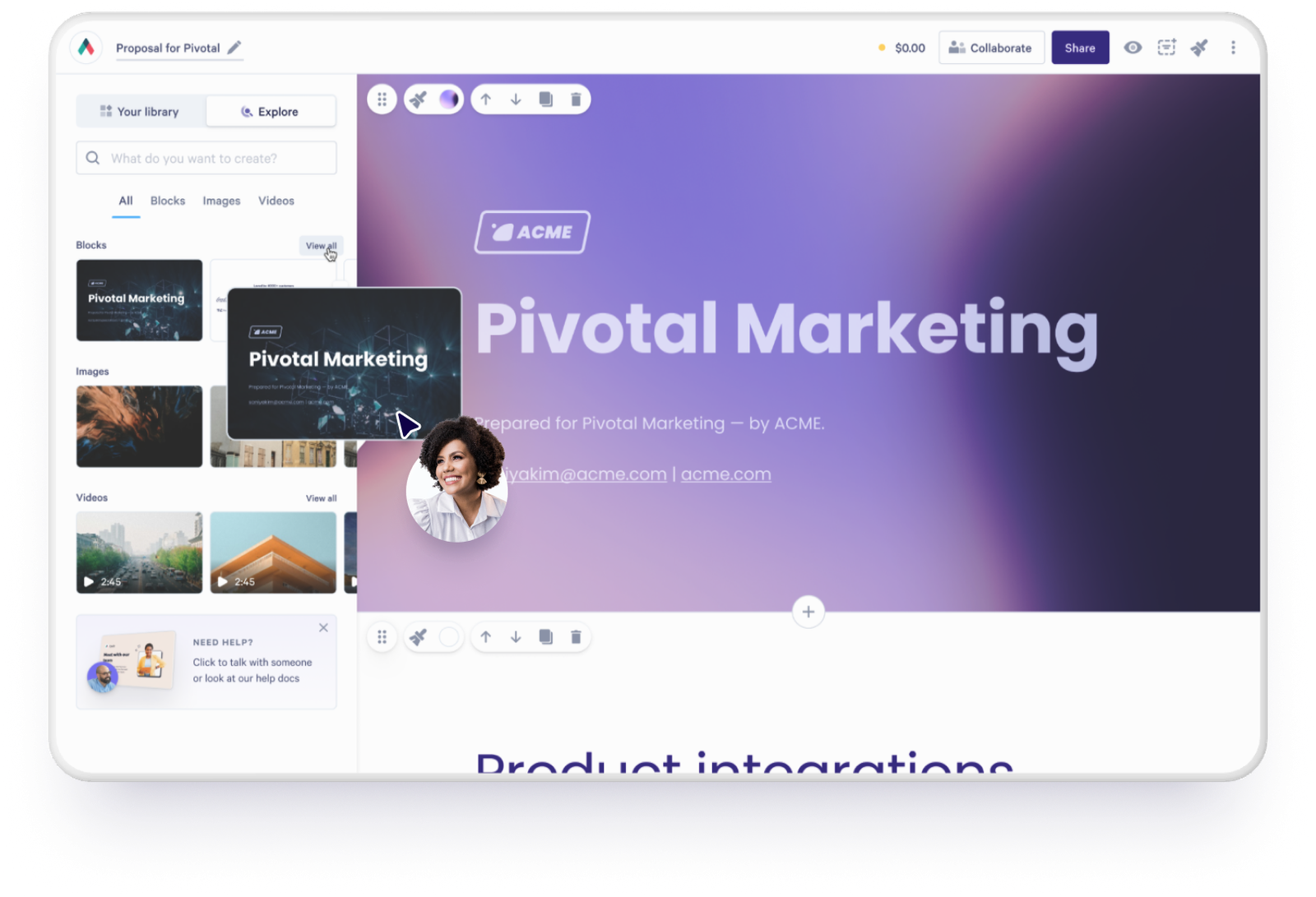
Why following up at the right time is harder than it sounds
Research consistently shows that 80% of sales take an average of five follow-ups to close, according to HubSpot citing the Brevet Group. Yet 44% of reps follow up only once before giving up.
When you can’t see whether a proposal has been opened, which parts got read, or whether it’s been shared with someone else in the business, every follow-up is a shot in the dark.
The problem with sending a PDF is that once it’s gone, it’s gone, with no way to know what to do next.
What is proposal tracking?
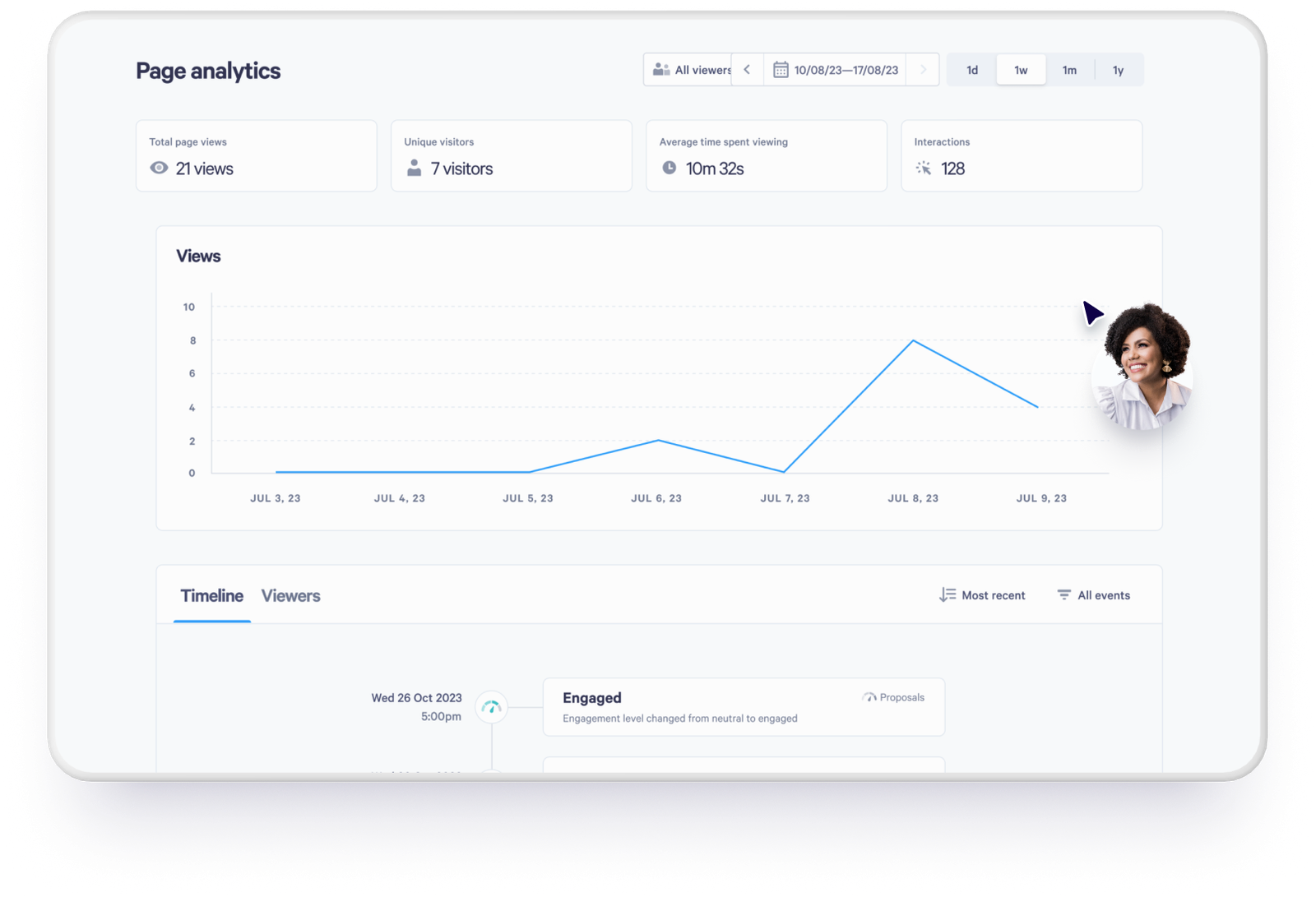
Proposal tracking shows you what happens after you hit send. It tells you when a proposal has been opened, which sections the buyer spent time on, and when someone new opens it.
Think of it as filling in the blank between sending a proposal and getting a response. Instead of waiting and wondering, you can see what the buyer is doing and reach out at the right moment, with the right message.
Not all tracking tools work the same way
Some tracking tools sit separately from your proposal software and rely on email-based tracking. An open pixel tells you the message was opened in an inbox. It can’t tell you what happened to the attachment after that, which is the point at which the deal gets interesting.
Tracking that’s built into the proposal platform records every visit to the page itself, including the ones that happen after it’s been forwarded. That gives you a much more complete picture of what’s going on.
Which engagement signals actually matter?
One data point on its own rarely tells you much. But when you look at a few signals together, you start to get a real sense of where a buyer is in their thinking.
When a proposal gets opened
Knowing a proposal has been viewed sounds simple, but it’s the signal that fixes your timing. It means your follow-up is based on something tangible, not just a feeling that enough time has passed. One caveat. A first view can be a link preview from an email client or a security scanner rather than a person, so a second open is much stronger evidence than a first.
How long they spent on each section
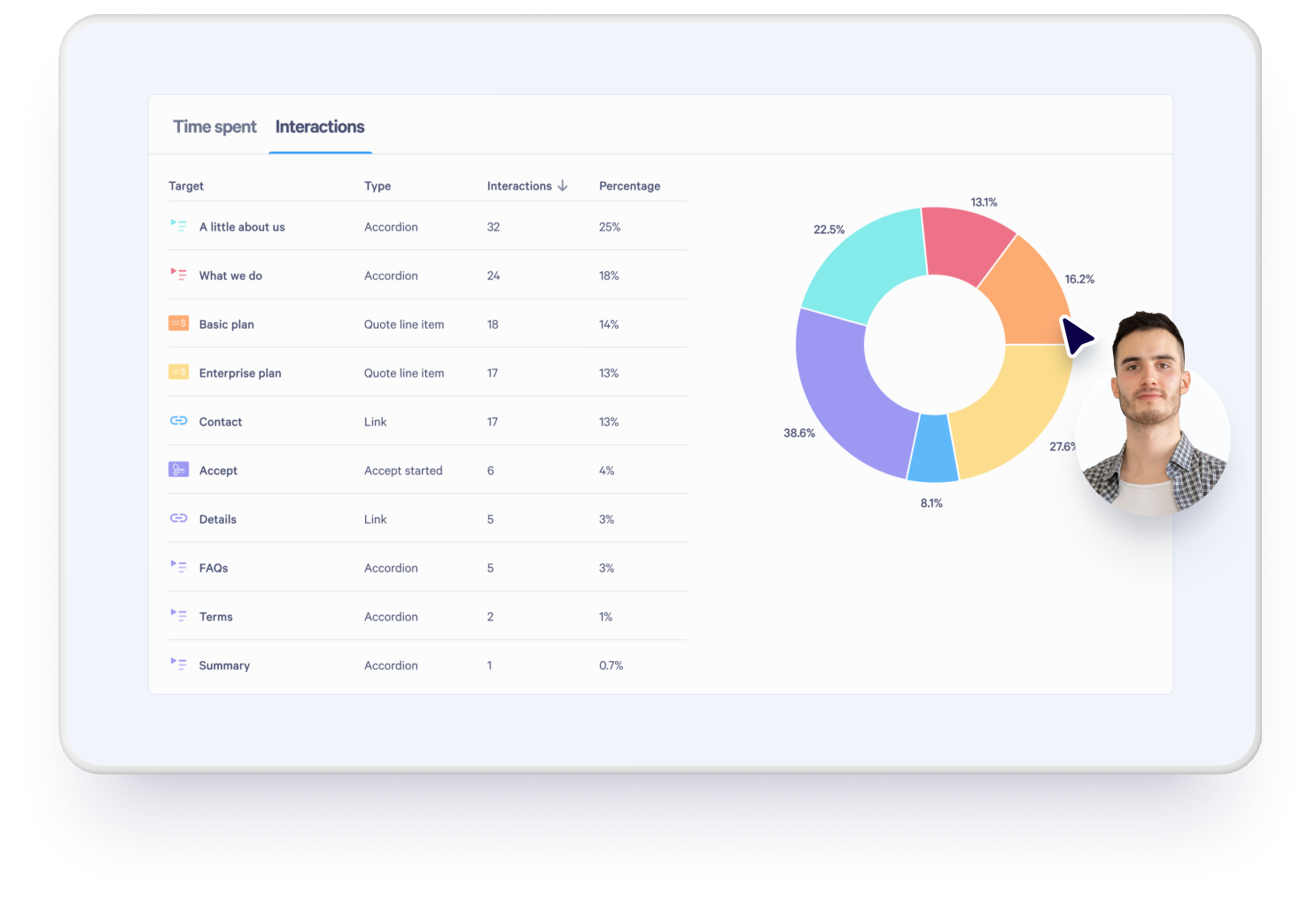
A buyer who spends ten minutes on pricing but barely touches the executive summary is telling you something. So is someone who jumps straight to implementation timelines. It’s that kind of detail that makes your next conversation far more targeted and relevant.
“It strengthens our next follow-up call. You’ve got confidence that they’ve looked and knowing which sections they’ve spent time reading can inform your conversations.”
Danny Dyton, Business Development Manager / Account Manager, Crown Information Management
How many times it’s been opened
Multiple opens usually mean the buyer is actively considering it. But if a proposal keeps getting opened with no response, that often means they’re interested but stuck. For example, they could be waiting on someone else internally, unsure about a specific detail, or comparing you against a competitor. Either way, that’s your cue to reach out and help move things along.
The speed at which a buyer digs into a proposal can be just as telling as what they look at. A buyer who opens a proposal three times in two days is showing more genuine intent than one who opened it once and hasn’t been back since. And an old proposal reopening after weeks of silence is worth more than most things in a pipeline review. Lorikeet runs Slack alerts on exactly that signal.
“Our team loves it when a deal has gone cold, and is seemingly lost, and then we suddenly get alerted that there’s someone revisiting a Qwilr page weeks later. That’s our signal to re-engage. We’ve revived many deals thanks to these notifications.”
Dilshi Gunasekara, Business Operations, Lorikeet
Whether it’s been shared internally
When a proposal gets opened by someone who wasn’t on the original email, the decision has moved beyond your original contact. Knowing that early means you can get ahead of it, whether that’s sending additional materials, anticipating different questions, or offering to walk the broader team through it.
Read it as a prompt rather than a fact. Seeing a name against a view is something you switch on, through Qwilr’s identification settings on the Growth and Scale plans, and it works by asking the viewer for their name and email. Without it you get the extra view, not the person, which still tells you to ask who else is involved.
How proposal tracking helps you close more deals
The data is only useful if it changes what you do next. Here’s where it makes a practical difference.
Better follow-ups
If you know a buyer spent a long time on your pricing section, you can open with something specific instead of a check-in: ask if they have questions on the numbers, offer to walk them through it, or address a concern before it becomes a reason to stall.
One rule before the examples. Use the signal to decide what to say and when, and don’t tell the buyer you watched them read it. Nothing kills a follow-up faster than “I saw you opened this three times.” Four openers that use the signal without announcing it:
- Long on pricing, then quiet. “Pricing is usually where the questions come up on these. Happy to walk through how the tiers work, or send a version with the numbers broken out if that’s easier.”
- Someone new has opened it. “Is there anyone else on your side who should see this? I’m happy to run through it with them so you’re not stuck relaying it.”
- Reopened after weeks of silence. “Checking in on this one. If the timing works better now than it did, happy to pick it back up wherever is useful.”
- Never opened. “Not sure this one reached you. Link again here in case it got buried.”
Knowing where to focus
When you’ve got several proposals out at once, it’s hard to know where to spend your time. Engagement data makes that much easier. A proposal that’s been opened multiple times by different people needs different attention than one that hasn’t been touched.
Better forecasting for the whole team
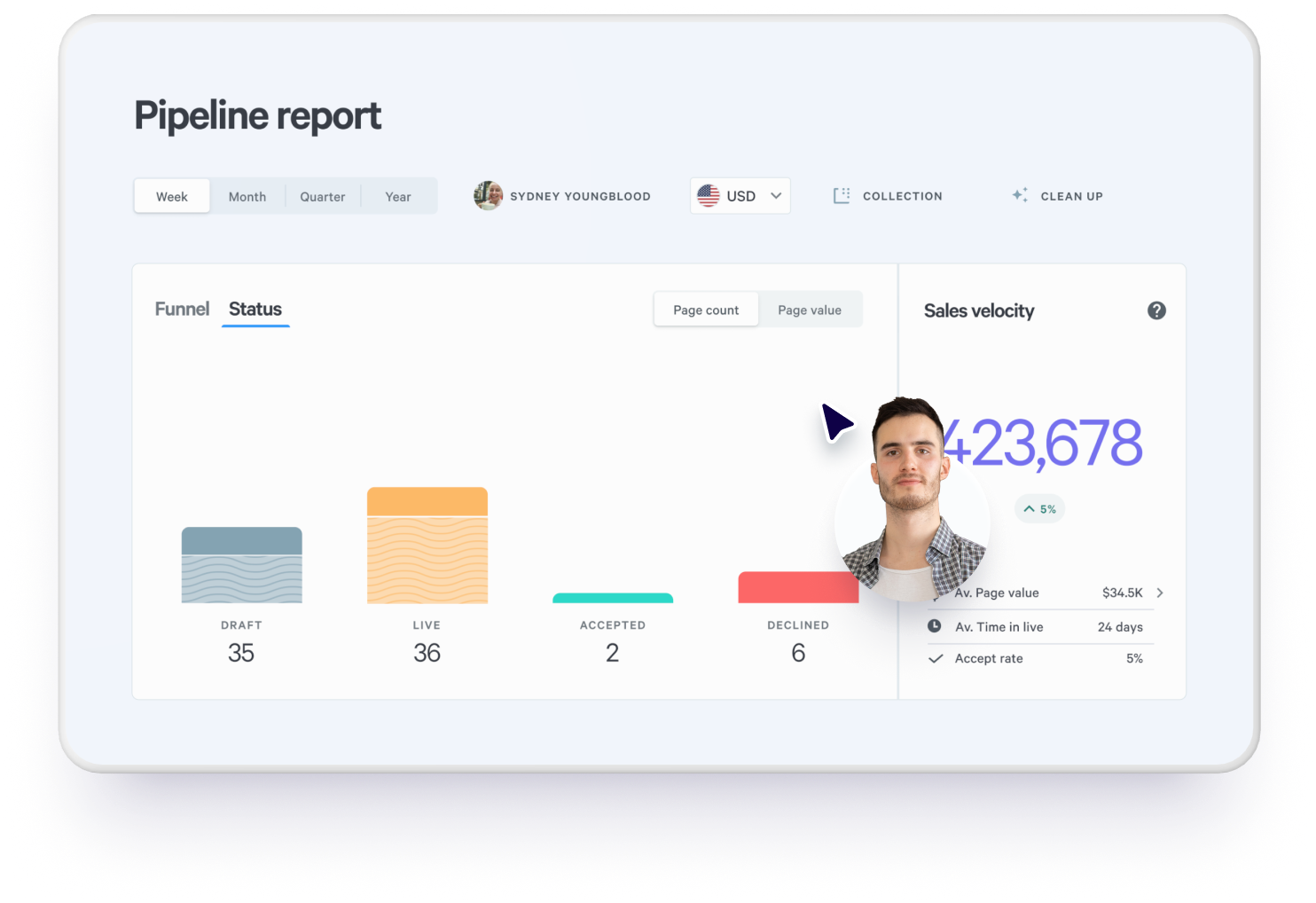
Proposal engagement data isn’t just useful for the rep who sent it. When it feeds into your CRM, sales leaders and ops teams can see which deals are moving and which ones are sitting still. That’s a more honest basis for forecasting than asking reps to self-report on how they think things are going.
With Qwilr and HubSpot, each view and the acceptance land on the deal record automatically, and the deal’s activity carries the date and time of every unique view. The section-level detail stays in Qwilr.
“The feedback you get from it, the fact that you can monitor the activity on it, it’s worth its weight in gold to us.”
Danny Dyton, Business Development Manager / Account Manager, Crown Information Management
What to look for in proposal tracking software
When you’re evaluating options, these are the things worth checking. Our rundown of proposal tracking tools goes through the main ones in detail.
- Open notifications you can tune, whether that’s the first view only or every one, so you can follow up while the proposal is still fresh in the buyer’s mind.
- Section-level data, showing which parts of the proposal got read.
- A record of new viewers, so you know when the audience has grown beyond your original contact. Check whether naming them is a setting or a plan upgrade.
- CRM integration that logs engagement without anyone doing it by hand.
- Automated workflows. A follow-up task or a team notification fires when something significant happens.
- Tracking native to the platform rather than a separate tool layered on top, which tends to give cleaner data.
Proposal tracking vs static PDF workflows
| Criteria | Proposal tracking software | Static PDF workflow |
|---|---|---|
Visibility after send | Opens, views and time on page from the moment it’s sent | Nothing until they reply |
Buyer engagement | Time recorded per section, and every repeat visit | Unknown |
New stakeholders | New viewer recorded | Invisible |
Follow-up quality | Triggered by what the buyer did | Timed on a hunch |
Forecasting | Engagement signals on the deal record | Rep self-report |
CRM integration | Views and acceptance on the HubSpot deal record | Manual updates required |
Real-time updates | Content edited at the same link after sending | Create and resend the file |
See what happens after you hit send
“If you want your sales materials to look professional, scale easily, and give you visibility into buyer engagement, Qwilr is the way to go.”
Dilshi Gunasekara, Business Operations, Lorikeet
Qwilr’s built-in tracking shows you when your proposal was opened, how long the buyer spent in each section, and when someone new arrives, and it logs views and acceptance to your HubSpot deal record.
Explore Qwilr’s buyer engagement features or browse proposal templates to see it in action. For more on reading the data once you have it, see document analytics.
About the author

Holly Slater|Holly Slater
Holly is a content specialist who helps brands turn complex ideas into clear, engaging content across web, SEO, UX writing, and content strategy. She’s worked across education, government, travel, and corporate sectors, focusing on content that improves user experience.
A lifelong language lover, she studied English, French, and Spanish at university and brings a multilingual, cross-cultural lens to her work. Originally from Wales, she blends creativity with strategic thinking, and outside of work you’ll usually find her walking her dog, catching up with friends and her partner, or discovering new restaurants as a self-confessed foodie
Frequently asked questions
Follow up within a day of the first real read rather than on a fixed schedule, and let what they read decide the message. HubSpot, citing the Brevet Group, puts the average at five follow-ups to close a sale, so the more common mistake is stopping too early. If the proposal hasn't been opened at all after a few days, that's a delivery problem, not a lack of interest.
It usually means the deal is live again on their side before it's live on yours. Lorikeet treats a reopened page as their trigger to re-engage and credits it with reviving deals the team had written off. Budget, a reorganization or a stalled competitor can all put an old proposal back in front of someone, and none of that shows up in a CRM.
Not meaningfully. Email open tracking can tell you the message was opened, but it can't see what happened to the attachment afterwards, and once the file is downloaded or forwarded the trail stops. Tracking that lives in the proposal page keeps recording wherever the link travels.
Partly. With Qwilr and HubSpot, views and acceptance are added to the deal timeline automatically, and the deal's activity shows the date and time of each unique view, so nobody updates a field by hand. The section-level breakdown stays in Qwilr rather than syncing across.